
Articles / Digital membership cards for Australian sports clubs
ARTICLES FOR SPORTS CLUBS
Digital membership cards for Australian sports clubs
A digital membership card is a membership card that lives on a member’s phone instead of in their wallet. Members usually add it to Apple Wallet or Google Wallet from a link in an email or SMS. The club scans a QR code or barcode at the door, the gate or the bar. For a club it means less printing and posting, and fewer “I’ve lost my card” emails. It also means a status that matches your membership records. This guide covers how the cards work, how to set them up, how to scan them reliably and what to do for members who don’t want one.
Published 10 November 2026.
What a digital membership card is
In plain terms, it is the same card you used to post out, rebuilt as a file your phone can display. RAC WA describes its digital card as a digital version of the member’s card. Members add it to Apple or Google Wallet from an emailed link or through the RAC member portal, then show it to redeem offers.
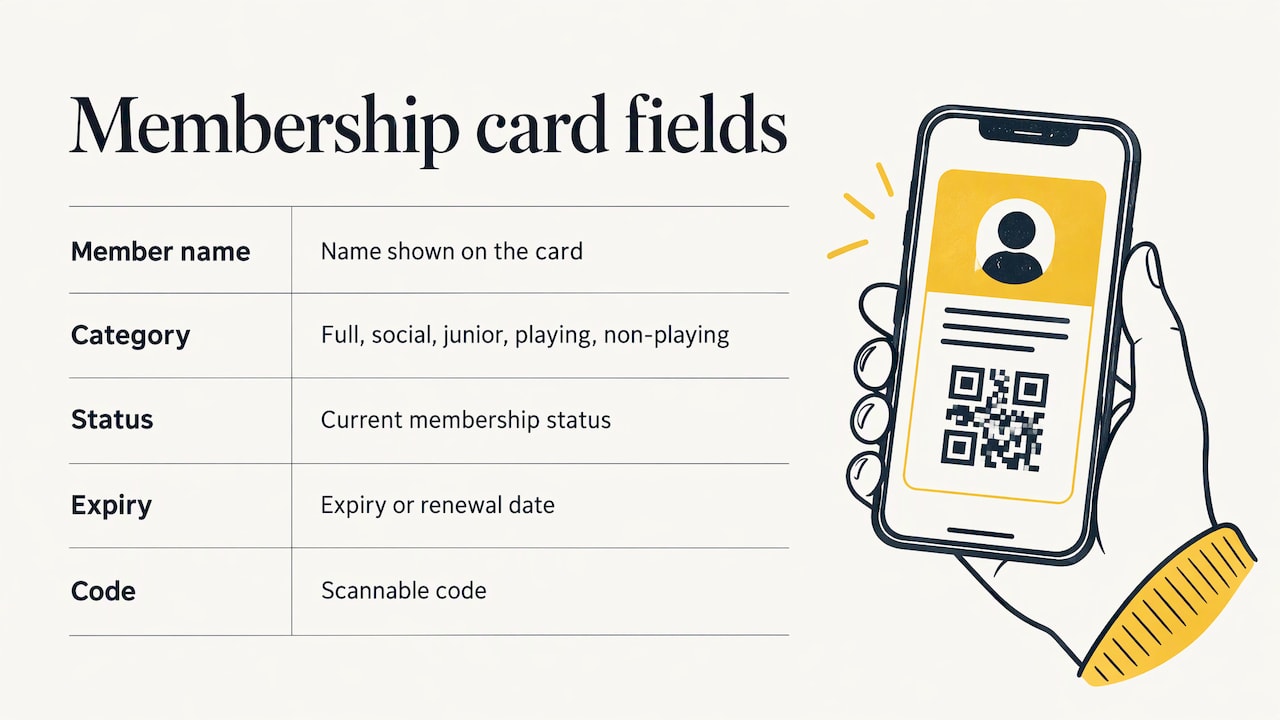
The Victorian Racing Club shows what a club-style card carries. Its digital card displays the member’s name, membership grade, member ID and a barcode. It can be used the same way as the physical card for race-day admission, cash on card and member discounts.
For a sports club, the equivalent is simple: name, membership category (full, social, junior, playing, non-playing), current status, expiry or renewal date and a scannable code.
Wallet pass or app card
There are two common forms:
- Wallet pass. The member taps a link, taps “Add to Wallet” and the card sits alongside their cards and tickets. No app to download.
- Card inside the club’s app or member portal. The member logs in and the card appears on screen. This works on almost any device with a browser, which helps members whose phones don’t support wallet passes.
Most clubs end up wanting both: wallet for the many, a portal view for the rest.
Why clubs are moving away from plastic
The benefits are practical, and most of them land on the office rather than the member.
- Less printing, posting and replacing. No card runs, no envelopes, no reprints for lost or damaged cards.
- Current details. When the status or expiry changes, the card can change with it. A plastic card printed in March still says “2026” in November.
- Faster entry. A scan beats a staff member reading a name off a card and checking a list.
- Attendance you can count. Every scan is a data point for how often members use the club, which helps with committee reporting and planning.
- Fewer lost cards. Members nearly always have their phone with them.
Norwood Football Club in South Australia is a good local example of the direction. For the 2026 season members could opt out of a physical card at sign-up, which cuts waste and speeds up entry through the digital card on their phone. Notice the word “option”: the club didn’t force the change.
How to set up digital cards for your club
The technology is the easy part. The hard part is the data behind it. Here is the order that works.
1\. Clean your membership records first
A digital card is only as accurate as the list it draws from. Before you issue anything, fix duplicates, missing emails and mobile numbers, wrong categories and members who have lapsed but are still marked active. If you run renewals by spreadsheet, this is the moment to tidy it. Our renewal season checklist for the treasurer and office is a handy way to work through it.
2\. Treat the database as the source of truth
The card should be a view of a member’s record, not a second copy you have to maintain by hand. When someone renews, upgrades or resigns, you change it once in the membership system, and the card follows. If you maintain two lists, they will drift apart within a season.
3\. Decide what the card shows
Keep it to what staff need at the door: an ID number, name, category, status and expiry or renewal date. Leave off dates of birth, addresses, phone numbers and anything medical. If someone photographs or shares a card, you want nothing sensitive on it.
4\. Choose how the card is issued
The usual path is a bulk import of members, a card design with your logo and colours, and a welcome email or SMS with the link. Test with a handful of real members first: committee, a few staff and a couple of older members who will tell you honestly if it is confusing. Whatever tool you use, expect some rows to fail on the first import because of formatting problems, usually in email addresses or dates, and plan time to correct them.
5\. Test on both platforms and your real scanners
Check iPhone and Android, an older phone and a newer one. Compatibility matters: RAC WA, for example, lists iPhone 5s and SE models and above on iOS 10 or later, or Android 9 and above for its card. Your own requirements will depend on your provider, so ask for the list and publish it for members.
Then scan the cards with the devices your staff really use, in the real lighting at your front desk, bar or gate.
6\. Roll out in stages
Start with new members and renewals, since they already need a fresh card. Offer existing members the option at their next renewal rather than switching everyone in one weekend.
Using the card at the door, on court and at the bar
At its simplest, a digital card gets someone in. Used well, it also supports bookings, events and function entry, because one scan can confirm who the person is and whether they are current.
The VRC example is useful here. Its card works for admission, cash on card and member discounts across the course. One credential covers several jobs. A sports club can follow the same logic: gate or clubhouse entry, bar or canteen member pricing, social events and guest sign-in.
Make the code scannable
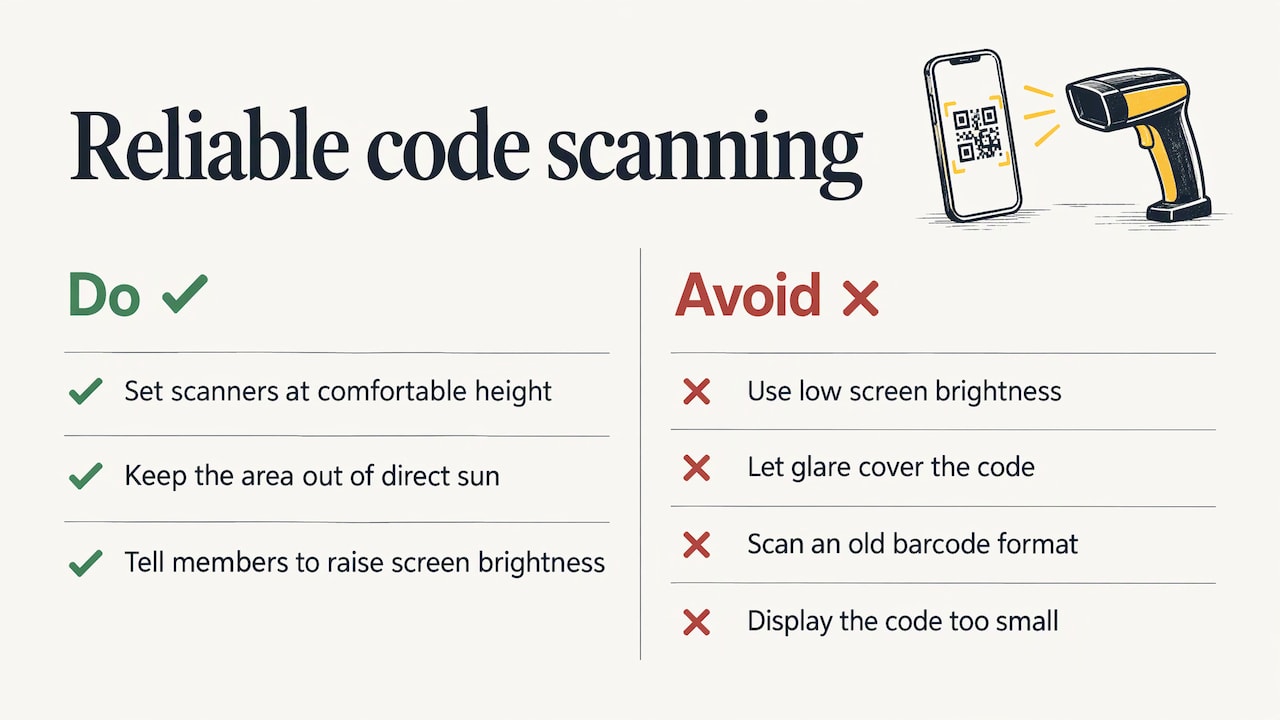
Most failed scans come down to practical issues, not technology: screen brightness too low, a glare on a phone case, a scanner pointed at an old barcode format or a code displayed too small. Set your scanners up at a comfortable height, keep the area out of direct sun and tell members to turn their brightness up. The same principles apply anywhere you print a QR code. This guide to making QR codes that scan covers contrast and size well, and those habits carry over to club signage and posters that point to your card link.
Don’t rely on the card for time-critical decisions
A wallet pass updates when the phone can reach the server. A phone in flight mode or with no signal may show yesterday’s information. So design for “eventually correct”. For entry decisions that matter, such as a suspended membership or a cancelled one, your staff should be able to look the member up in the live record as well.
Court booking and access
Members will also expect the card to tie in with booking a court or a room. Here the card identifies the person, and the booking system decides what they can do. Our court booking software for clubs covers bookings. Automated door and gate control is something we are planning: see our access control page for where it stands.
Security and privacy for Australian clubs
A membership card involves personal information, so think about it before issuing, not after a member asks.
- Collect only what you need. Look at how a large club does it. Wagga RSL’s privacy policy says its digital card service collects identity, contact, membership, device and sign-in information for creating cards and verifying membership. It also describes encryption, secure communications, security assessments and restricted access.
- Say so in your own privacy policy. Members should know what the card collects, why and who can see it. Update the policy when you introduce cards.
- Use an opaque member ID. A random number on the card is safer than a name plus date of birth.
- Cancel what should be cancelled. When a member resigns or is removed, their card should stop working. Build this into your offboarding steps.
- Ask where the data is hosted and how it’s protected. A reasonable question for any provider, and one members may ask you.
If you handle anything beyond basic membership details, or you’re unsure of your obligations under Australian privacy law, speak to your association’s adviser or the Office of the Australian Information Commissioner. Our Trust Centre explains how we approach security and data.
Members who can’t or won’t use a smartphone
Every club has them: long-standing members, juniors without phones and people who simply prefer plastic. Digital cards work when nobody is locked out.
Other Australian organisations handle it in a few ways:
- Browser view. RAC WA says that if a phone doesn’t support Apple or Google Wallet, the member can view the card in the myRAC browser portal if the device can get online. They can also ask for a plastic card.
- Keep the physical card. The VRC says members without a smartphone or compatible wallet can keep using their physical card to enter Flemington and the Members Enclosure.
- Opt-out at sign-up. Norwood FC’s approach, noted above, makes digital the default choice but keeps the physical card as an option.
For your club, the simplest policy is: digital by default for new members, plastic on request, a printable or portal view for anyone else. Say it plainly in your renewal email. If you want help with a changeover from an old system or spreadsheets, our changing over guide walks through it.
Keeping cards current and reliable
Issuing cards is a one-off job. Keeping them correct is the ongoing one. A short routine is enough.
- Update from one place. Change status, category and expiry in the membership record only.
- Resend links when members change phones. The card doesn’t always move across automatically. A resend link in the member inbox or a simple “get my card again” page saves a lot of emails.
- Revoke on cancellation. Don’t wait for the expiry date if someone leaves early.
- Know how updates arrive. When the club edits a pass, the phone is nudged to fetch the new version once it can reach the server. Offline phones catch up later, which is why live look-ups matter for important decisions.
- Keep a manual fallback. A printed list or a tablet with the member list at the front desk covers a flat battery, a dead network or a scanner that has stopped working.
- Brief your staff. Volunteers on a Saturday morning need a one-page guide: how to scan, what a failed scan means, who to call.
Use your renewal period to measure it. Count how many members added their card, how many scans failed and how many asked for plastic. Those three numbers tell you what to fix.
Our perspective
We built Sports Club OS with people who have run clubs, and the same lesson keeps coming back: members don’t care about the technology, they care about getting through the door and getting on with their game.
A digital card is a good idea when it sits on top of one reliable membership record. It is a poor one when it becomes another list for the office to keep up. That is why we focus first on the system underneath: membership, renewals, bookings, communications, rostering and reporting in one place, so that whatever a member shows on their phone is what the club’s records say.
We also think the committee should be able to run all of this without an IT person. A fully managed platform, with no installation, a fixed monthly price and no revenue share, means the treasurer and the office spend their time on members, not on software.
Start with clean records, offer digital without forcing it, and keep a plan B for the front desk. Do those three things and the card will earn its place.
Adam
Run the membership side from one system
A digital card works best when your membership, renewals and bookings already live together. Sports Club OS is a cloud-based, fully managed club system with membership management, court and facility booking, events and functions, staff rostering, financial reporting, point of sale, bulk communications and a member inbox. It also has an AI-powered editor for your club website, and it works across devices.
To see how it would fit your club, look at our club membership and renewals software or the full sports club management software page, and book a walkthrough.
Sources
Do members need to download an app for a digital membership card?
Not always. Many clubs issue the card as a wallet pass that members add to Apple Wallet or Google Wallet from an emailed link or SMS. Others show it inside a member portal in a web browser. Check which options your provider supports and tell members which one to use.
What should a digital membership card show?
Only what staff need at the door: member ID, name, membership category, current status and renewal or expiry date, plus a QR code or barcode. Leave off addresses, birth dates and phone numbers. The VRC card, for example, shows name, grade, member ID and barcode.
What if a member’s phone doesn’t support digital cards?
Give them an alternative. Other Australian organisations let members view the card in a browser portal or keep using a physical card. A small stock of plastic cards, issued on request, keeps everyone included.
Can a club switch to digital cards in the middle of a season?
Yes, but a staged approach is easier. Issue digital cards to new members and at renewal, keep plastic cards valid in the meantime and publish a short how-to for members. Once most members have added theirs, you can decide whether to retire plastic cards.
BOOK A WALKTHROUGH
Get a personalised walkthrough and demo
Book a walkthrough and bring the jobs that take your office the longest.