
The club system / Membership Management
MEMBERSHIP MANAGEMENT · FULL DETAILS
Everything about membership
Members and families, membership types and fees, applications and elections, invoices, payments, renewals, the member’s own page and the committee’s reports. Here is every part, and how it works.
THE FULL WALKTHROUGH
Every part of Membership Management, start to finish
A longer, slower look at the real pages, in chapters. Press a chapter to jump to it.
What it is
Membership Management is the club’s one member list, and everything that hangs off it. A person’s bookings, invoices, classes, competition results and email choices all sit on their one record, so nobody keeps a second list.
It covers the whole journey: a person applies from your website, the committee decides, the records and the first invoice are made for you, and from then on renewals, payments and reports all read from the same place.
Everything it does
- One member list
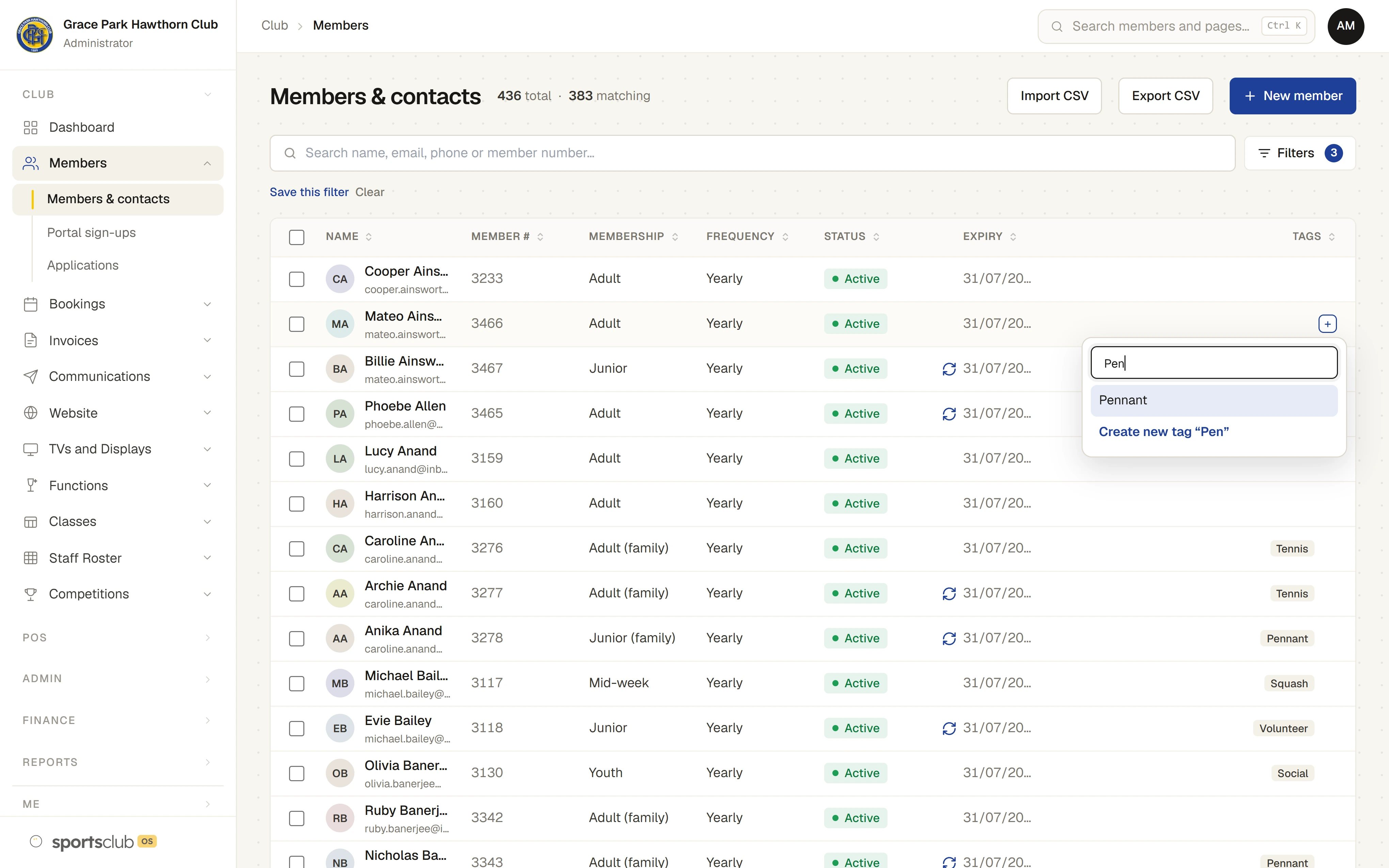
- Members and plain contacts in one list, found by name, email, phone or member number, with a filter panel that counts as you choose: status, membership, payment frequency, auto renew, tags and suburb. Every column sorts, and a tag can be added from a member’s row without opening their record.
- Saved filters
- Save a set of filters under a name, such as “Current members, pays monthly”. It is kept for your login on any computer, and can choose who a message goes to.
- A full record for each person
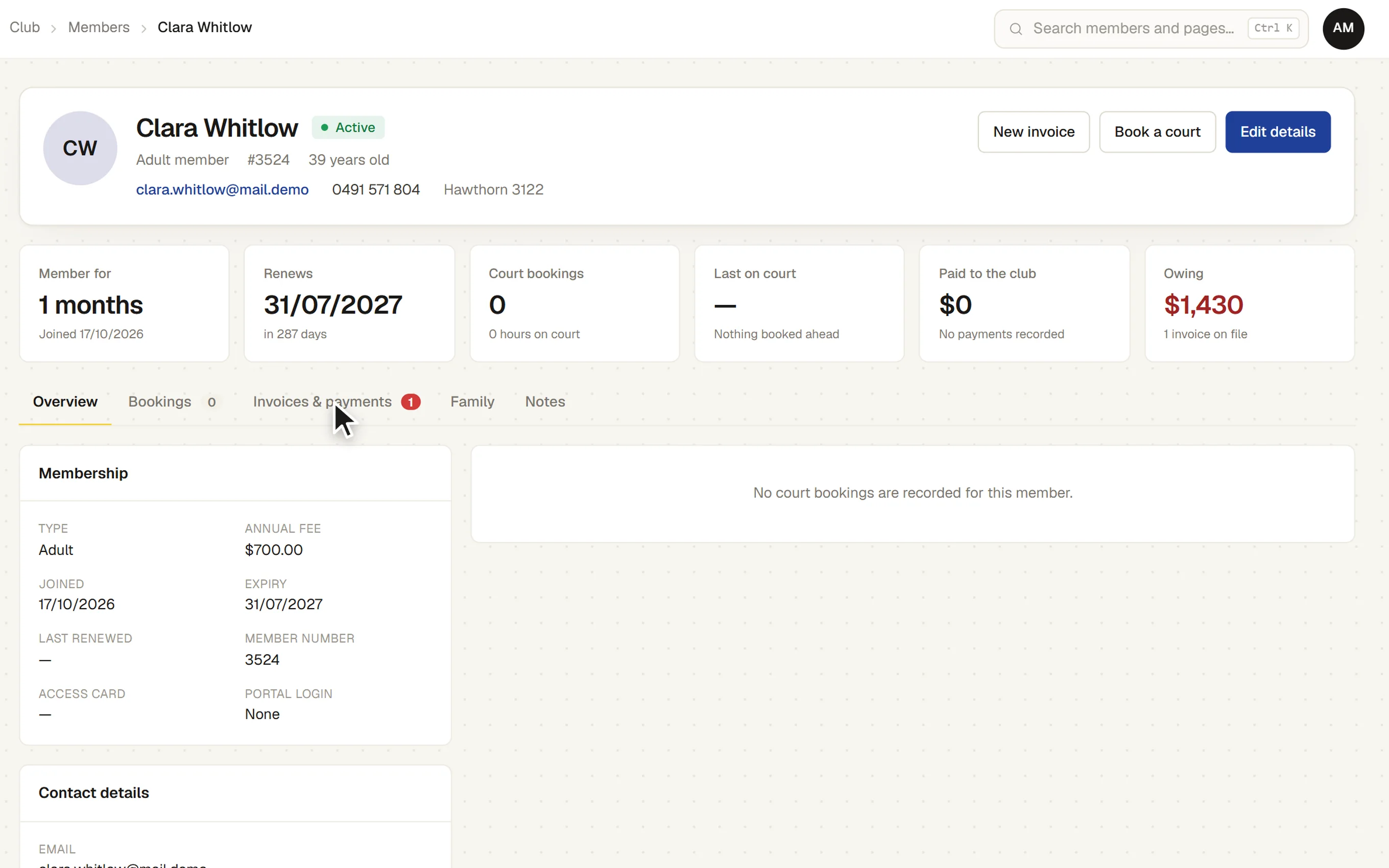
- Contact details, date of birth, emergency contact, membership type, joined, last renewed and expiry dates, and a member number given automatically. Club-defined tags and fields. Staff notes the member never sees.
- Tags on each record
- Add a tag to a member from their page, choosing from the club’s tags or typing a new one. Each change is saved at once. The same tags show on a login’s page for the member it belongs to.
- Tag rules
- Rules tag people automatically from what they do and who they are. The ready-made rules cover, for example: ever booked a squash court, booked a tennis class, an active or lapsed player, a new member, a junior or someone about to turn 18, a family with a junior, pays monthly, behind with payments, renewal due, a long-standing member, a competition player, a class regular, charges to a bar account, a social member who plays, and an email address that bounces. A rule can join up to five conditions, all of which must be true.
- Tag rules keep tags up to date
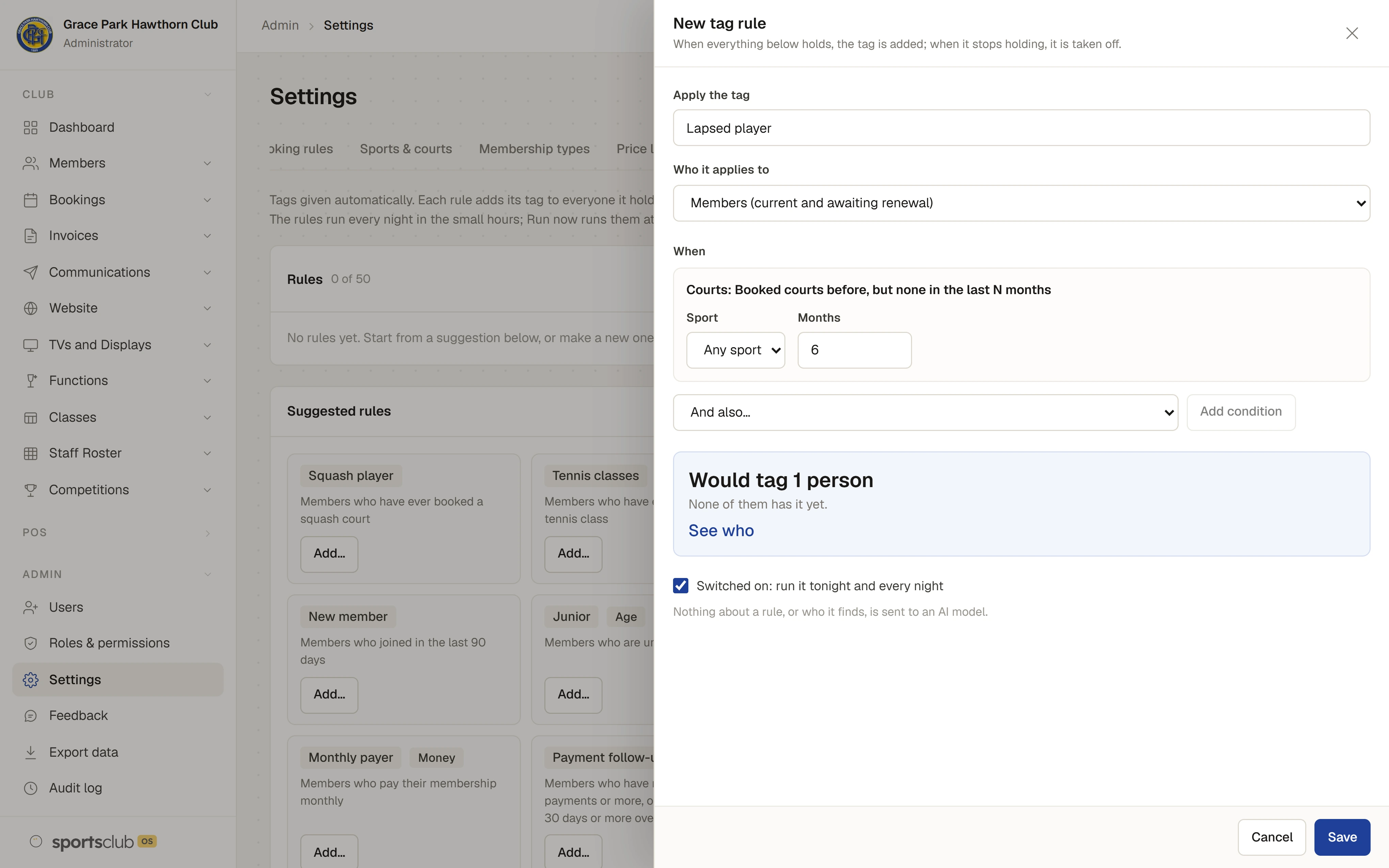
- Before a rule is saved, it shows how many people it would tag. The rules run every night, or straight away with Run now, and a tag comes off when it is no longer true. The latest runs are listed with how many tags each added and took off, and each one opens out to show the tags it added and took off, rule by rule. Someone who may see members also sees the people, each linked to their record. The last 30 runs are kept.
- Tags given by hand are kept
- A rule never takes off a tag someone gave by hand. A tag a rule gave is marked on the member’s record with the rule that gave it.
- What tags are used for
- Choosing who a message goes to, filtering the member list, and grouping figures in reports.
- Families and households
- Children and partners are linked to the member who pays, so a household has one account and one invoice.
- Membership statuses
- Active, Suspended, Lapsed and Cancelled, with Expired worked out for you when an Active member’s expiry has passed. Earlier memberships are kept as history.
- How each member uses the club
- Each record shows time as a member, bookings, last time on court, what they have paid and what they owe, and a short written summary: favourite court, busiest day, guests brought.
- Membership types and fees
- Each type has its annual fee, joining fee, sports it includes and its own weekly booking limit. Renewal can follow a fixed membership year, the anniversary of joining, or have no expiry.
- Fees part-way through the year
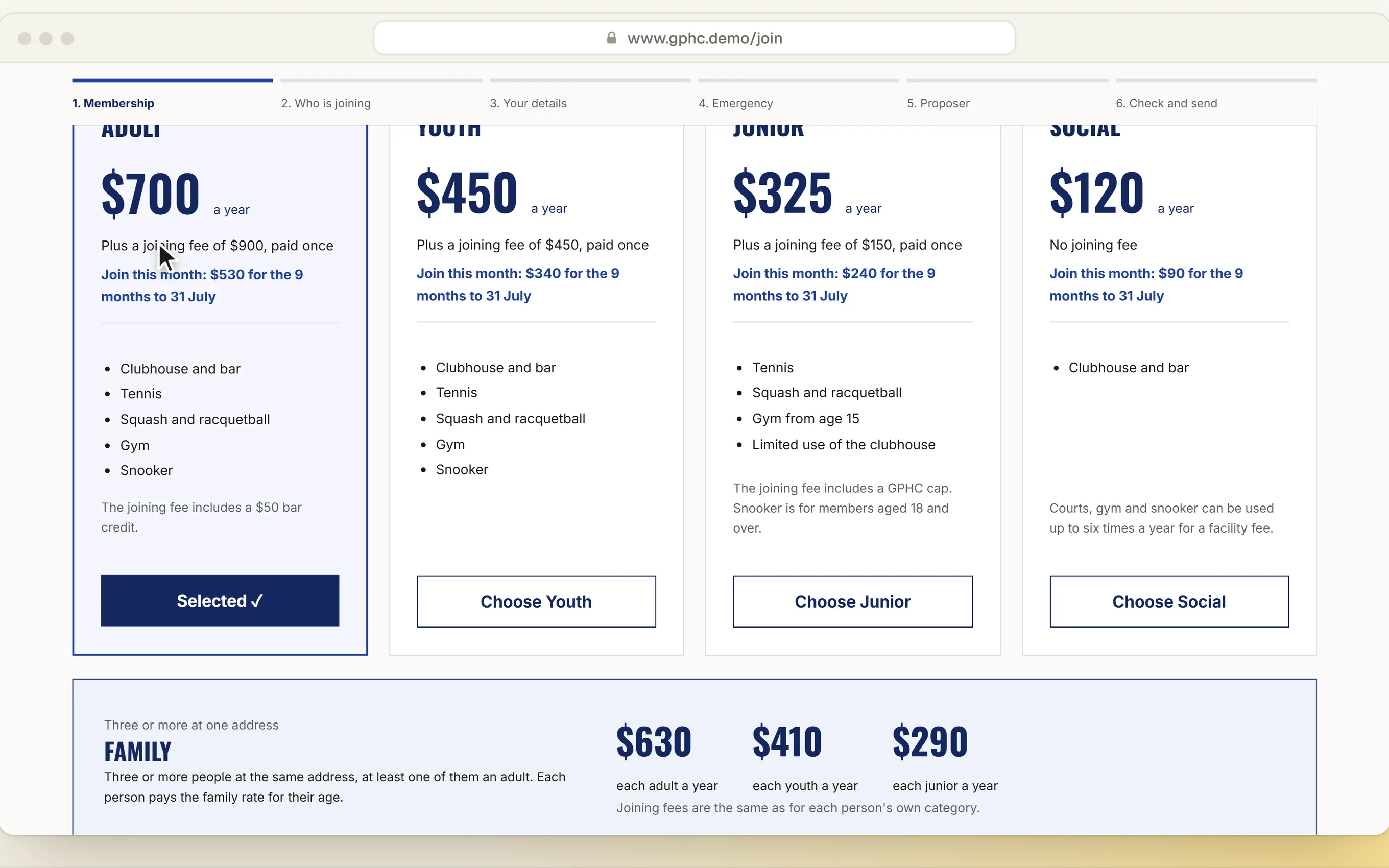
- For a fixed membership year, the first year’s fee is worked out from the months remaining, with a quote tool for the office.
- Online applications
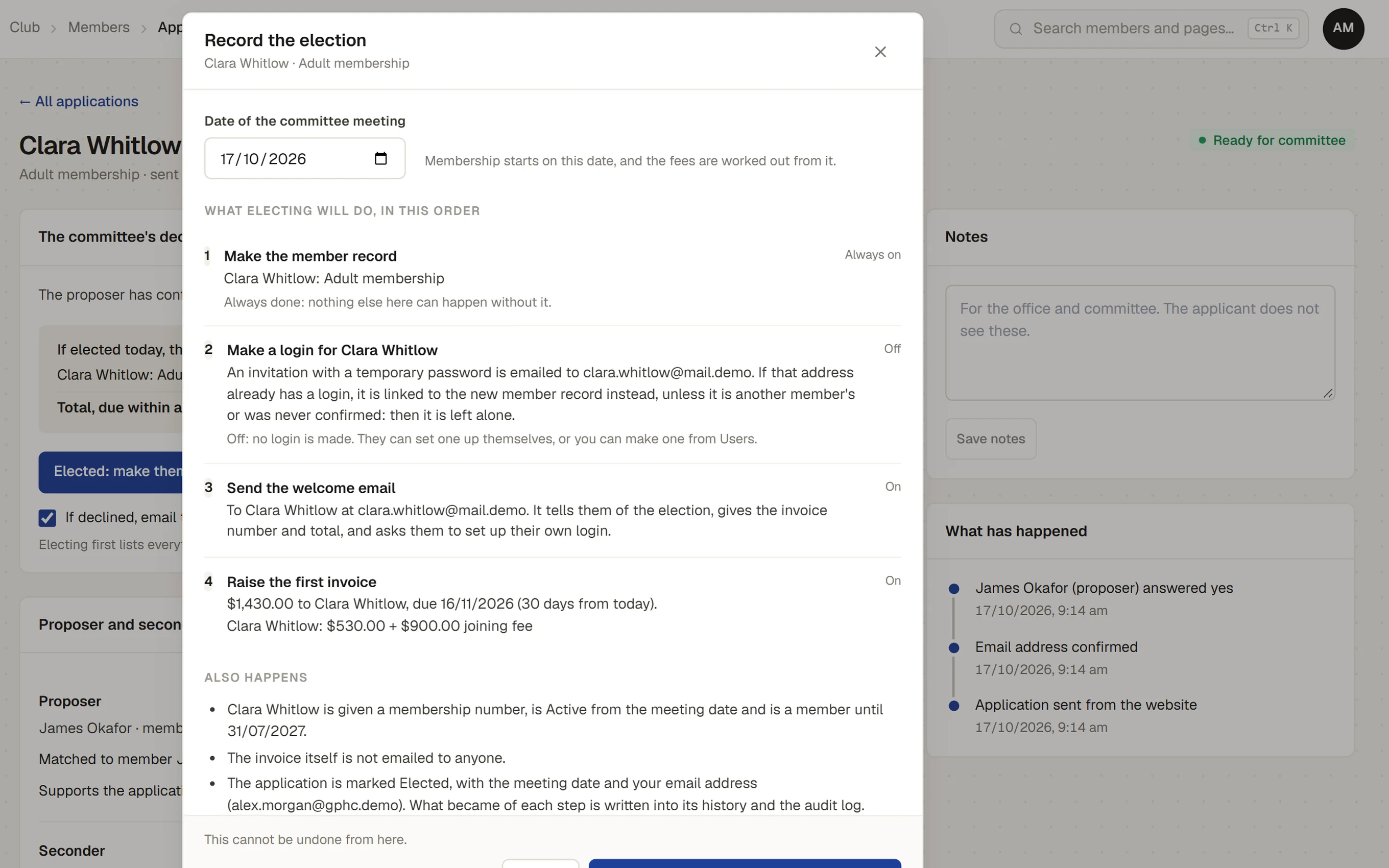
- A join form on your website for adults, youth, juniors, social members and families, with your real fees. The applicant confirms by email before the office sees it. Proposers, seconders and the committee’s decision, if your club elects members. Before electing, the office sees each step it will take and can leave out the login, the welcome email or the first invoice.
- Invoices and payments
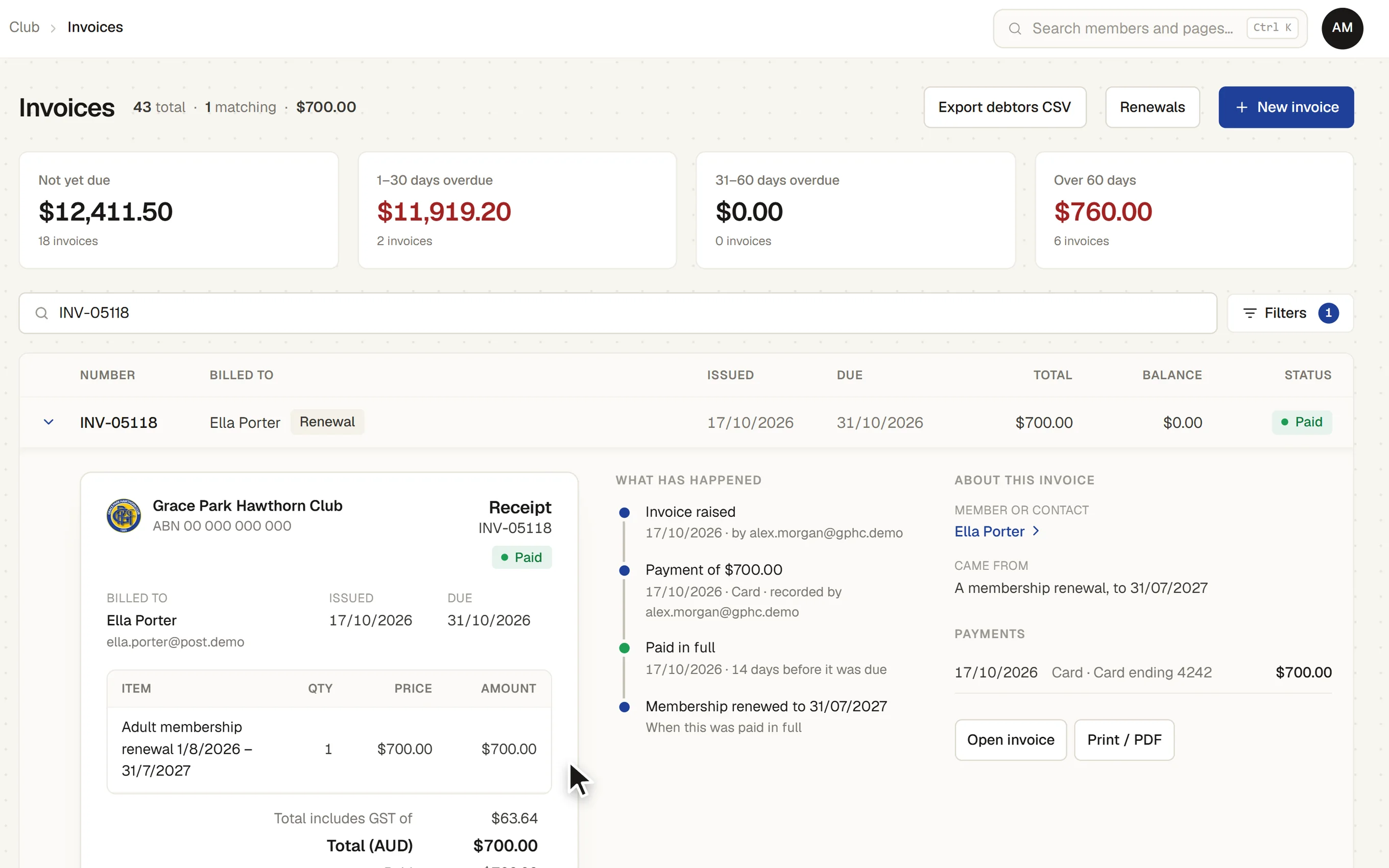
- A price list, tax invoices with the GST worked out on each line by its GST code, numbering of your choice, and payments recorded by bank transfer, EFTPOS, card, cash or cheque, in part or in full. Each invoice opens out under its row: as it prints, what has happened to it and its payments. A printable invoice with your ABN and bank details.
- Renewals
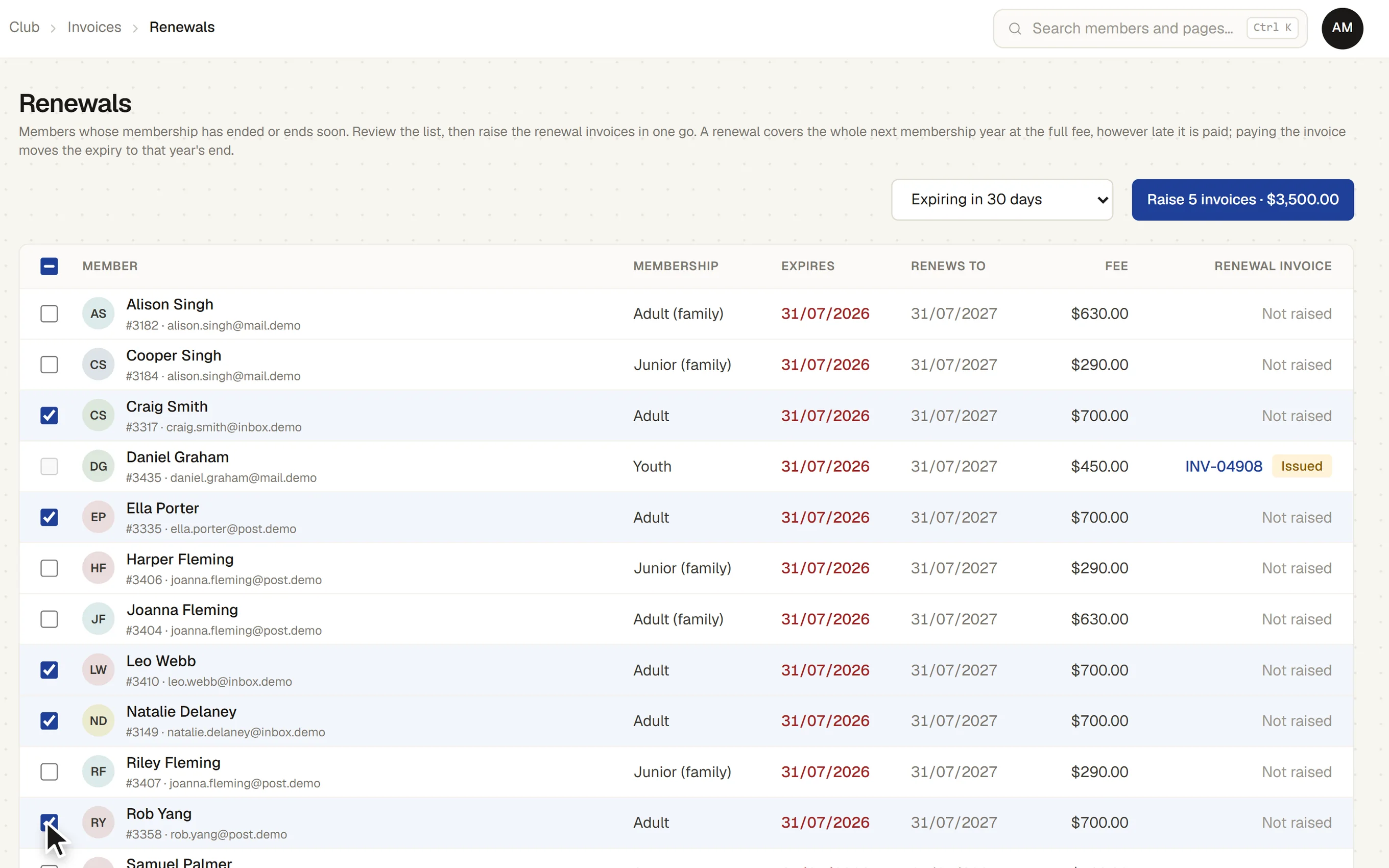
- See who is due in the coming weeks, with the new expiry and the fee, and raise renewal invoices in one batch or one at a time. Paying a renewal invoice moves the expiry on and makes the member Active.
- Auto renew and invoice
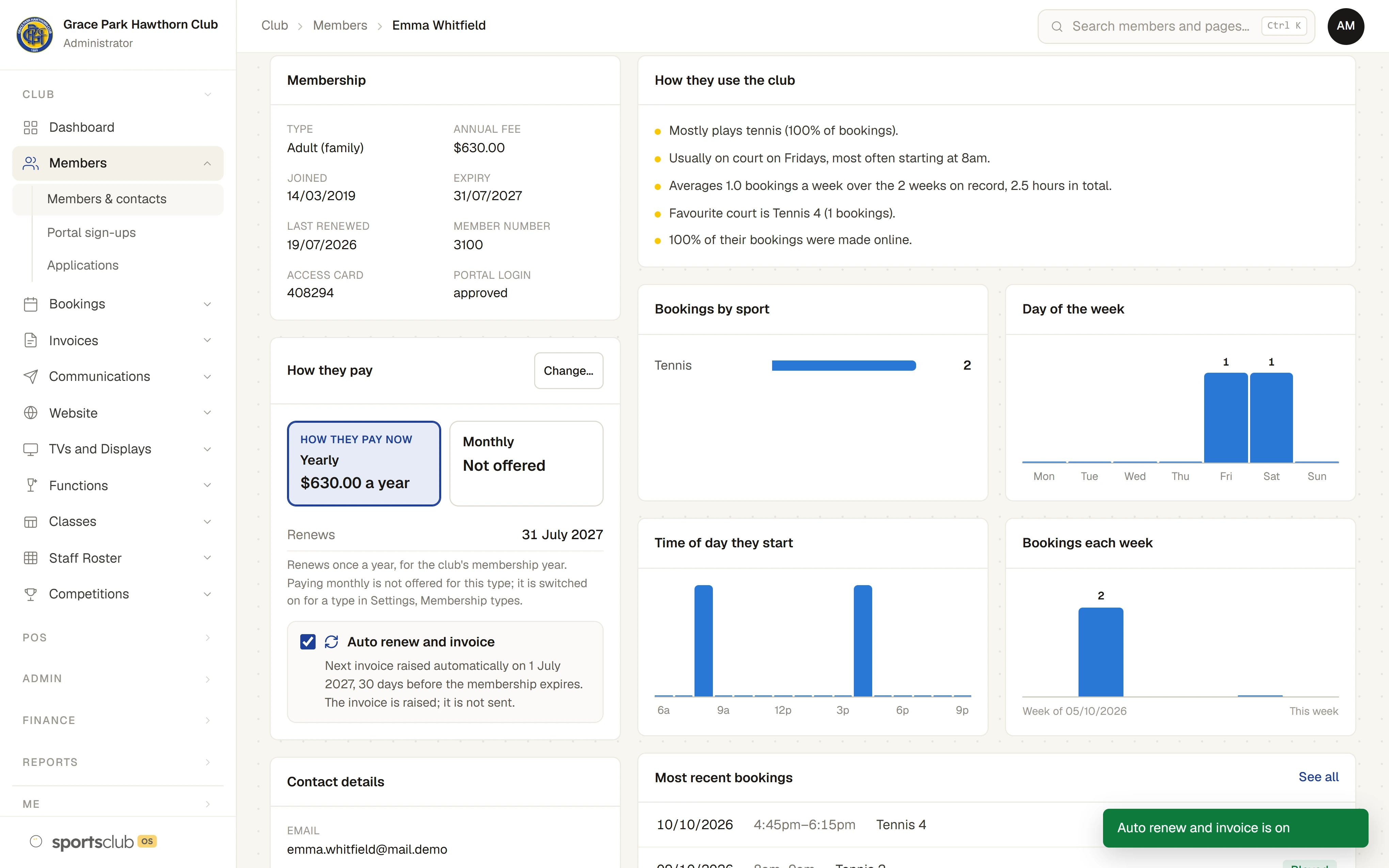
- Switch a member on to auto renew, and their renewal invoice is raised for them 30 days before their membership expires, or as many days as the club chooses, never twice. The member page shows the date it will be raised, and the club can start every new member on it. The invoice is raised, not sent.
- Pay yearly or monthly
- Where the club allows it for a membership type, a member can pay yearly, as before, or monthly. The member, or the head of a household for its people, chooses on their own page, and the office can change it on the member page. A change is worked out to the day, with credit for unused time, and the screen shows exactly what it will do before it is made.
- Monthly invoices, made for you
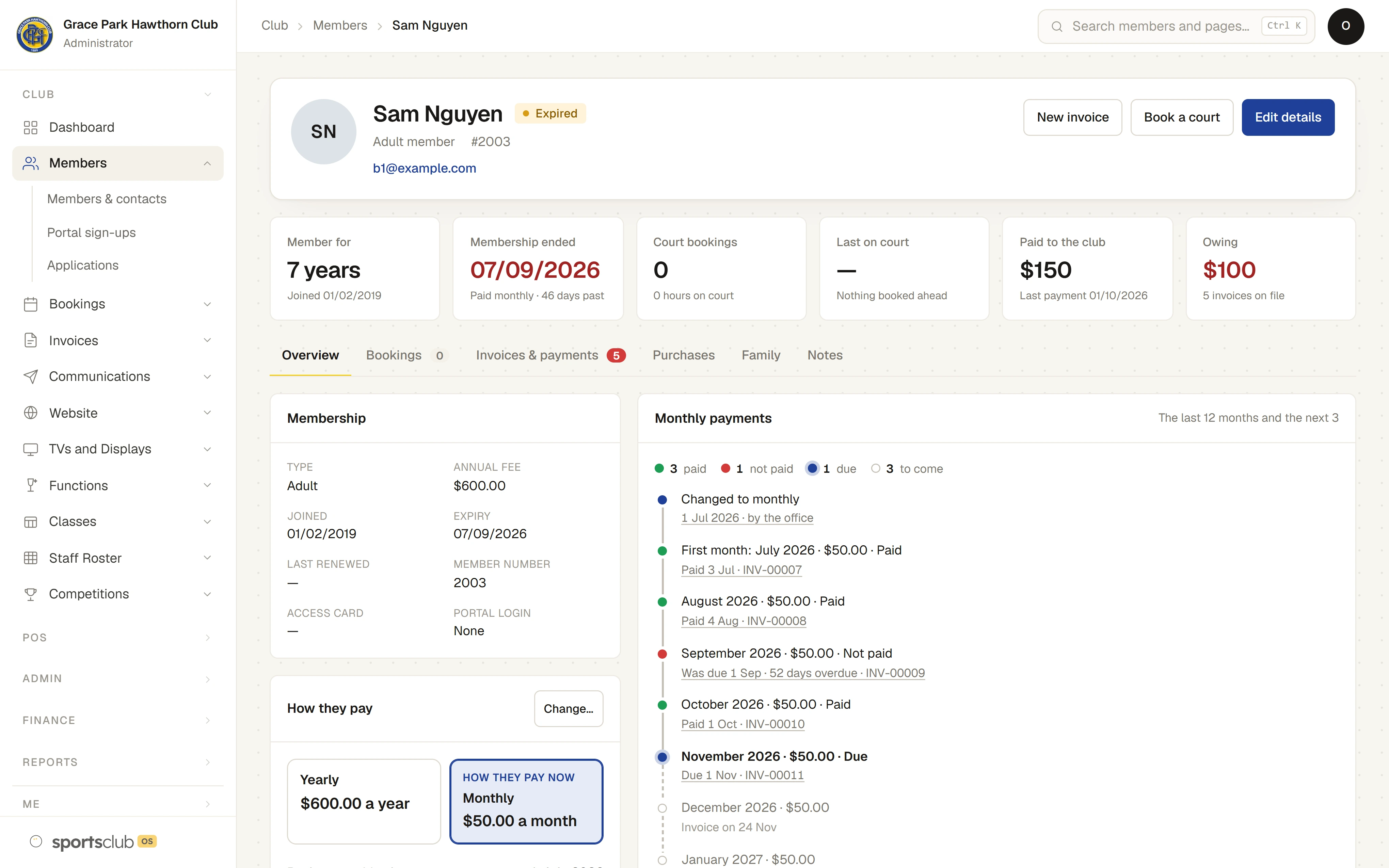
- Each month’s invoice is made automatically, with a line for each person in the household. A timeline on the member page and on the member’s own page shows every month as paid, not paid, due or to come.
- Missed months are flagged, not acted on
- Online booking pauses a few days after the last month paid, as it does for a member whose yearly membership has expired. After two months not paid, the member page says the club must decide what to do. Nothing happens on its own.
- GST, the BAS and the bank
- GST codes, the BAS worksheet, bank reconciliation and the export to your accounts are in Finance and GST.
- What is still owing
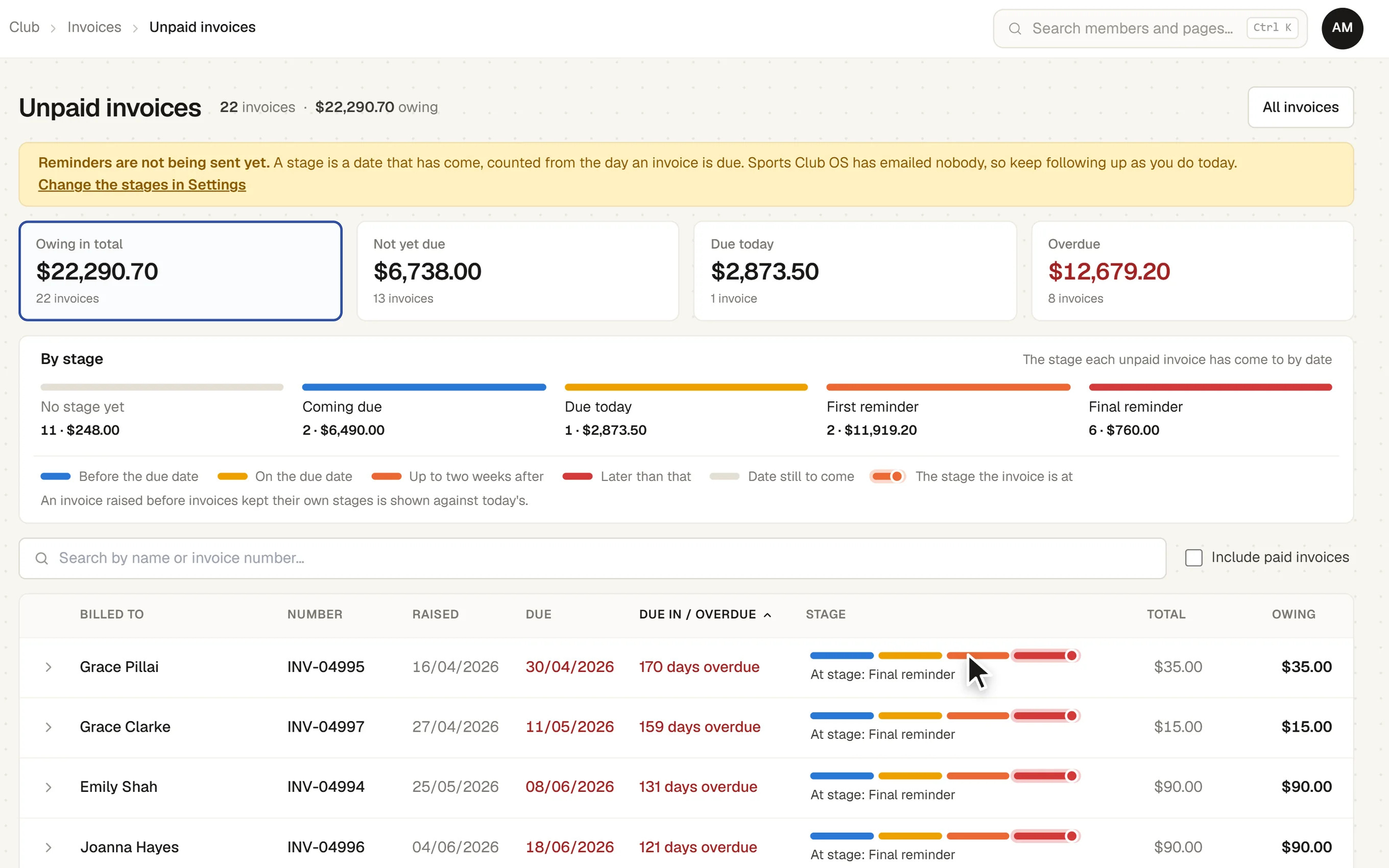
- Every unpaid invoice on one page, with what is not yet due, due today and overdue, and how late each one is against the club’s reminder schedule.
- The member’s own page
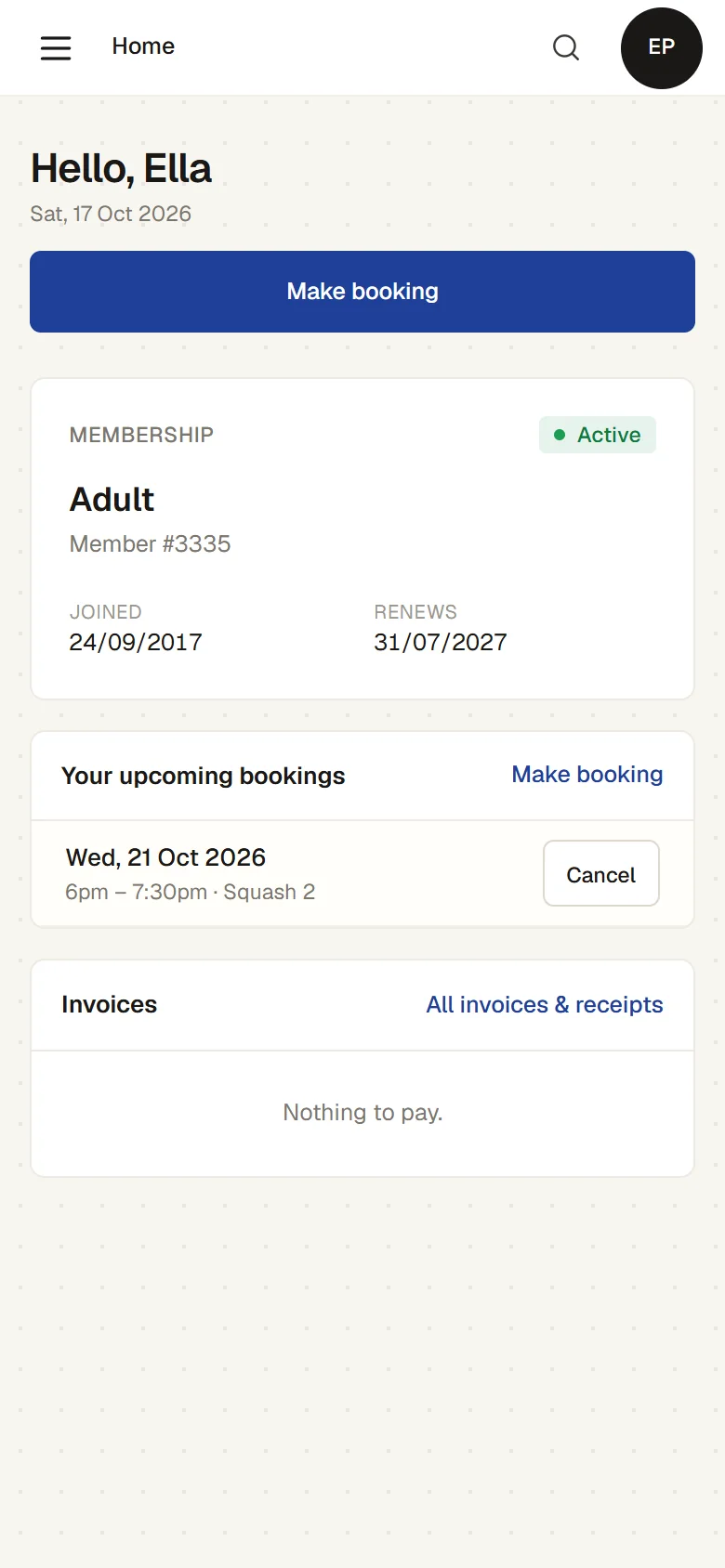
- Members see their membership and expiry, their bookings and their invoices and receipts, and keep their own details up to date, from a phone. No app to download.
- Committee reports
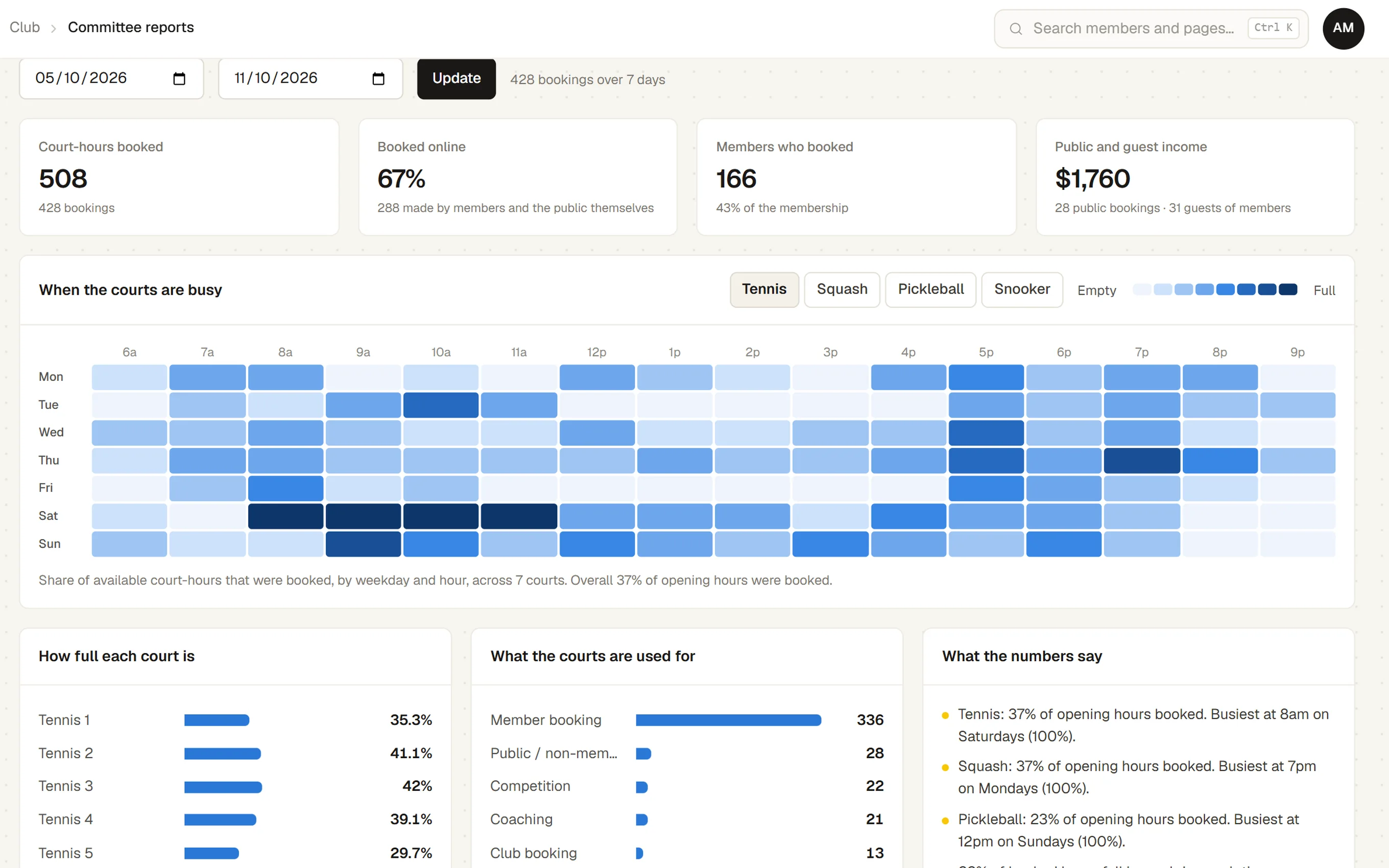
- Members by type and status, renewal rate, income by month and by kind, court use and the busiest hours, with plain-English commentary. Printable for the meeting.
- Importing your members
- A spreadsheet or a SportLogic / inTennis export comes in with its headings matched and a preview before anything is saved. People already in Sports Club OS are matched by member number, or by email and name, so importing the same file twice adds nobody.
How it works
- Someone applies. They choose a membership on your website, add the family, and confirm by the link in their email.
- The proposer says yes. The proposer is emailed at the address the club holds and answers from that email. A letter can stand in for them.
- The committee decides. The office records the decision. Election makes the member records, links the family, raises the first invoice and sends a welcome email.
- They pay. The payment is recorded against the invoice when it arrives, and the member is Active. A member who pays monthly gets one invoice a month instead of one a year.
- The year comes round. Renewals shows who is due. Raise their invoices, or let auto renew raise each one 30 days before it expires. Paying them moves each expiry on.
The screens
Real screens from Sports Club OS, on an invented club.
Settings and options
- Membership types
- Fees, joining fees, sports included, booking limits, how each one renews, and whether it can be paid monthly and at what monthly fee.
- Auto renew
- How many days before expiry a renewal invoice is raised for a member on auto renew, and whether new members start on it.
- Join form
- Which categories the public form offers, each tied to a membership type so the fees shown are the fees invoiced.
- Invoices
- Prefix and numbering, ABN and bank details printed on each invoice, and the price list. GST codes and whether prices are typed with or without GST are set in Finance and GST.
- Reminder schedule
- Up to six stages around each invoice’s due date, with their wording, ready for when reminder sending arrives.
- Tags and fields
- The club’s own tags and extra fields on a member’s record.
- Tag rules
- The club’s rules for tagging members automatically, each switched on or off, with ready-made rules to start from.
Who can do what
| Who | What they can do |
|---|---|
| Administrator | Everything, including deciding applications and making the tag rules. The club can give the tag rules to another role. |
| Office staff (Head Coach, Casual Staff) | See and change members and their tags, switch members on to auto renew, see and raise invoices, record payments and read the committee reports. |
| Treasurer | Runs Finance and GST: GST codes, the BAS worksheet, income received in advance, bank reconciliation and the export to the accounts. Also sees and manages invoices and payments, sees the sales figures and functions, and reads and downloads reports. |
| Reporting | Reads the club’s figures and can see imported bank statements and how they were matched. Changes nothing. |
| Members | Their own membership, invoices and details, and nobody else’s. The head of a household chooses yearly or monthly payment for its people. |
These are the starting roles. The club can change what each role may do on its Roles & permissions page, give a person several roles, and take a role away when they step down. The server checks every request against those roles, so a hidden button is never the only protection.
What gets sent
| To | What |
|---|---|
| The applicant | An email to confirm their application, and a welcome email when they are elected, with their first invoice’s number and a link to set up their login. |
| The proposer | An email asking them to support the application, and a reminder if the office sends one. |
Questions
Can members pay monthly?
Yes, for a membership type the club allows it on. A member, or the head of their household, chooses yearly or monthly on their own page. A change is worked out to the day, with credit for the unused time, and each month’s invoice is made automatically.
Does it charge members automatically each month?
Not yet. Each month’s invoice is made automatically, but it is paid the ways invoices are paid today. Online card payment and automatic charging are being built. Direct debit is not available.
What happens if a member misses a month?
The month shows as not paid on the member page and on the member’s own page. Online booking pauses a few days after the last month paid, and after two months not paid the member page says the club must decide what to do. Nothing happens on its own, and reminders for missed months are not sent yet.
Can renewal invoices be raised automatically?
Yes. Switch a member on to auto renew and their renewal invoice is raised 30 days before their membership expires, or as many days as the club chooses. It is raised, not sent: emailing invoices is coming. Members who pay monthly have each month’s invoice made automatically already.
Can members pay online by card?
Not yet. Today a payment is recorded against the invoice when it arrives by bank transfer, at the club or by EFTPOS, and monthly invoices are paid the same ways. Online card payment is being built.
Are invoices emailed?
Not yet. Invoices print, or save as a PDF, and members see their own on their page. Emailing invoices and sending reminders are coming; the reminder schedule can be set up now.
Does it connect to Xero?
Not yet. It is being built. Meanwhile Finance and GST exports each month as a summary for MYOB and a spreadsheet for your accountant, and the Administrator can download everything the club holds as spreadsheets.
Can members be tagged automatically?
Yes. Tag rules tag people from what they do, such as booking a squash court in the last 60 days or joining in the last 90 days, and take the tag off when it stops being true. They run every night, or when you press Run now. A tag given by hand is never taken off by a rule.
Do we have to elect members?
No. Proposers and the committee’s decision are there for clubs that use them.
Can we bring our members across?
Yes. We bring them across for you as part of set-up, from SportLogic or inTennis exports or a spreadsheet.
On its way
Online card payment, automatic charging of monthly membership and the Xero connection.
Sending invoice reminders and emailing invoices, including reminders for missed monthly payments and renewal invoices raised by auto renew. The schedule can be set now.
Monthly payment on the join form, stopping a monthly membership at the end of a month, and a settings page for the monthly rules.
Works with
 Finance and GST
 Sport Booking Management
 Communications
BOOK A WALKTHROUGH
Get a personalised walkthrough and demo
Book a walkthrough and bring the jobs that take your office the longest.