SOFTWARE FOR TENNIS CLUBS

Tennis Club
Management
Software

Sports Club OS is tennis club management software for member clubs: court bookings, memberships, junior coaching, club championships and the clubhouse around the courts, in one system — powered by AI.

Built at a member club in Melbourne with tennis courts, by one of its members.

ONE SYSTEM FOR THE WHOLE TENNIS CLUB
Courts · Coaching · Competitions · Members · Clubhouse

WHY SPORTS CLUB OS

Everything you need to run your tennis club, end to end.

01

Fully run and managed for you.

Nothing to install. Members book tennis courts from any phone or browser.

02

Court rules the committee sets.

How far ahead, how long, how many a week, and which memberships may book at peak times.

03

Coaching on the same courts.

A junior group or squad holds its court, so members can’t book over a lesson.

04

Club championships and night comps.

Ladders, box leagues, round robins and knockouts, scored by the set on a phone and shown on the clubhouse TV.

05

The clubhouse as well.

The bar till, functions, staff rosters, and GST and the BAS for the treasurer.

06

Every feature in every plan.

Priced by the number of members, from A$215 a month + GST for up to 300 members.

BENEFITS

Benefits for
tennis clubs

What Sports Club OS does for a tennis club, from the members to the courts.

  1. 01Tennis court booking
  2. 02Memberships for families, juniors and seniors
  3. 03Coaching and junior programs
  4. 04Club championships, ladders and night comps
  5. 05Bar, pro shop and functions
  6. 06The treasurer: invoices, GST and the bank
  7. 07Volunteers and staff
01

Tennis court booking

A tennis court booking system members use from their phone: they book, move and cancel their own courts under your rules, and a court can never be booked twice. The office sees every court, social night, pennant night and coaching session on one calendar.
  • Your rules, applied as they book.How far ahead, how long, how many a week, peak times, and which memberships may book tennis.
  • Regular nights hold their courts.Social tennis, pennant and coaching repeat each week, so members can’t book over them.
  • Resurfacing and wet days.Close courts for a few hours or days and see which bookings it affects. Members see the closed time and its reason.
  • Guests and visitors.Guests go on a booking with the fee shown first. A visitor’s court is sold at the desk or bar till and goes straight onto the calendar.
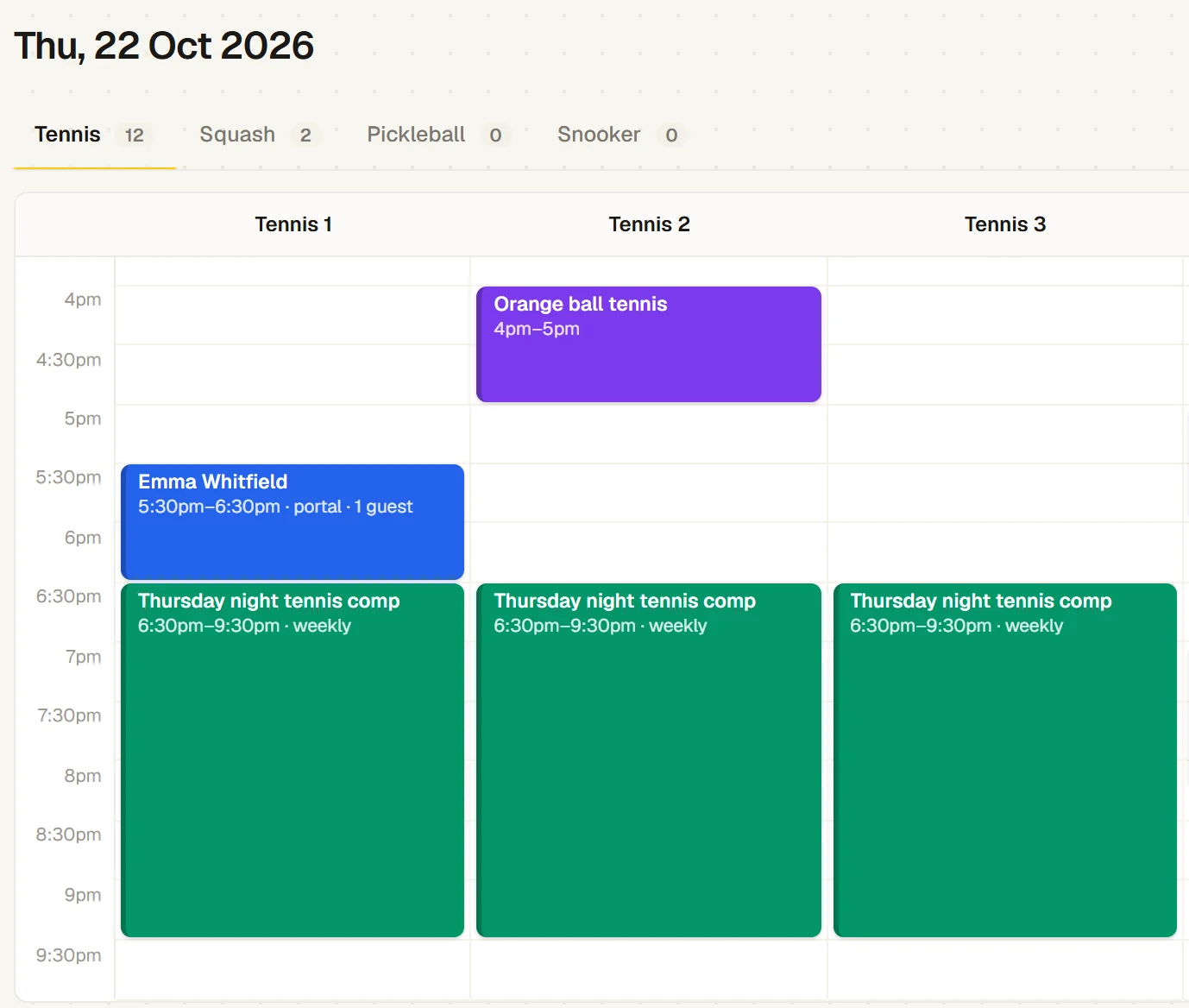
The office’s tennis calendar for Thursday 22 October: Emma Whitfield on Tennis 1 at 5:30pm with a guest, Orange ball tennis on Tennis 2, and the Thursday night tennis comp on courts 1 to 3 from 6:30pm, every week
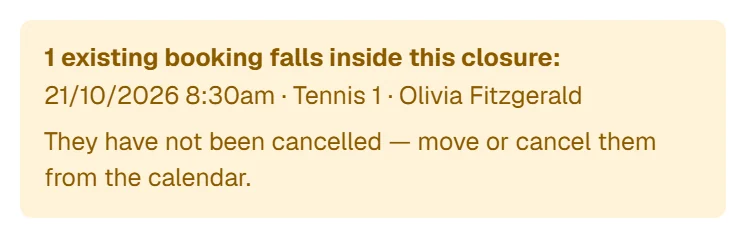
A closure for line marking on courts 1 and 2, just saved: 1 existing booking falls inside it, Tennis 1 at 8:30am, to move or cancel from the calendar
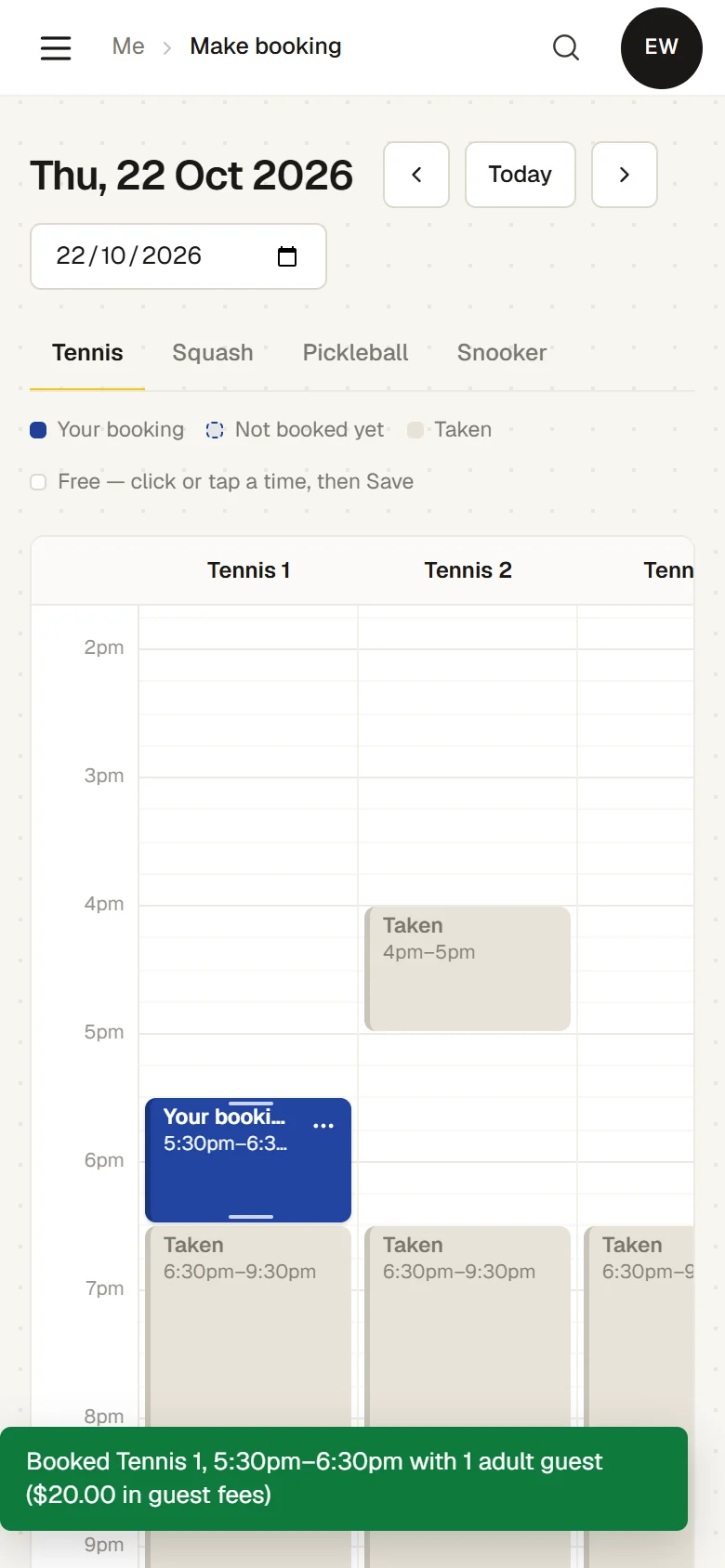
A member has just booked Tennis 1 from 5:30pm to 6:30pm on a phone, with 1 adult guest ($20.00 in guest fees), next to courts taken from 6:30pm
02

Memberships for families, juniors and seniors

Tennis club membership software that follows each member from the day they apply to the day they renew. Members see their own membership, bookings and invoices on their phone.

  • Joining online.People apply from your website and see the fees for their category. A proposer confirms by email and the committee elects them.
  • Family, junior and mid-week rates.Each rate is a membership type with its own fee and renewal date. A type can include only some sports, set its own weekly limit or be off-peak only. A family is one household under a head who pays.
  • Renewals and monthly payments.Raise every renewal at once, or have them raised automatically before the membership ends. Members can pay yearly or monthly.
  • Email the right members.Write from a template or have AI draft it, and send to everyone, a membership type such as Junior, or members with a tag such as Pennant. Members choose which emails they get.
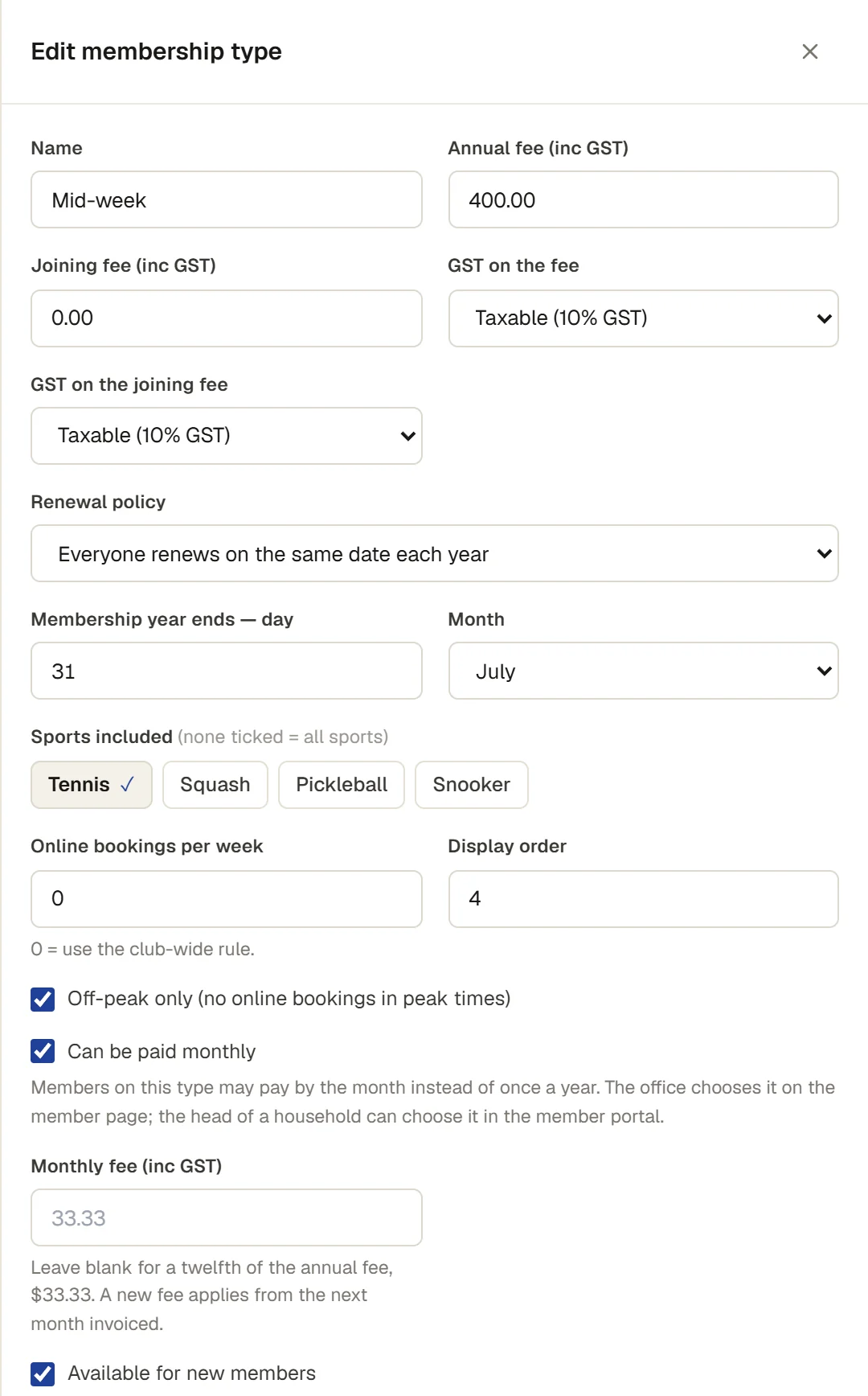
Editing the Mid-week membership type: $400.00 a year, renewing on 31 July, Tennis the only sport included, Off-peak only and Can be paid monthly ticked
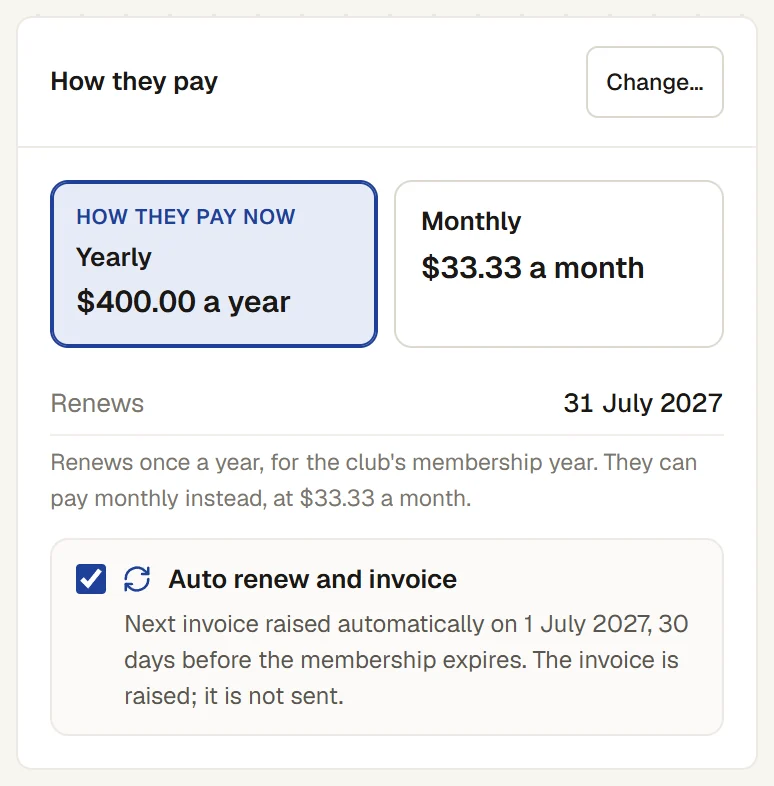
How a Mid-week member pays: yearly at $400.00 or monthly at $33.33, renewing 31 July 2027, and Auto renew and invoice on: the next invoice is raised automatically on 1 July 2027
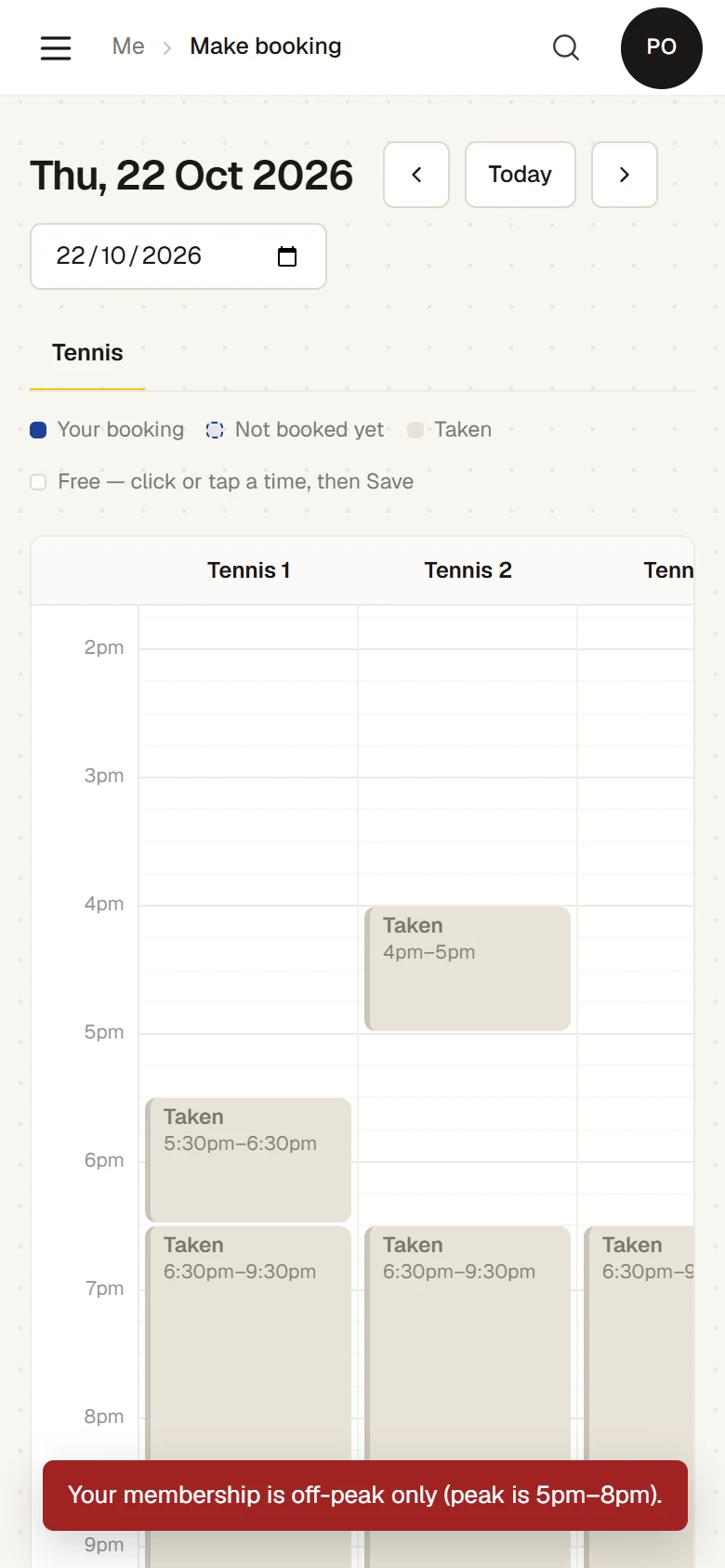
An off-peak member taps 5:30pm on a tennis court on Thursday and is told: Your membership is off-peak only (peak is 5pm–8pm)
03

Coaching and junior programs

Junior groups, adult beginner courses, squads and holiday camps on one timetable that members book and parents enrol from. Each is run by the club or by an outside coaching business, holds its court, and keeps a waitlist when it is full.
  • Junior groups by ball colour.Red, orange and green groups run for the term, each for its ages. The coach moves a child up a stage when they are ready.
  • Enrolled once for the term.A parent enrols each child once, pays for the sessions left in the term, and the family discount comes off.
  • Waitlists that offer the place.When a place comes up, the next family is offered it and has until a set time to take it.
  • Wet weather and missed weeks.A session called off for weather gives each child a credit for another session at the same stage, and so does a parent who says ahead that a child is away.
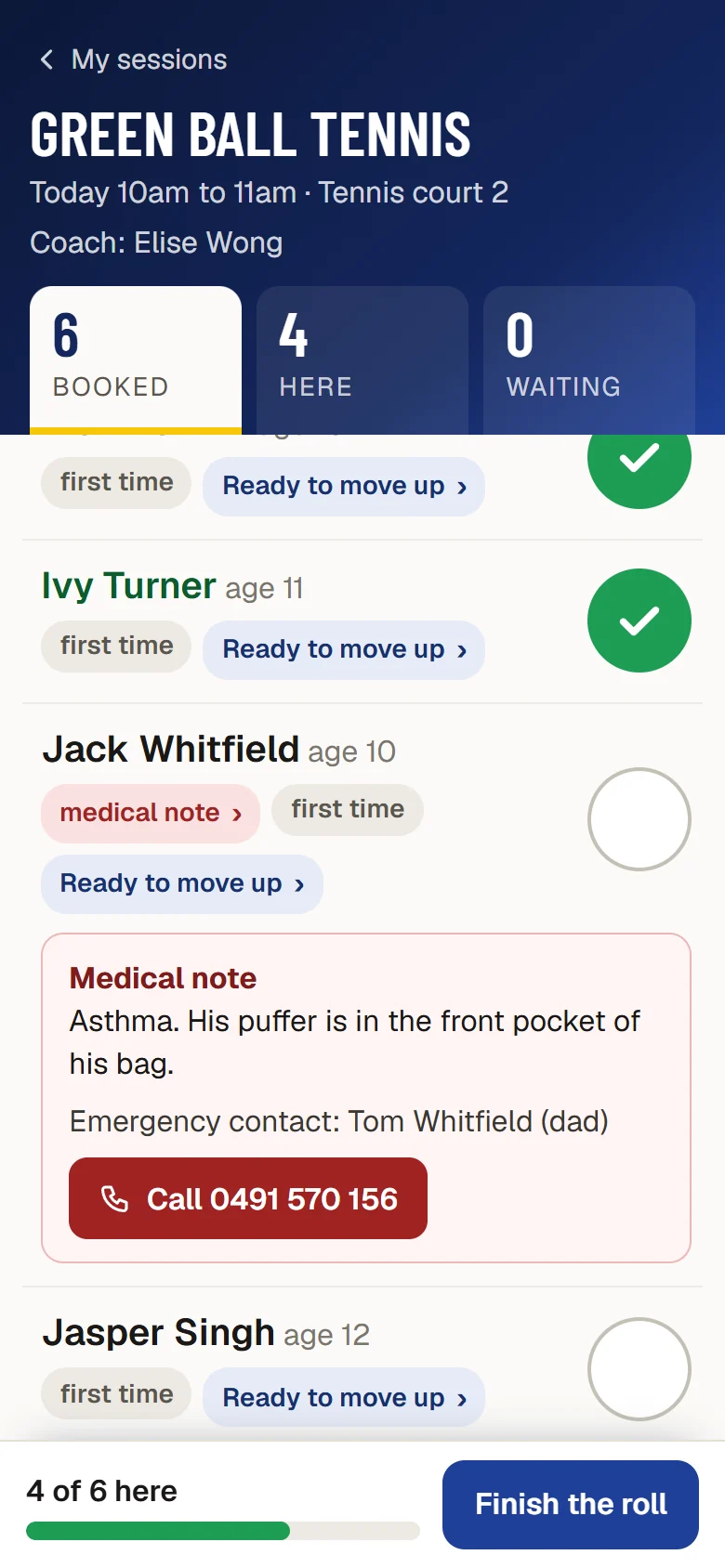
  • The roll on the coach’s phone.Each child’s age, any medical note and the emergency contact, and the club sees when each coach’s Working with Children Check expires.
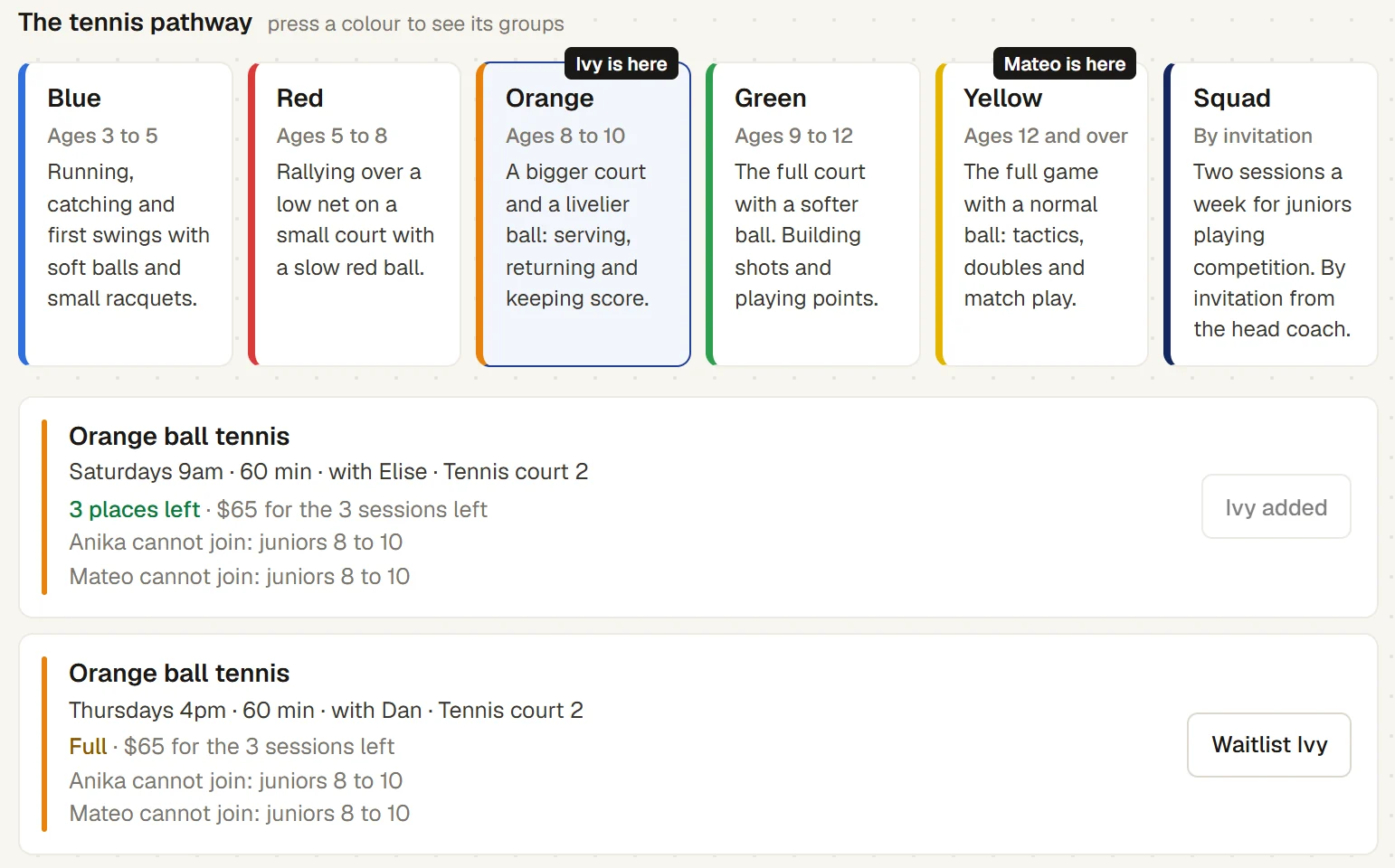
Enrol for a term: the tennis pathway open at Orange, ages 8 to 10, where Ivy is. Ivy is added to the Saturday Orange ball group, the Thursday group is full with Waitlist Ivy, and Mateo, at Yellow, cannot join: juniors 8 to 10
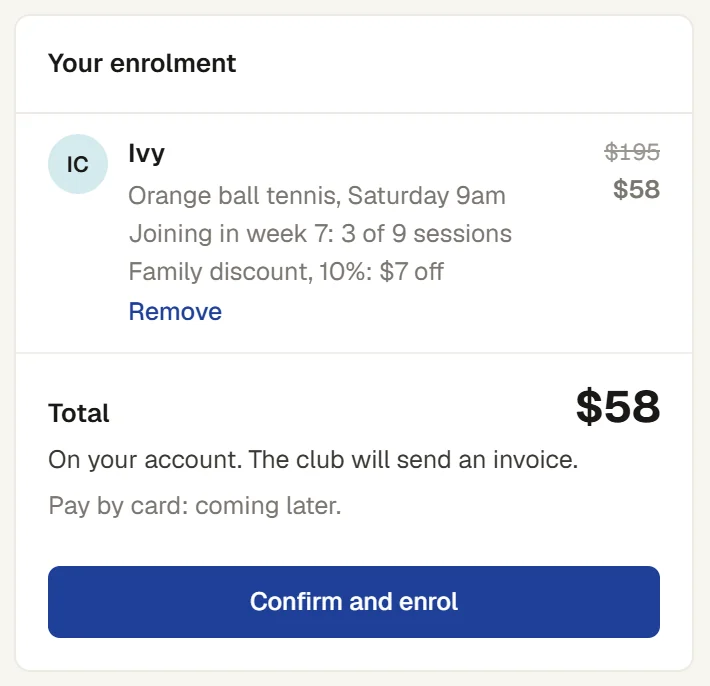
Your enrolment: Ivy in Orange ball tennis on Saturday at 9am, joining in week 7 for 3 of 9 sessions, family discount of 10%, $58 instead of $195, on the family account
The coach’s roll for Green ball tennis on a phone: 4 of 6 here, and Jack Whitfield’s medical note open (asthma, his puffer in his bag) with a button to call his emergency contact
04

Club championships, ladders and night comps

Your conveners run every tennis competition from a phone. Players enter their own results, the draws and tables follow from the scores, and live scores go up on the clubhouse TV.

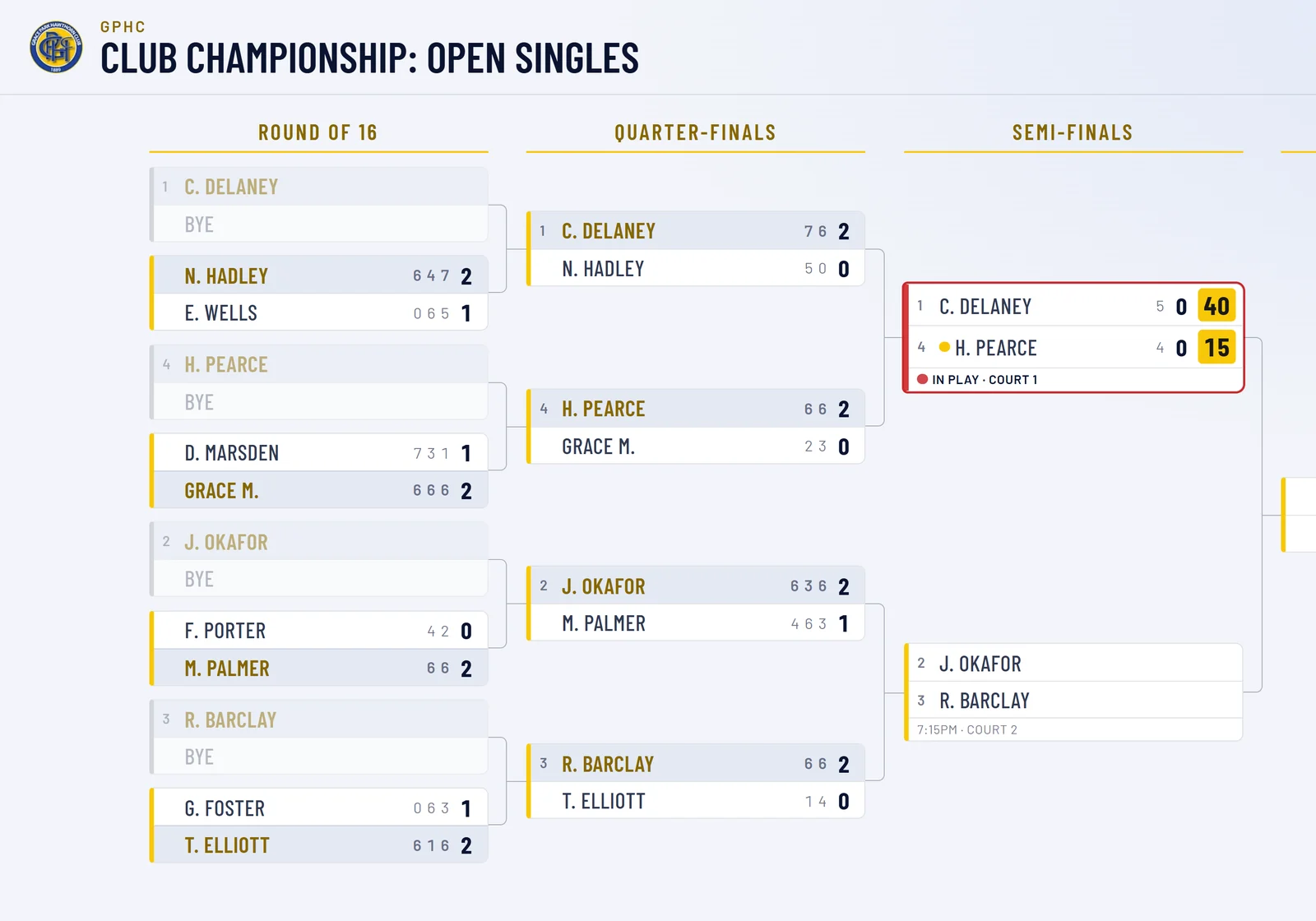
  • Club championships.Every grade in one event, singles or doubles, with knockout draws, a plate for those who lose their first match, and an order of play across your courts.
  • Ladders.Players challenge up to a set number of places above them. Win, and take the place.
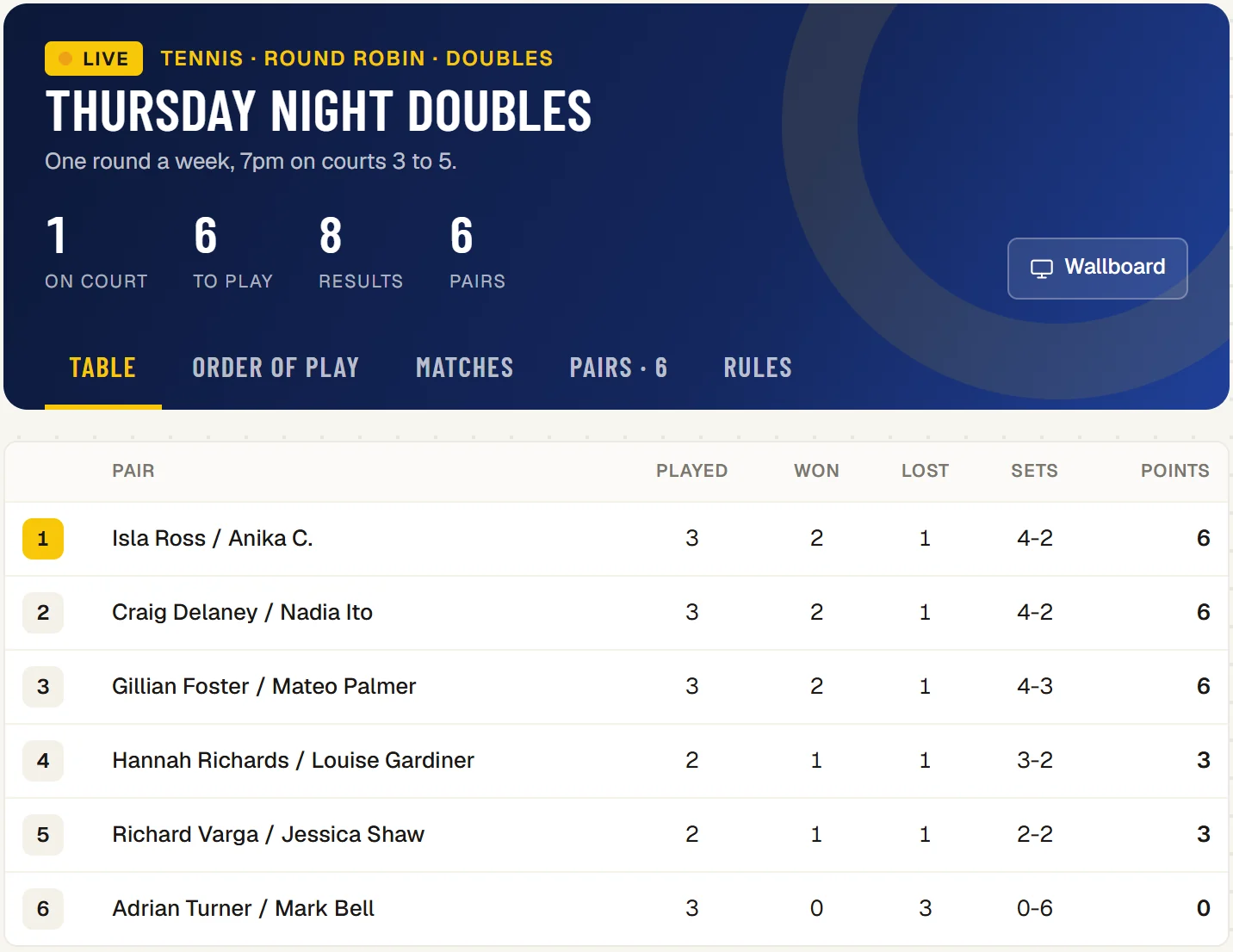
  • Night comps.Box leagues and round robins for singles or doubles pairs, with a table that follows each result.
  • Scored by the set, live.Best of three sets, a match tie-break to 10, Fast4, no-ad or one set. A phone scores each point, with deuce, advantage and tie-breaks, and the court’s TV and the draw follow.
The Club Championship: Open Singles draw on the clubhouse TV: the first semi-final in play on court 1 at 40–15, and the second due at 7:15pm on court 2
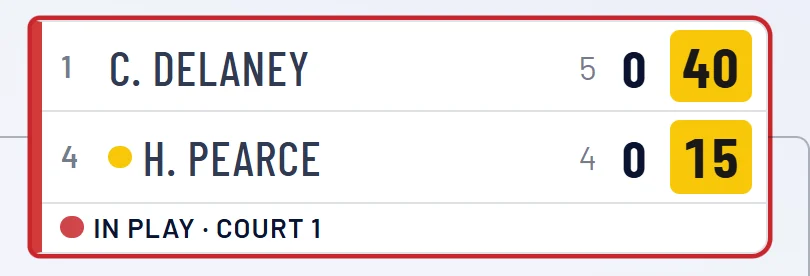
The semi-final on the TV draw: C. Delaney leads H. Pearce 5 games to 4 and 40–15, in play on court 1
Thursday Night Doubles, a tennis round robin for pairs: live, 1 match on court, and the table of six pairs with played, won, lost, sets and points
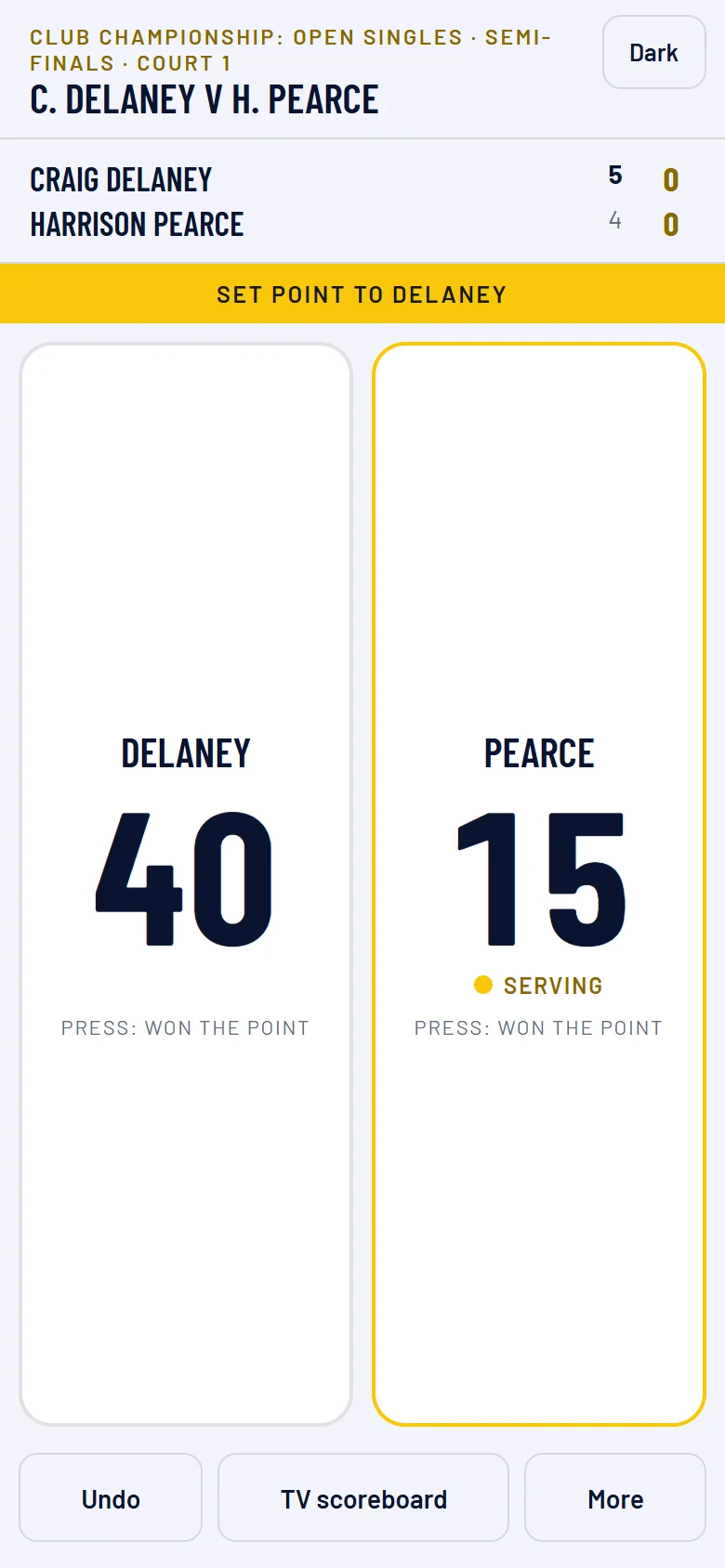
Scoring a tennis semi-final on a phone: Delaney 40, Pearce 15 and serving, Delaney leading 5 games to 4, and Set point to Delaney
05

Bar, pro shop and functions

The clubhouse runs on the same member list as the courts. The till sells drinks, food, court time and guest fees, members can charge to their account, and function enquiries become quotes, deposits and a function sheet.
  • One till for the bar and the desk.Member accounts, tabs and prepaid credit, a PIN for each person, a cash-up at close, and cash and account sales carry on if the internet drops.
  • Court time and guest fees at the desk.A walk-in court sold at the till is a real booking, and the guest fees owing today are listed to be paid.
  • Racquet and ball machine hire.Hire out equipment and mark it back, and take in a racquet for restringing and charge it when it is collected.
  • Function hire.Enquiry, quote, deposit and a function sheet for the clubhouse, and a confirmed function that uses courts closes them.
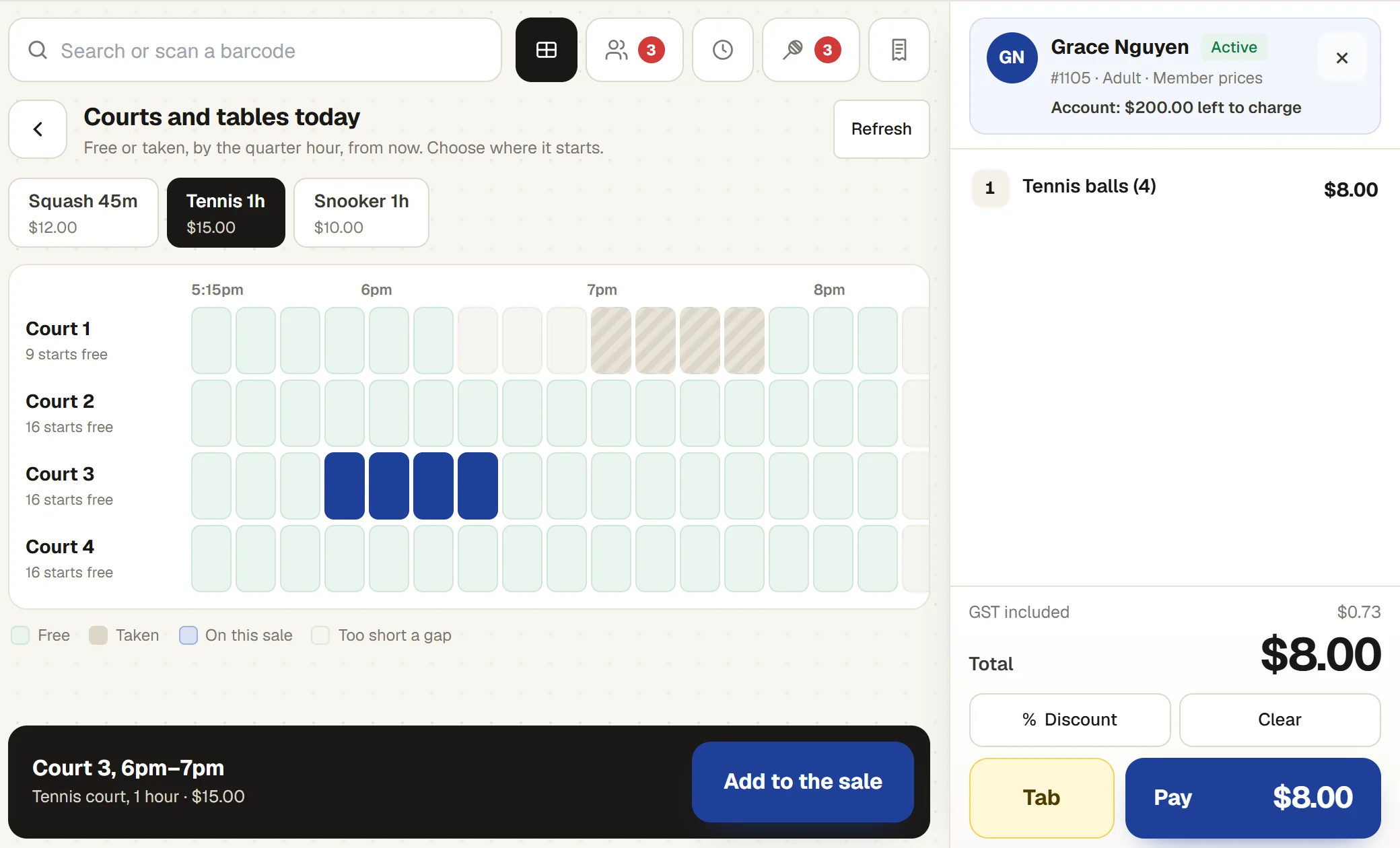
The bar till: Grace Nguyen at member prices with tennis balls on the sale, and a tennis court picked on the court grid: Court 3, 6pm to 7pm, $15.00, with Add to the sale
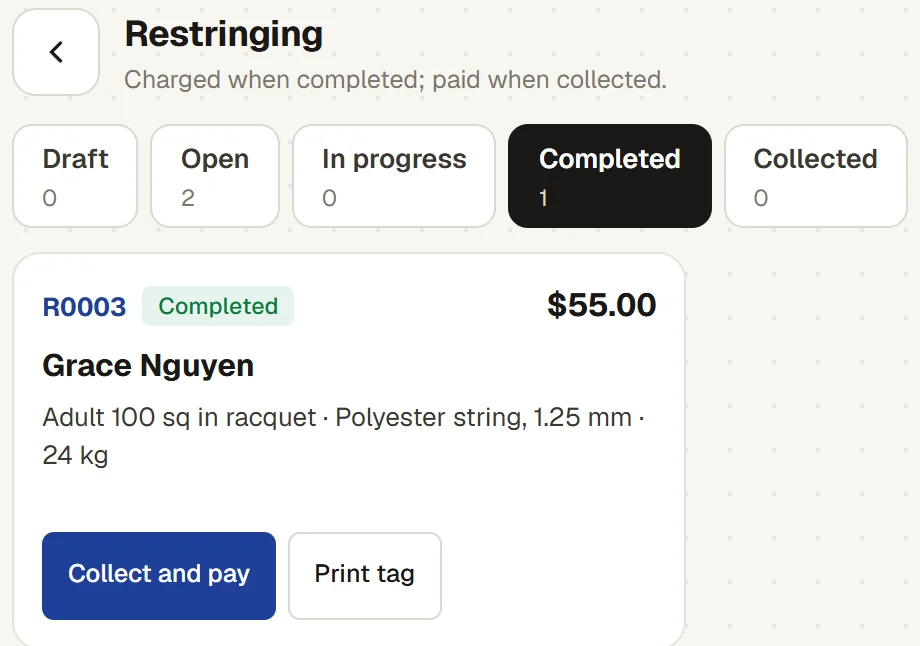
Restringing at the till: Grace Nguyen’s racquet, polyester string at 24 kg, completed, $55.00, with Collect and pay
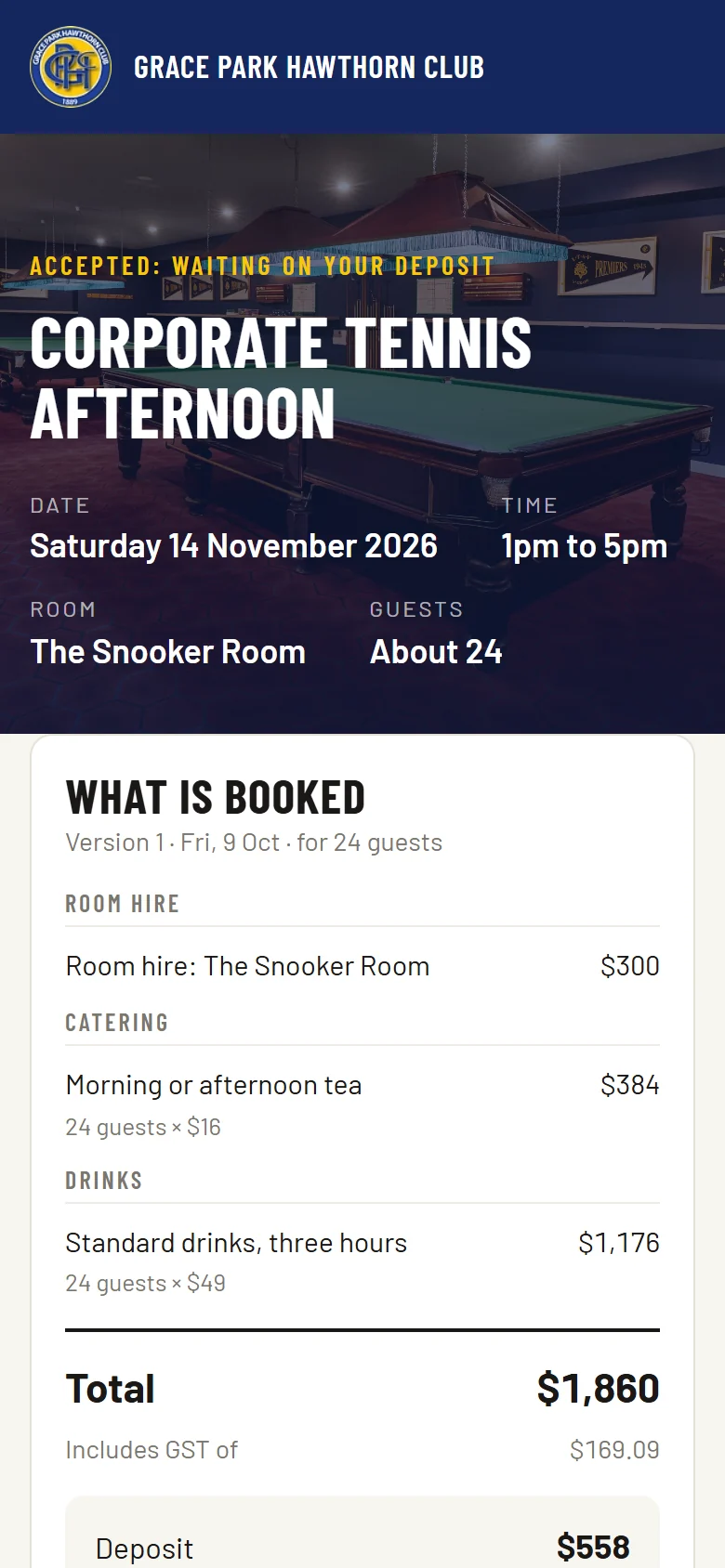
The hirer’s page on a phone just after accepting the quote: Corporate tennis afternoon, Saturday 14 November, 1pm to 5pm, the Snooker Room, about 24 guests, accepted and waiting on the deposit, and what is booked
06

The treasurer: invoices, GST and the bank

Membership invoices, court hire and bar sales are recorded in one place, with GST on every invoice line, a BAS worksheet and a bank reconciliation for the treasurer.
  • Who owes what.Every unpaid invoice, how late it is, and the total owed.
  • GST and the BAS.GST on every invoice line, and a worksheet for each quarter with the figures to report, marking any that are estimated. Sports Club OS lodges nothing for you.
  • The bank statement.Import the statement file, match deposits to payments and the till’s cash, and mark the account reconciled once it balances.
  • Court use and committee reports.Court use by day and hour, members, income, and an AI Report Assistant that answers a question in plain words.
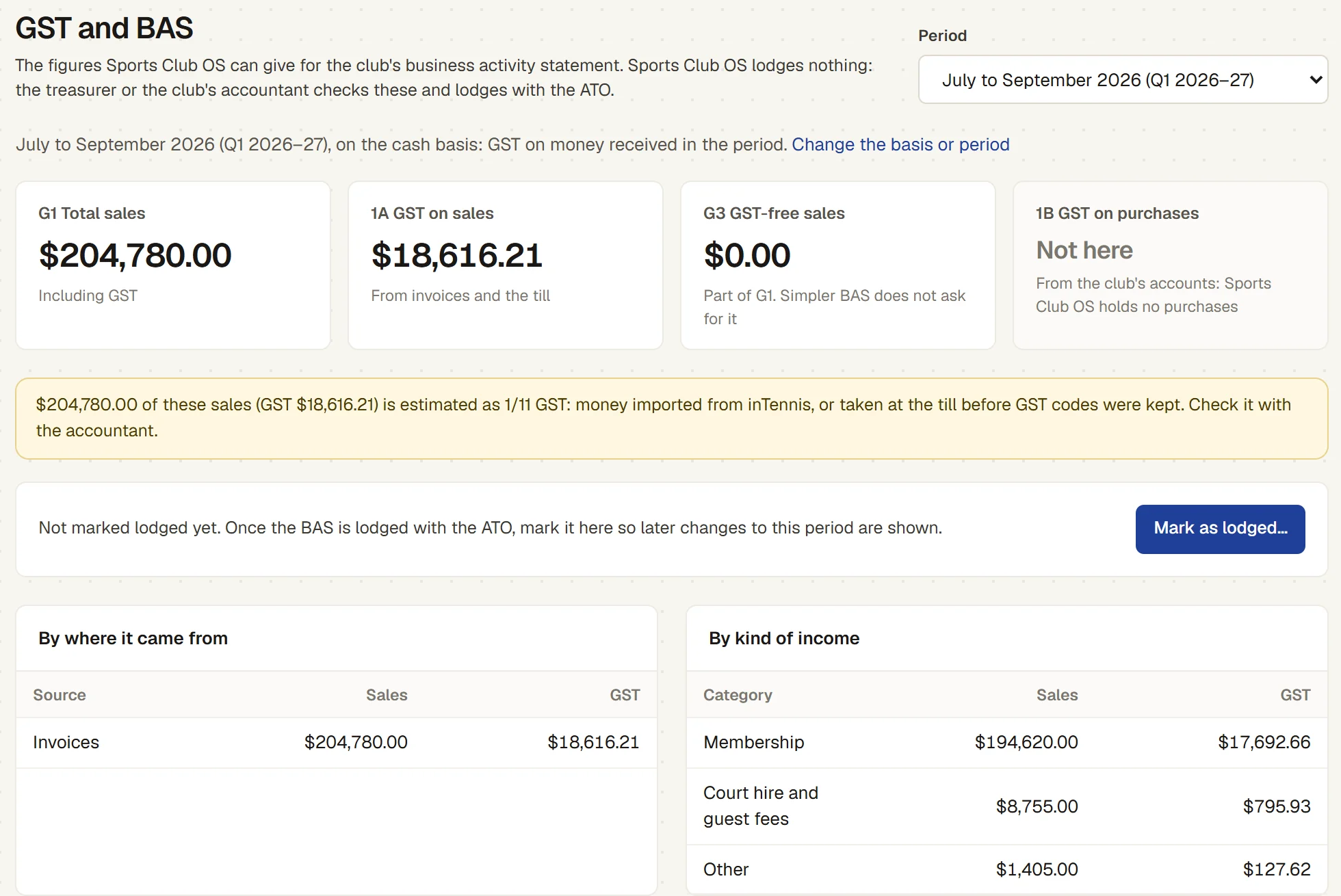
GST and BAS for July to September 2026: G1 total sales $204,780.00 and 1A GST on sales $18,616.21, a note that the GST on imported money is estimated, and sales by source and by kind of income
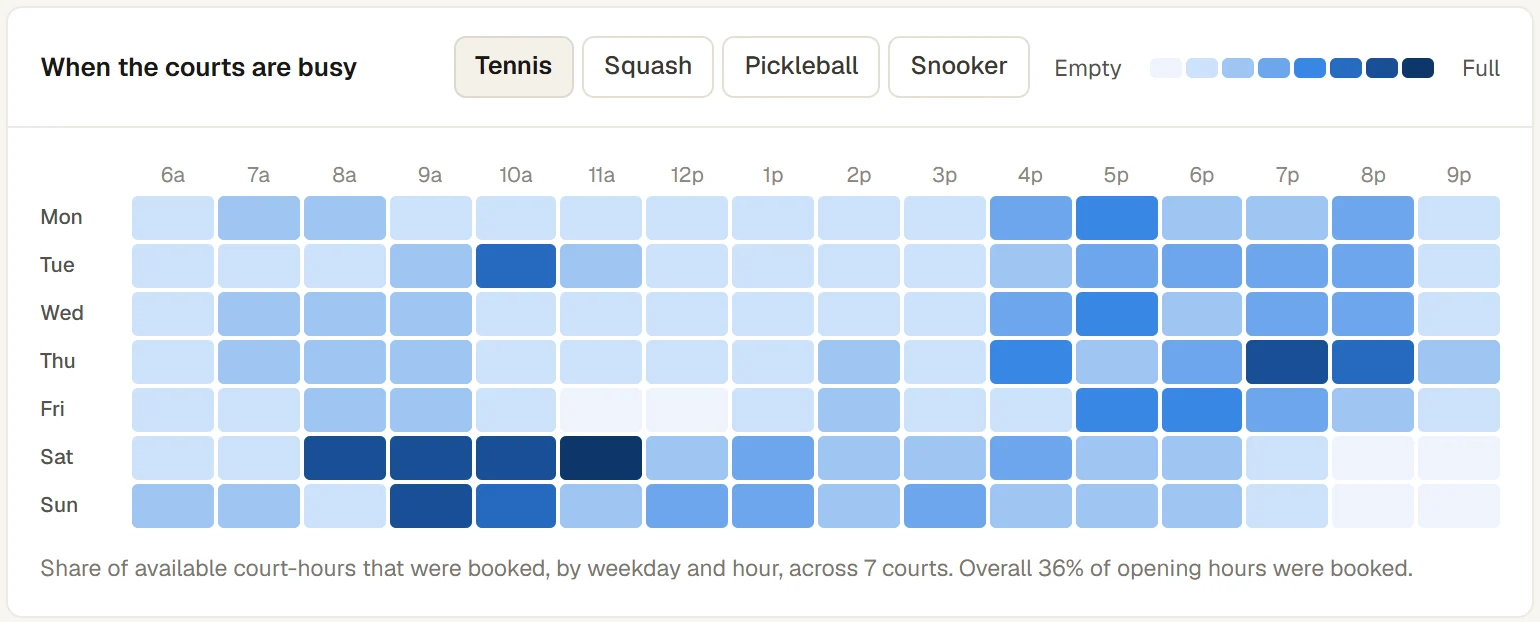
When the tennis courts are busy: a heat map of booked court-hours by weekday and hour across 7 courts, darkest on Saturday mornings and weekday evenings
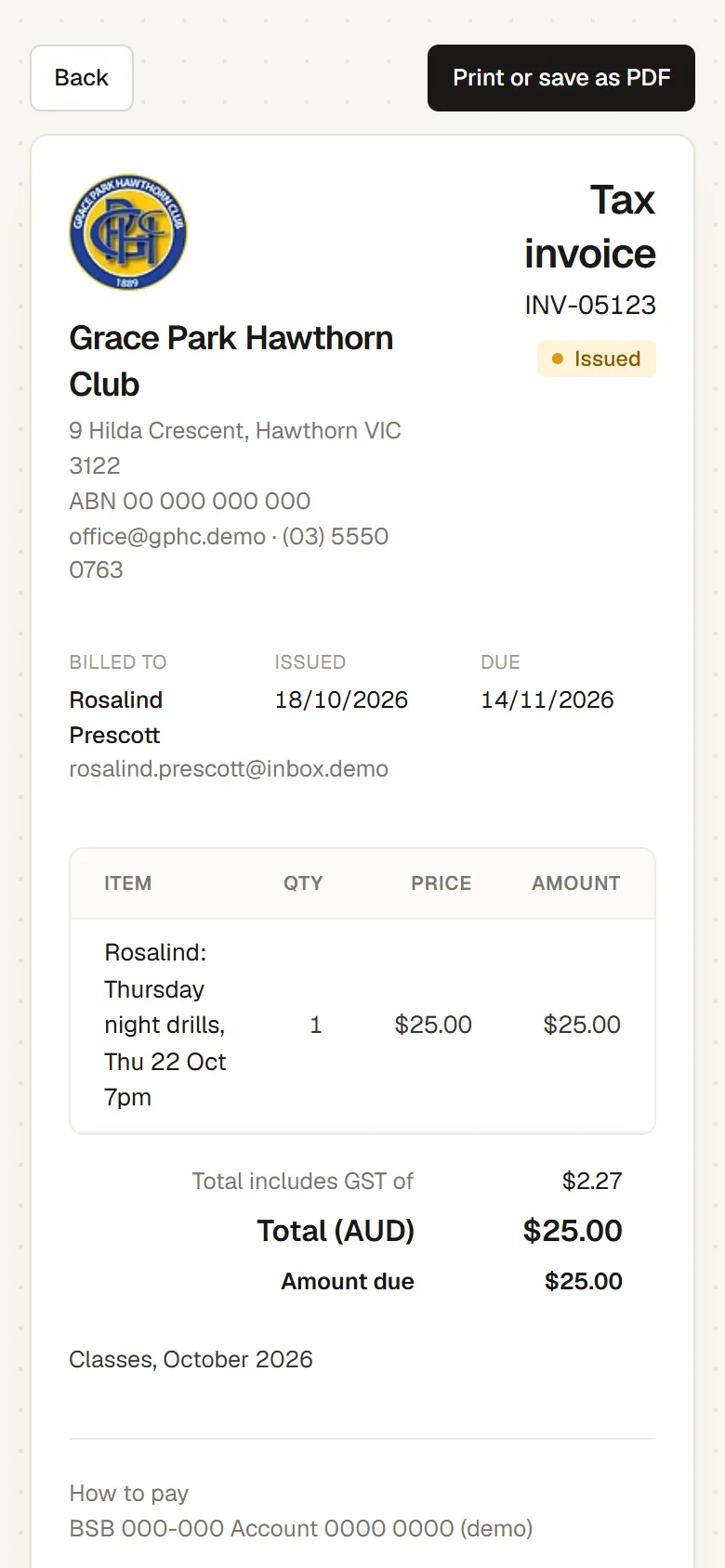
A member’s tax invoice on a phone: one class session at $25.00, a total that includes $2.27 of GST, and the amount due
07

Volunteers and staff

Roster bar and event staff around the availability they give you, and give each volunteer a role that shows them their part and nothing else.
  • Rostered around availability.As you build the week, staff show as available, already on a shift or not available, with the reason.
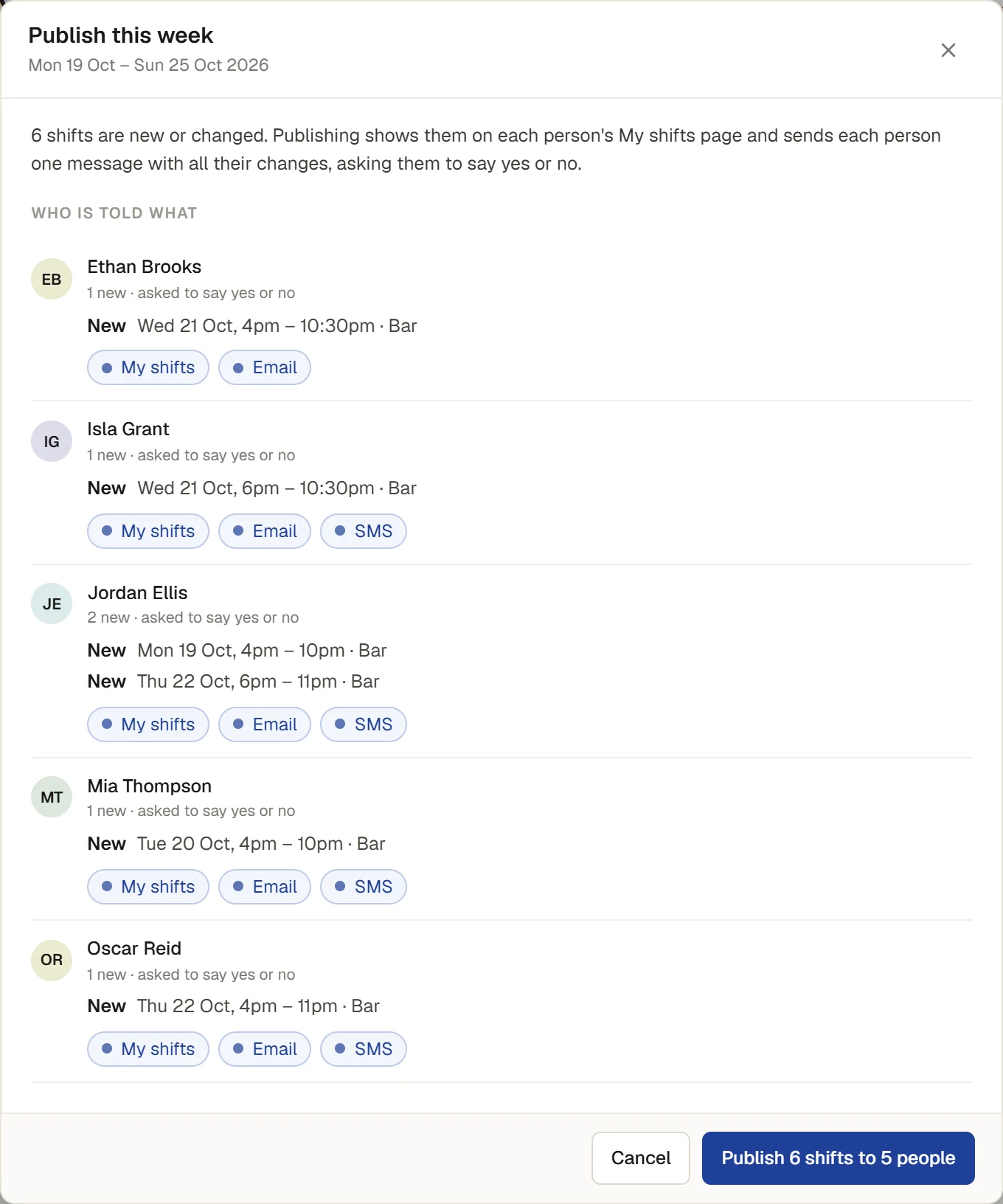
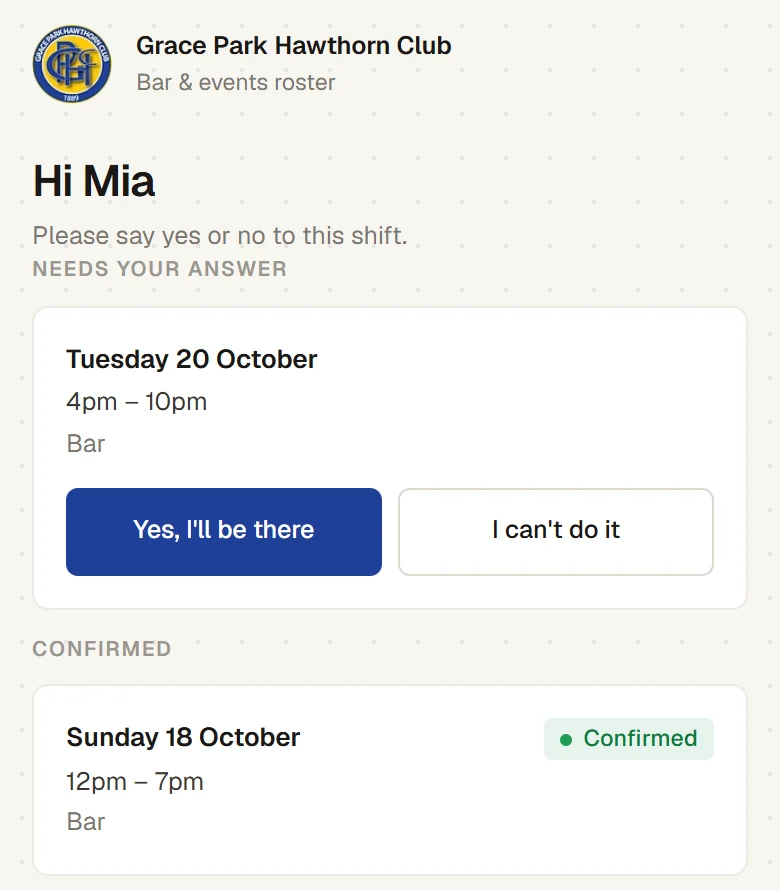
  • Answered by email or text.Publishing sends each person their shifts with a yes or no link, and the roster shows who has answered.
  • Roles for conveners, coaches and the treasurer.The club edits what each role may do, and takes a role away when someone steps down.
  • Two-factor sign-in and an audit log.See who changed what, and when.
Publishing the bar roster: 6 shifts to 5 people, each person with their new shifts and how they will be told (My shifts, email, SMS) and asked to say yes or no
A staff member’s yes or no link, opened from the text message: Tuesday 20 October, 4pm to 10pm at the bar, with Yes, I’ll be there and I can’t do it, and a shift already confirmed
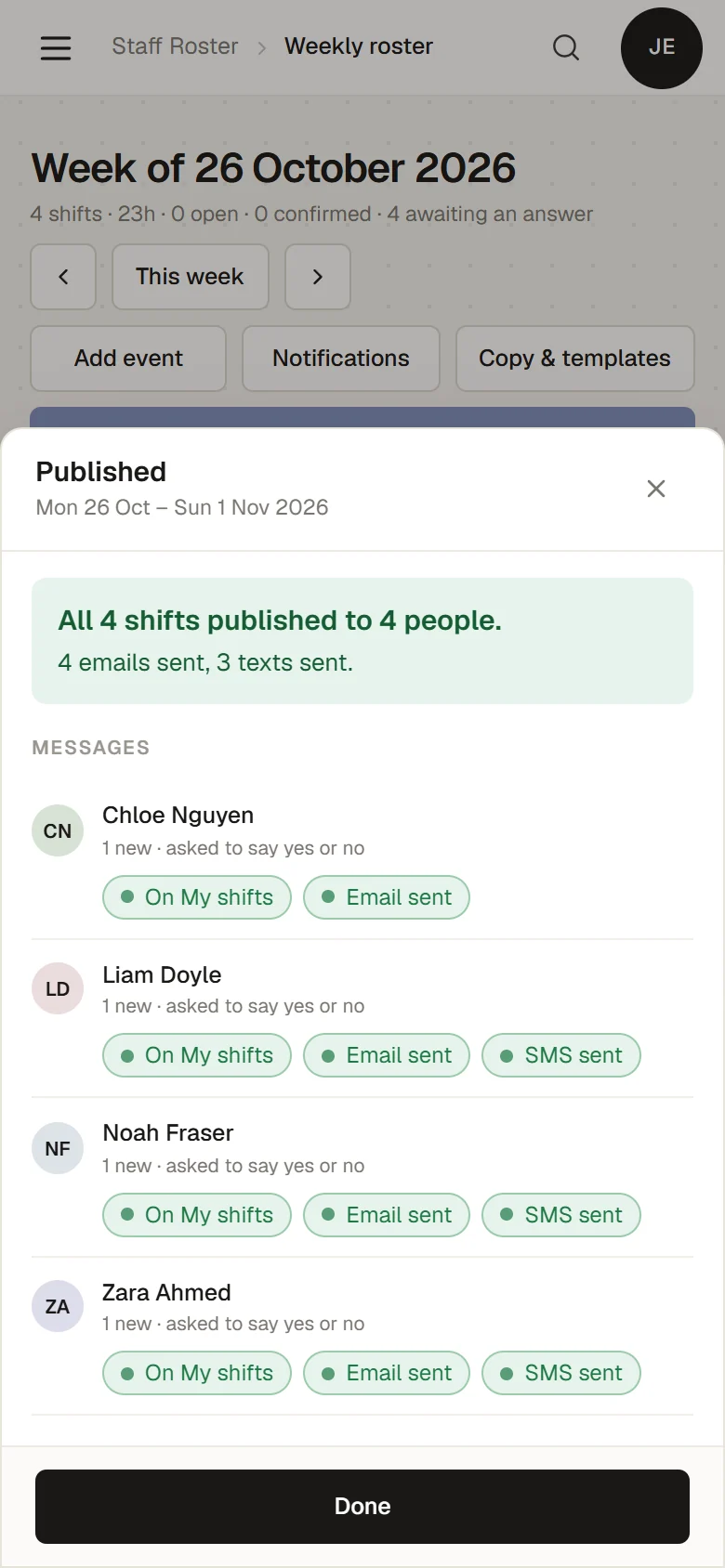
Published, on the bar manager’s phone: all 4 shifts published to 4 people, 4 emails sent and 3 texts sent, and each person’s messages: On My shifts, Email sent, SMS sent

Tennis beside squash, pickleball or snooker?

Each sport has its own courts, opening hours and booking grid, and its own tab on the calendar and the court board. Each membership says which sports it includes, and the booking rules are one set for the whole club.

THE CLUB SYSTEM

Features

MEMBERSHIP MANAGEMENT

End-to-end membership management.

Fully integrated and customisable membership applications, including optional elections, proposers and references.

See this in action

    The club’s online membership application, choosing a membership category with its fees

    The real product, captured from the demo. Invented club and people.

    CHANGING OVER

    Moving your tennis club to Sports Club OS

    We bring your members, payments and bookings across, set the club up with you, and show the office and committee around before anything is switched on. We read SportLogic and inTennis exports today, and work from spreadsheets from other systems.

    How changing over works ↗   Leaving SportLogic? ↗

    ON ITS WAY

    Online card payments and the Xero connection are being built. Until then, payments are recorded against each invoice.

    QUESTIONS

    Common questions
    from tennis clubs

    Is it only a tennis court booking system?

    No. Court booking is one part. The same tennis club management system runs memberships and renewals, junior coaching, club championships, the bar till, functions, staff rosters and the club’s finance, with one member list.

    We are on ClubSpark. What does Sports Club OS add?

    ClubSpark is Tennis Australia’s platform for clubs. It is free to affiliated clubs and covers court booking, memberships and coaching programs. Sports Club OS covers those too, and the rest of what a tennis club runs: the bar and shop till, function hire, staff rosters, GST and the BAS, bank reconciliation, classes, competitions with TV scoreboards and the club’s website, on one member list. Where it stands today: Sports Club OS does not take card payments yet, does not open gates or switch lights, and does not connect to ClubSpark or to Tennis Australia’s pennant systems.

    Can members book tennis courts from their phone? Is there a tennis club app?

    Yes. Sports Club OS is a web page at the club’s own address, so there is no app to download. Members book, move and cancel their own courts under the club’s rules. Visitors can’t book online yet: they pay for a court at the desk or the bar till, and it goes onto the calendar like any other booking.

    Can members and visitors pay for courts online?

    Not yet. Card payments are being built. Today a member’s own online booking carries no court fee in Sports Club OS (a club can sell court time at the till), guest fees are recorded on the booking and paid at the club, and invoices are paid by bank transfer or at the club, with the club recording the payment.

    Does it open the gate and turn the lights on?

    No, not yet. Sports Club OS does not control gates, locks or lights.

    Does it run our pennant?

    No. Keep your association’s systems for pennant entries, fixtures and results. Pennant nights go on the court calendar as weekly club bookings, so members can’t book over them.

    Which tennis scoring does it use?

    The ITF Rules of Tennis 2026 by default: best of three tie-break sets, with advantage. The club can also offer no-ad, Fast4, a match tie-break to 10 in place of the final set, pro sets to 8, short sets to 4, one set and best of five. Ladders, box leagues, round robins and knockouts, singles or doubles pairs, run on any of these. Social doubles with partners changed each set are not built yet.

    Does it connect to UTR?

    Not yet. Every result moves the club’s own tennis rating, which seeds the draws and sets the boxes, and a convener can download the club’s tennis results as a file for a rating service. A direct link to UTR needs UTR’s agreement.

    Can we add pickleball or squash to a tennis club?

    Yes. Each sport has its own courts, opening hours and booking grid, and its own tab on the calendar and the court board, and each membership says which sports it includes. How far ahead members can book, the longest booking and the peak times are one set of rules for the whole club. Competitions cover tennis, squash, padel, pickleball, badminton and snooker.

    Is there a free tennis scorer?

    Yes. The free match scorer scores tennis, singles or doubles, on any phone in the browser, with no account, by the ITF rules or Fast4 and no-ad, and lets others watch with a code. Try the free match scorer.

    What does it cost?

    Every plan has every feature, priced by the number of members, from A$215 a month + GST for up to 300 members. See the plans.

    BOOK A WALKTHROUGH

    Get a personalised walkthrough for your tennis club

    Thirty minutes on a video call with Adam, who built Sports Club OS. He shows the jobs you name on a made-up club, and you get a firm price and a plain answer on anything it does not do yet.

    Book my walkthrough

    We use these details only to reply to you. See the privacy policy.

    Rather write it yourself? Email hello@sportsclubos.net.