SOFTWARE FOR PICKLEBALL CLUBS

Pickleball Club
Management
Software

Sports Club OS is pickleball club management software for member clubs, including tennis and squash clubs adding pickleball: court bookings from a phone, clinics and social sessions with places and waitlists, memberships, and the clubhouse around the courts, in one system — powered by AI.

Built at a member club in Melbourne with tennis and squash courts, by one of its members.

ONE SYSTEM FOR THE WHOLE PICKLEBALL CLUB
Courts · Sessions · Coaching · Members · Clubhouse

WHY SPORTS CLUB OS

Everything you need to run your pickleball club, end to end.

01

Fully run and managed for you.

Nothing to install. Members book pickleball courts from any phone or browser.

02

Pickleball beside your other courts.

Add it as a sport with its own courts and hours, and give members a pickleball membership or one that covers several sports.

03

Clinics and social sessions with places.

Set the places and the fees, keep a waitlist, and let visitors ask for a place from your website.

04

A low, fixed monthly cost.

No hidden fees, and no percentage of your revenue.

05

Built at a member club with several sports.

Designed from the ground up for how a member club with more than one sport really runs.

06

The clubhouse as well.

The bar till, functions, staff rosters, and GST and the BAS for the treasurer.

BENEFITS

Benefits for
pickleball clubs

What Sports Club OS does for a pickleball club, from the members to the courts.

  1. 01Pickleball court booking software for members
  2. 02Clinics, social sessions and coaching
  3. 03Membership management
  4. 04Member portal and club website included
  5. 05Email members by level or interest
  6. 06Paddle hire, the pro shop and the bar till
  7. 07Reports on court use and income
01

Pickleball court booking software for members

A pickleball court booking system members use from their phone: they book, move and cancel their own courts under the club’s rules, and a court can never be booked twice. The office sees every court, session and closure on one calendar.
  • Pickleball beside your other sports.Its own courts, opening hours, booking grid and usual booking length, and its own tab on the calendar and the court board.
  • The club’s rules, applied as they book.How far ahead, the longest booking, bookings a week and peak times, set once for the whole club, and whether their membership includes pickleball.
  • Guests and guest fees.Co-players who aren’t members are added to the booking, with the fee shown before it is made.
  • A court board for the foyer.A TV shows each pickleball court by the half-hour, with free times marked.
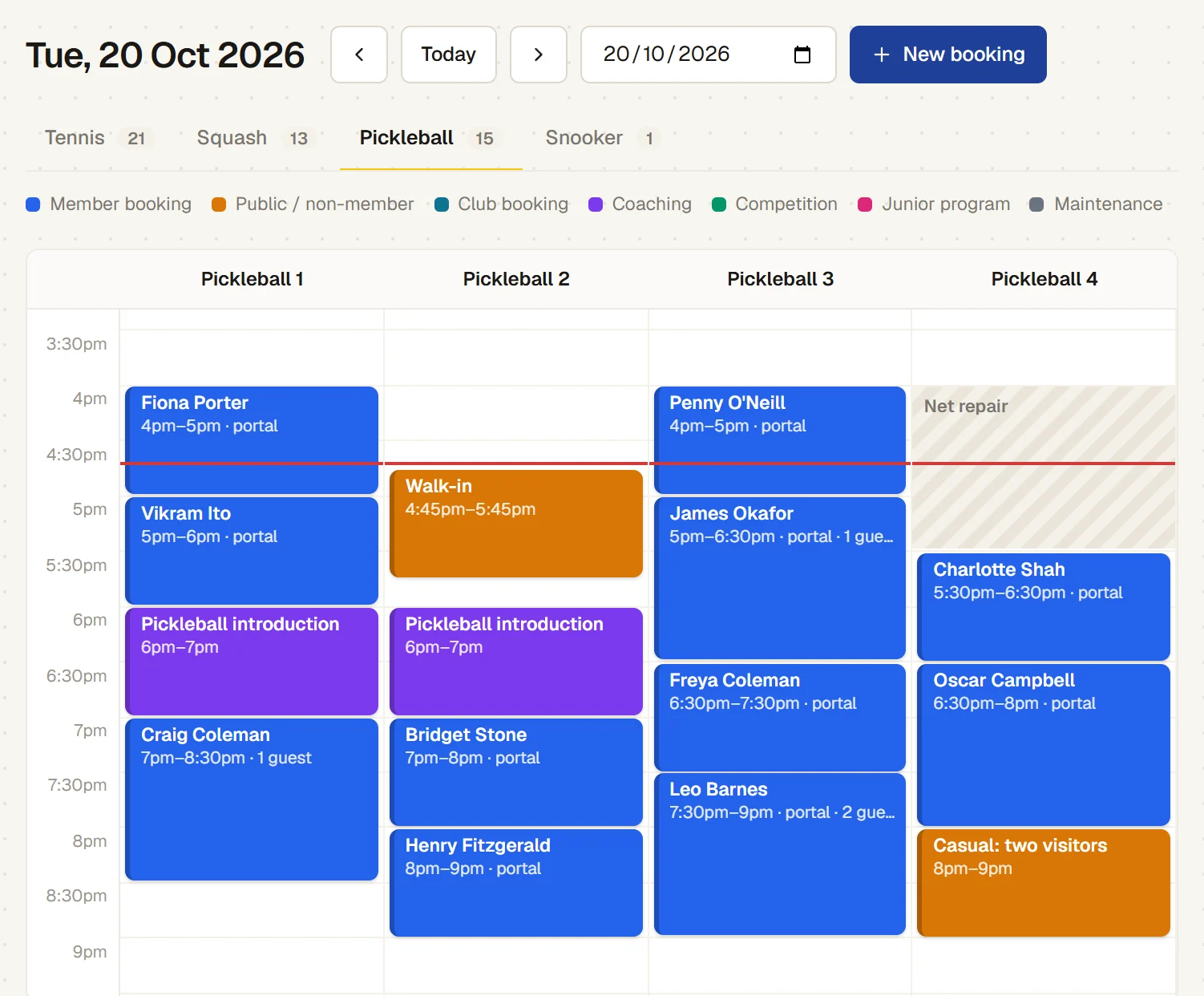
The office’s pickleball calendar for Tuesday 20 October: four pickleball courts side by side, members’ bookings made in the portal, the Pickleball introduction holding courts 1 and 2, a walk-in sold at the bar, and Pickleball 4 closed for a net repair
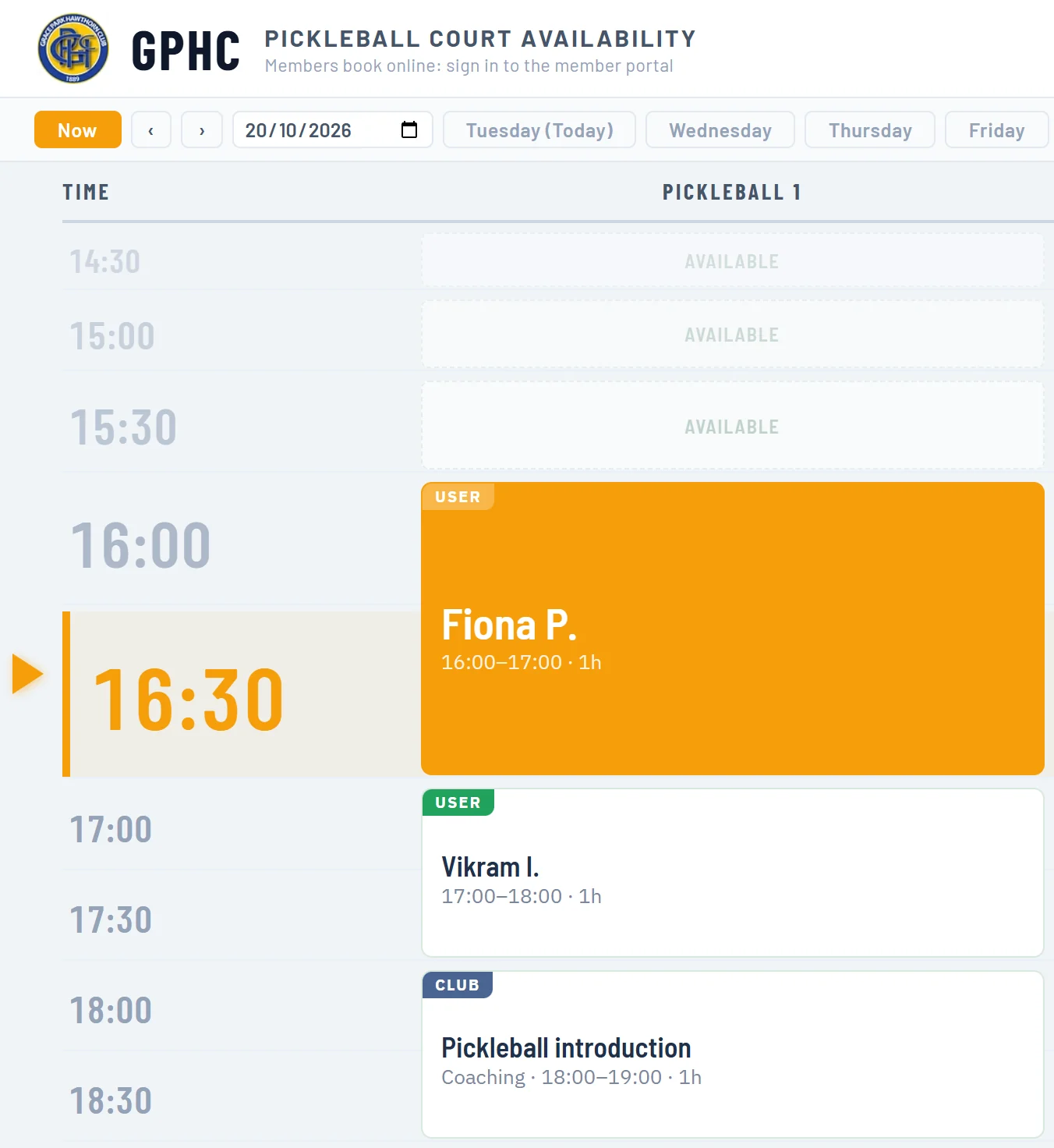
The pickleball court board on the foyer TV at 4:30pm: Fiona P. playing on Pickleball 1 now, then Vikram I. and the Pickleball introduction, with earlier times marked Available
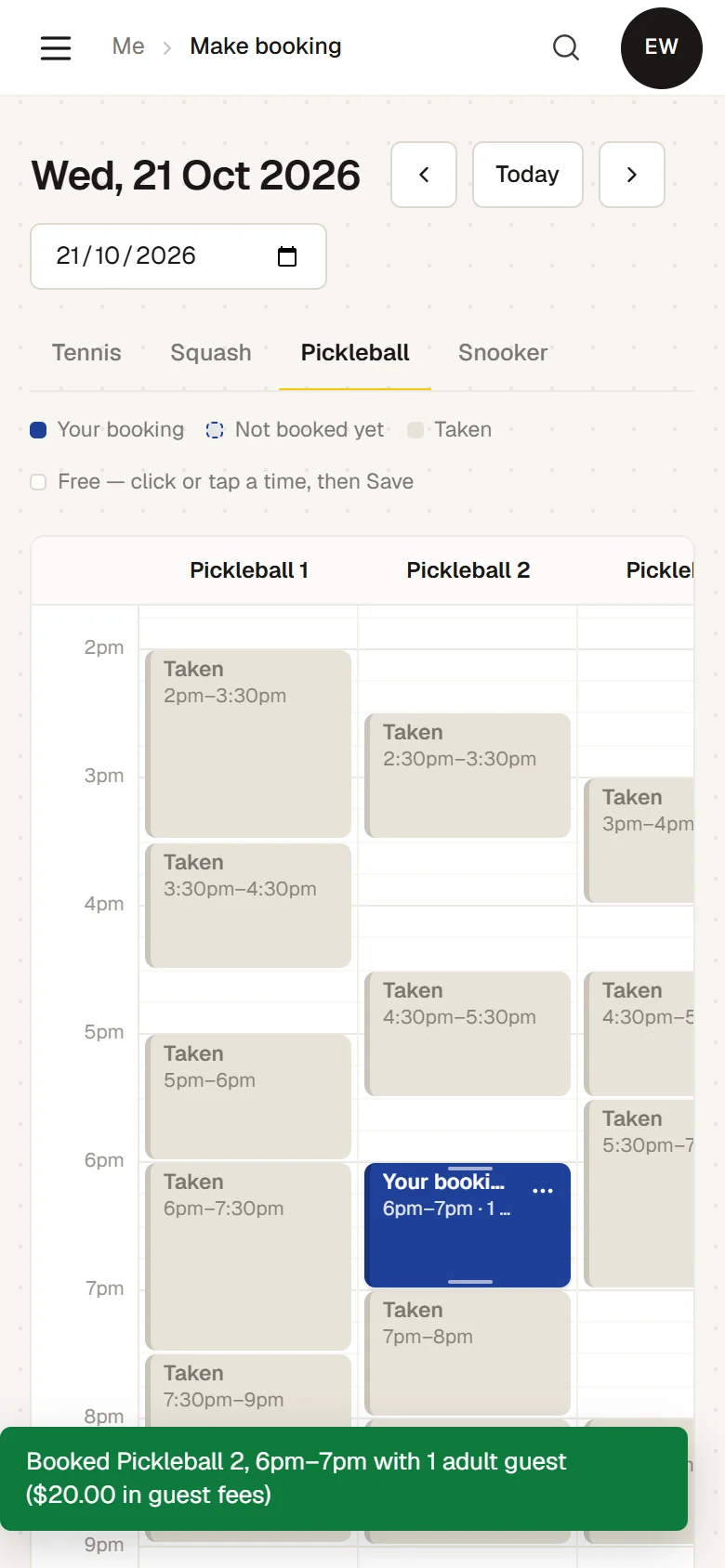
A member’s phone just after booking: Booked Pickleball 2, 6pm–7pm with 1 adult guest ($20.00 in guest fees), with other members’ bookings shown only as Taken
02

Clinics, social sessions and coaching

Beginner clinics, social sessions and junior programmes on one timetable that members book and visitors see on your website. Each session holds its courts, a full session keeps a waitlist, and the coach takes the roll on a phone.
  • Places and fees.Set the number of places and a fee for members and one for visitors, or include it with a membership.
  • First session free.A class can give a newcomer their first session free, shown on the public page.
  • Waitlists that offer the place.When a place comes up, the next person is offered it until a set time, then the next.
  • Visitors ask online.A visitor asks for a place from your What’s on page, confirms by email and pays at the club.
  • The roll on the coach’s phone.Ticked as people arrive, with a child’s age, and any medical note with the emergency contact.
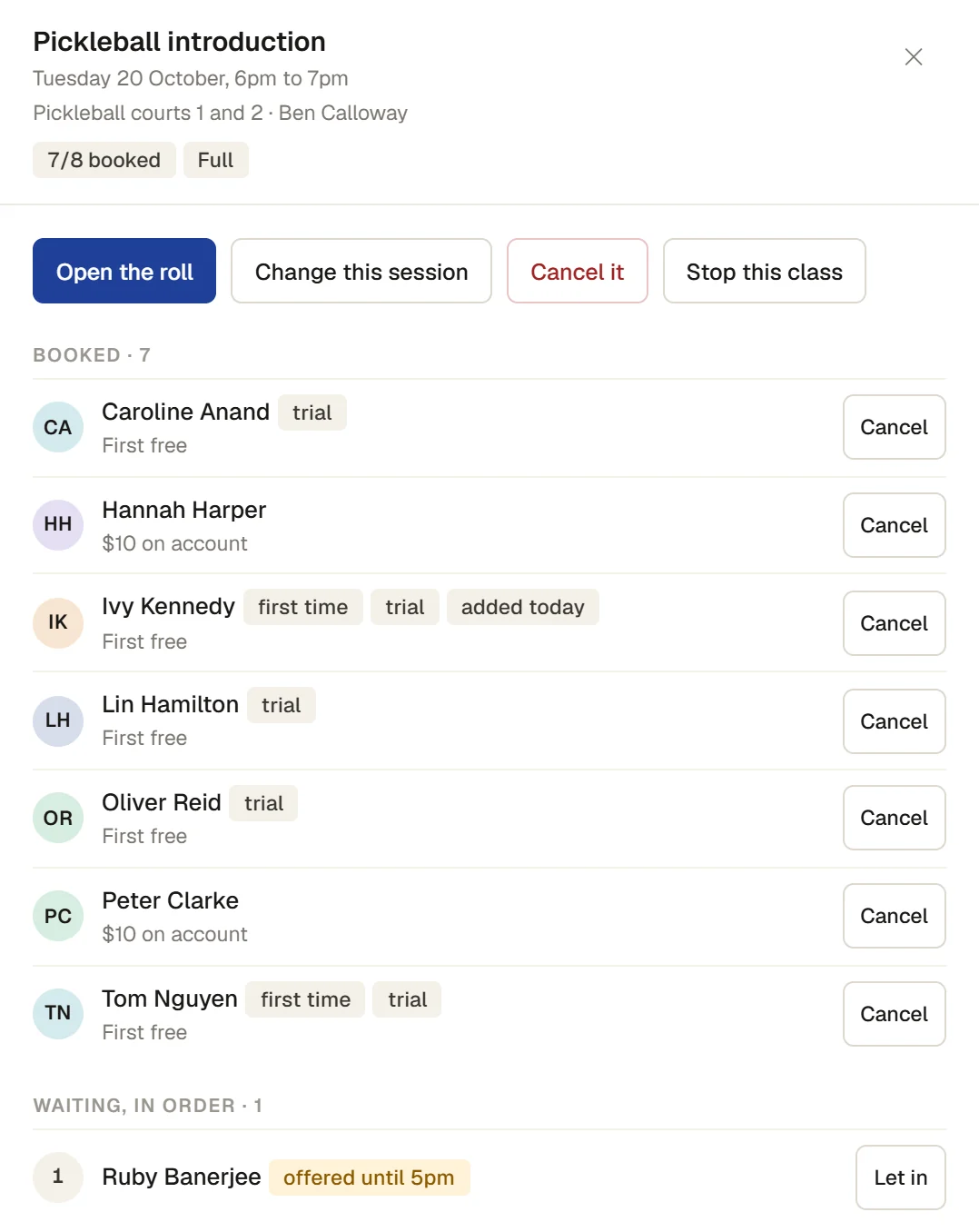
Pickleball introduction, Tuesday 20 October 6pm on pickleball courts 1 and 2 with Ben Calloway: seven of eight booked, most on a free first session, and Ruby Banerjee, first on the waitlist, offered the place until 5pm
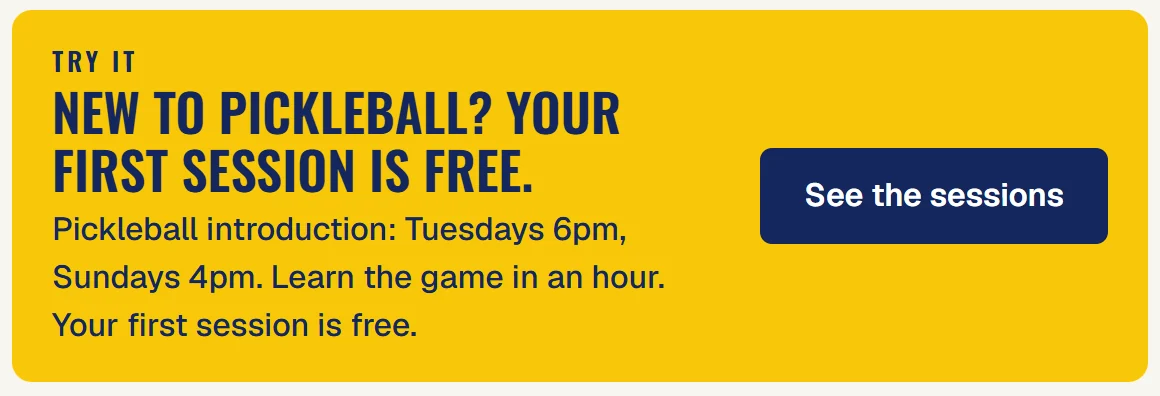
The club’s What’s on page: Try it. New to pickleball? Your first session is free. Pickleball introduction on Tuesdays 6pm and Sundays 4pm
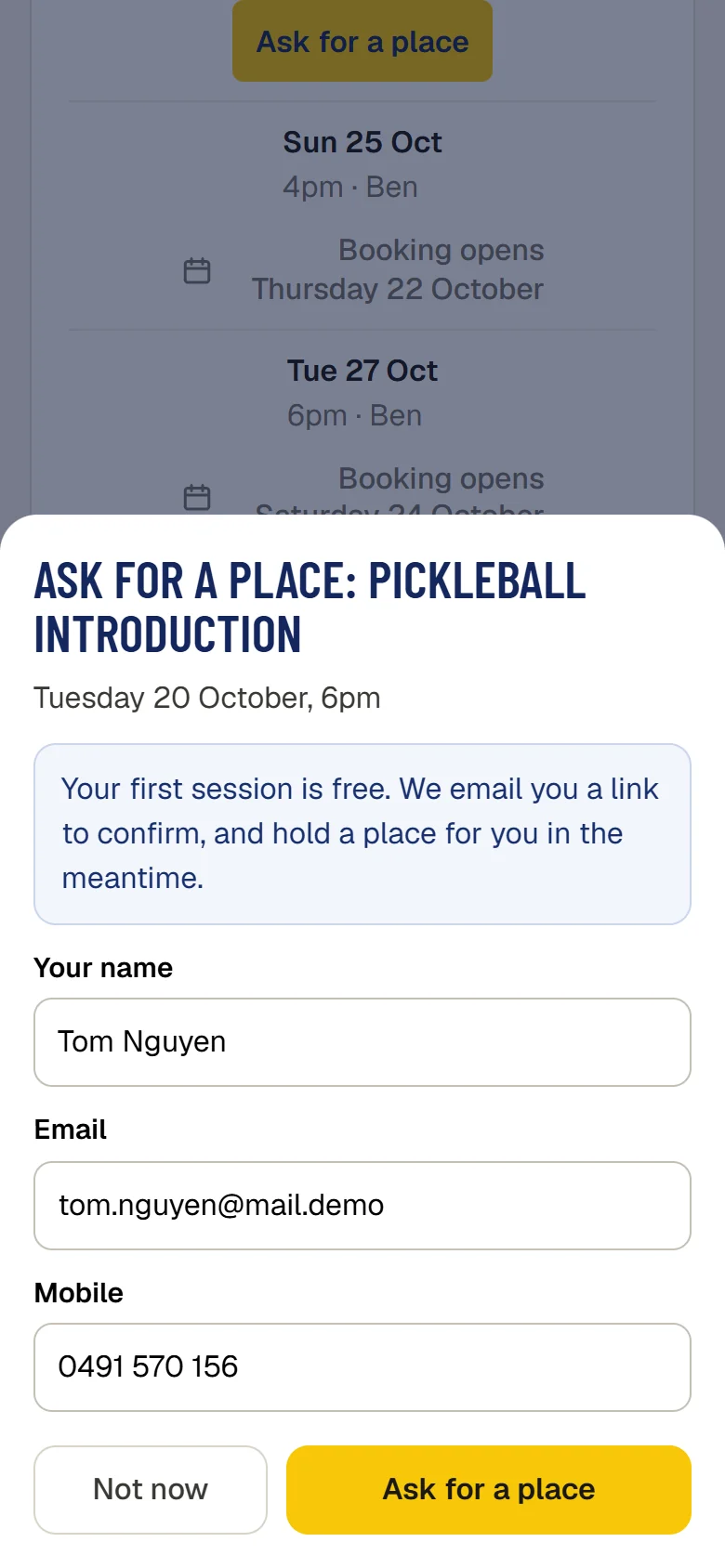
A visitor asking for a place in Pickleball introduction on Tuesday 20 October, 6pm, on their phone: Your first session is free. We email you a link to confirm, and hold a place for you in the meantime
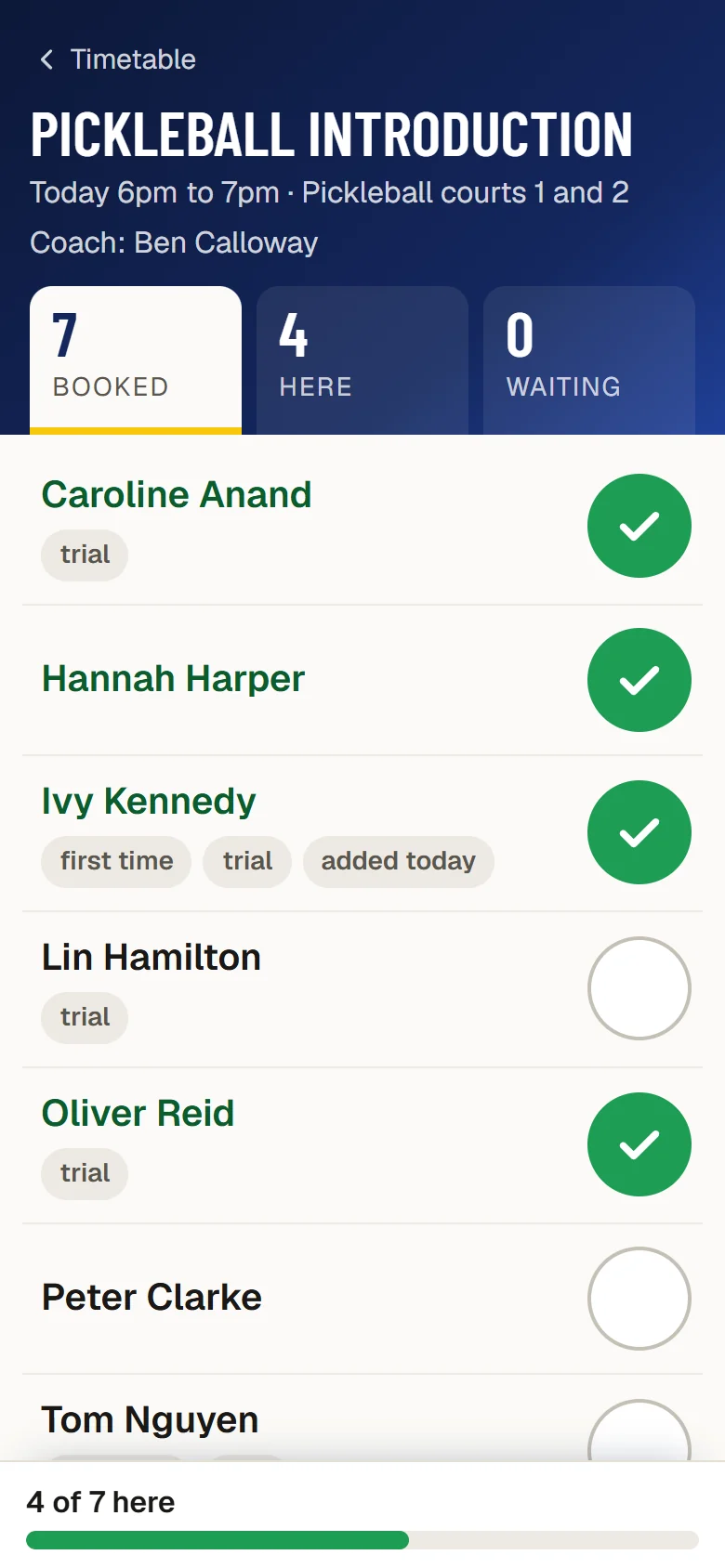
The roll for Pickleball introduction on the coach’s phone: today 6pm to 7pm on pickleball courts 1 and 2, seven booked and four marked here
03

Membership management

Every member and family in one place, from the day they apply to the day they renew. Make a pickleball-only membership, or one that covers pickleball and tennis. The office raises renewals in one go, and members see their own membership, bookings and invoices on their phone.
  • Memberships by sport.Choose which sports a membership includes. Members see only the sports their membership includes.
  • A weekly limit for each membership.Set how many online bookings a week a membership allows, or make it off-peak only. A booking past the limit is refused, with the reason.
  • Joining online.People apply from your website and see the fees for their category. A member proposes them, or they write a short letter, and the committee elects them.
  • Renewals in one go.Raise every renewal invoice at once, or have them raised automatically for members on auto renew, a set number of days before their membership ends.
  • Yearly or monthly.Members can pay monthly, and each month shows as paid, due or not paid.
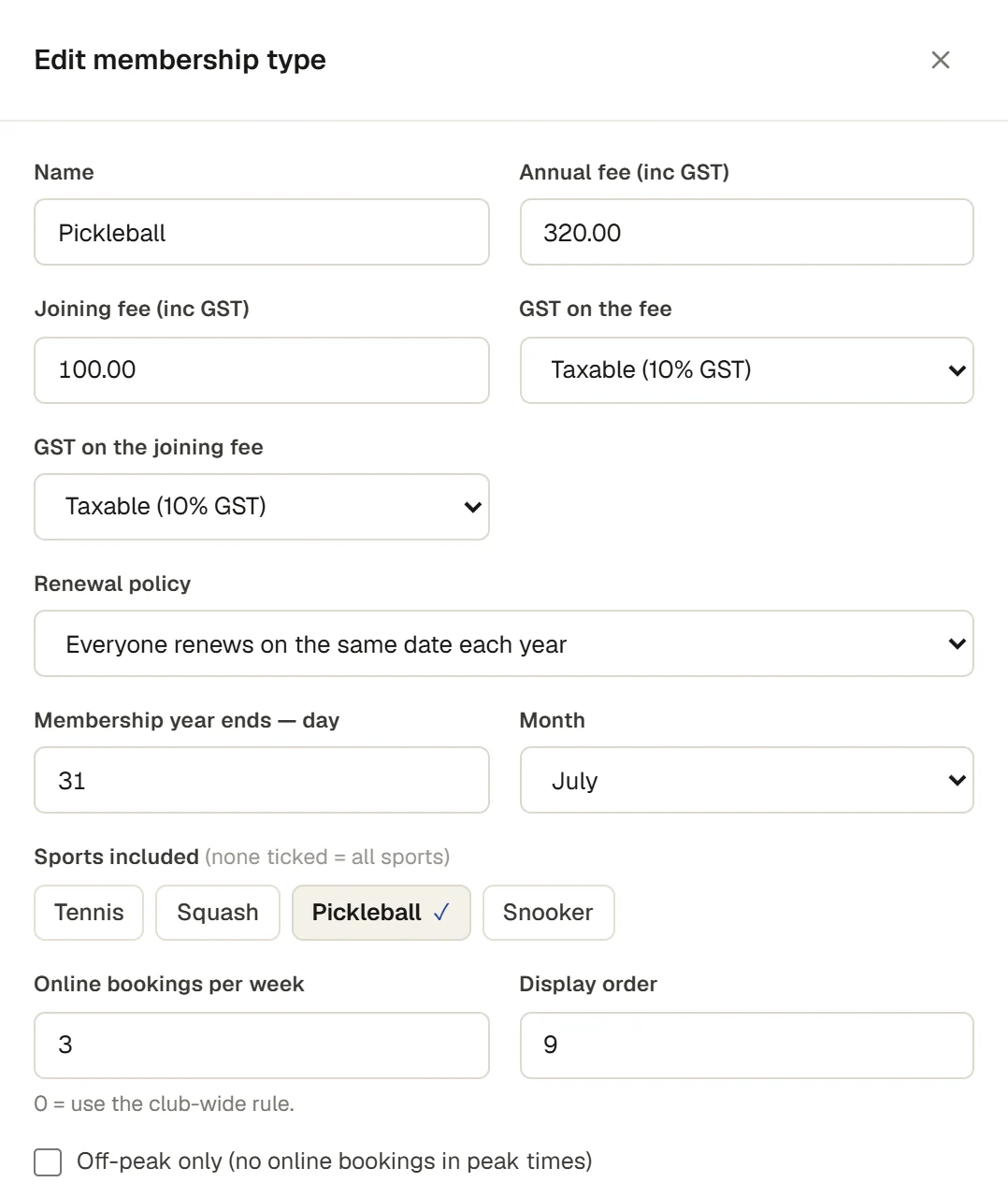
Editing the Pickleball membership type: $320.00 a year with a $100.00 joining fee, Sports included set to Pickleball only, and three online bookings a week
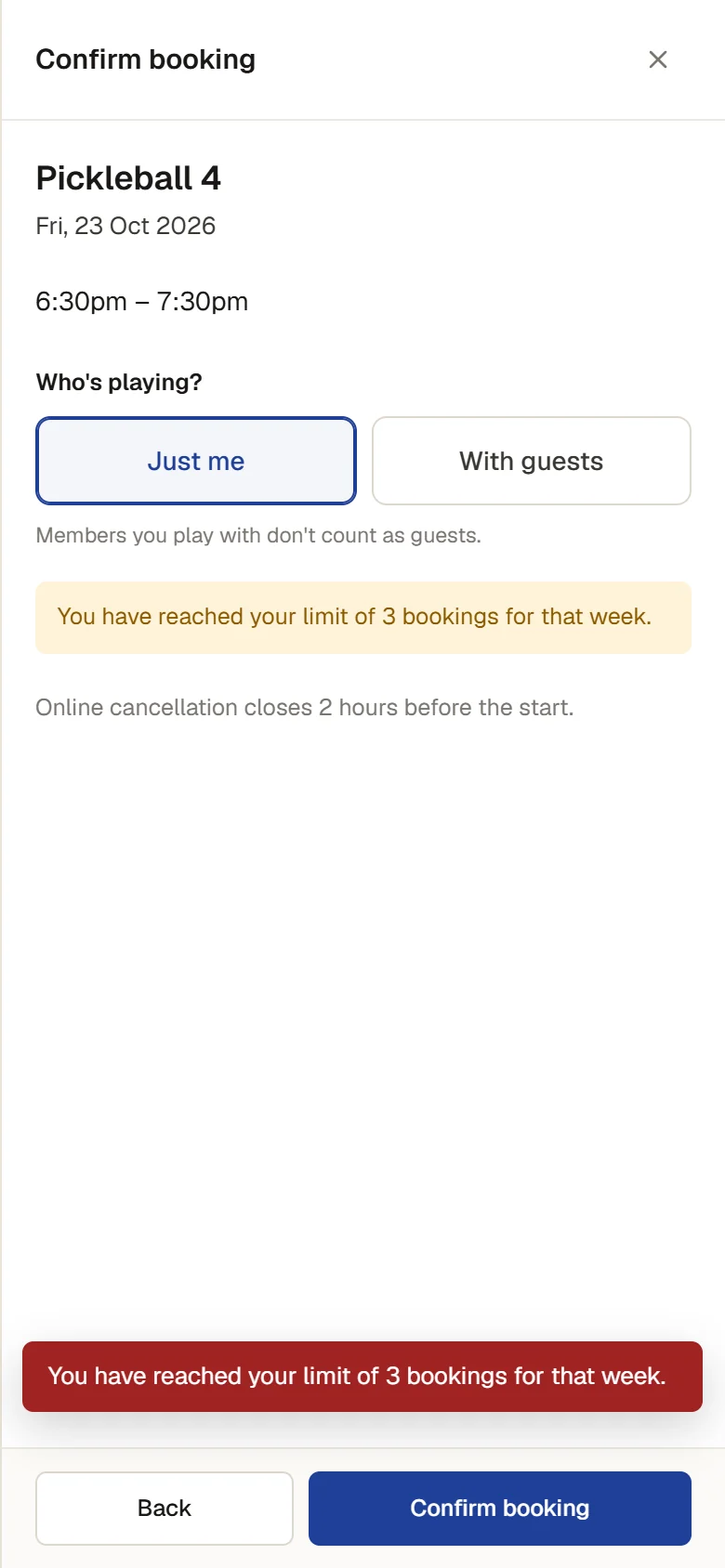
A member on the Pickleball membership booking Pickleball 4 for Friday 23 October, 6:30pm, on their phone, and refused: You have reached your limit of 3 bookings for that week
04

Member portal and club website included

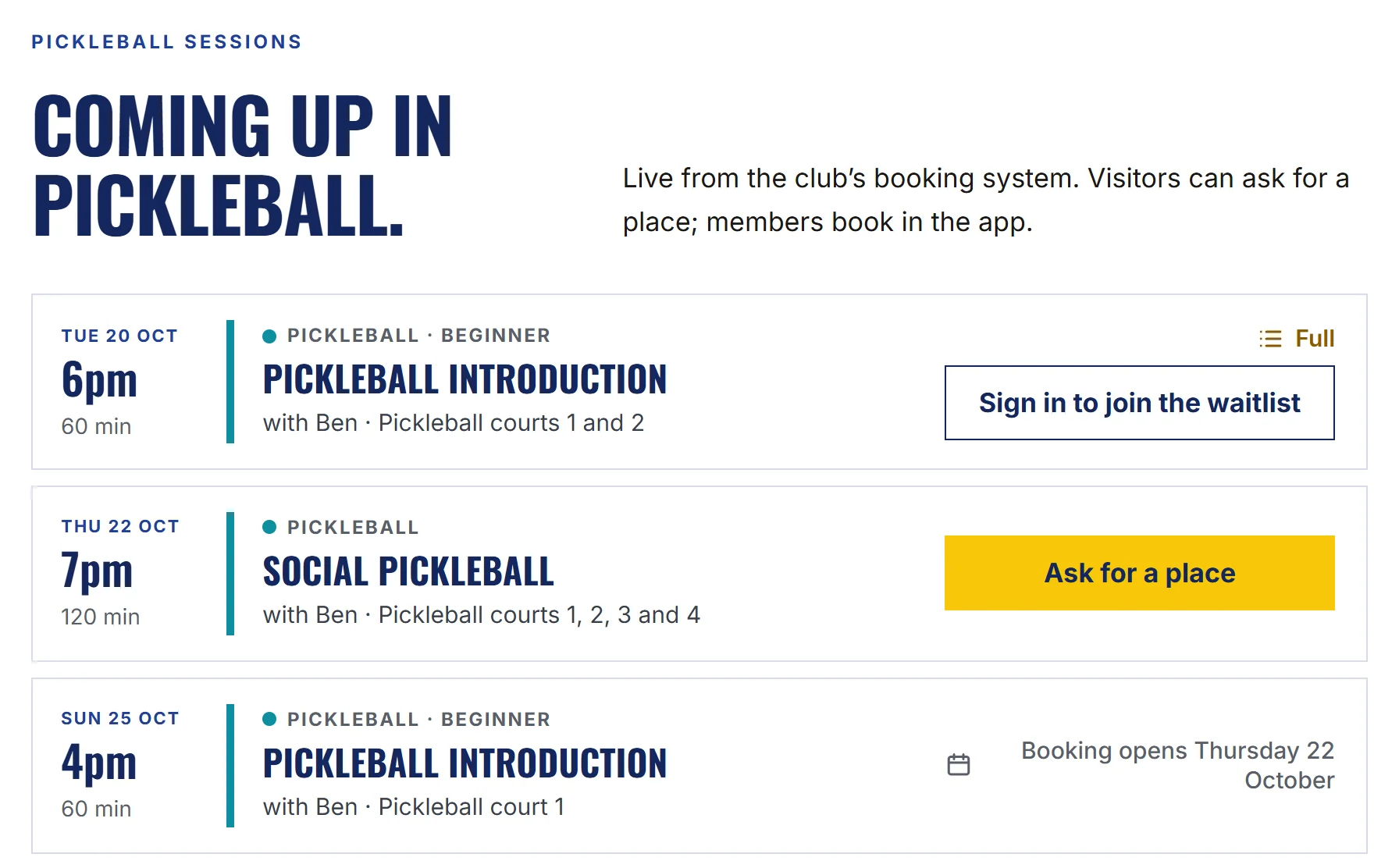
Every member gets their own portal at your club’s address, and the club gets its own website, both included in the price. The pickleball page on the website shows the sessions coming up, live from the club system.
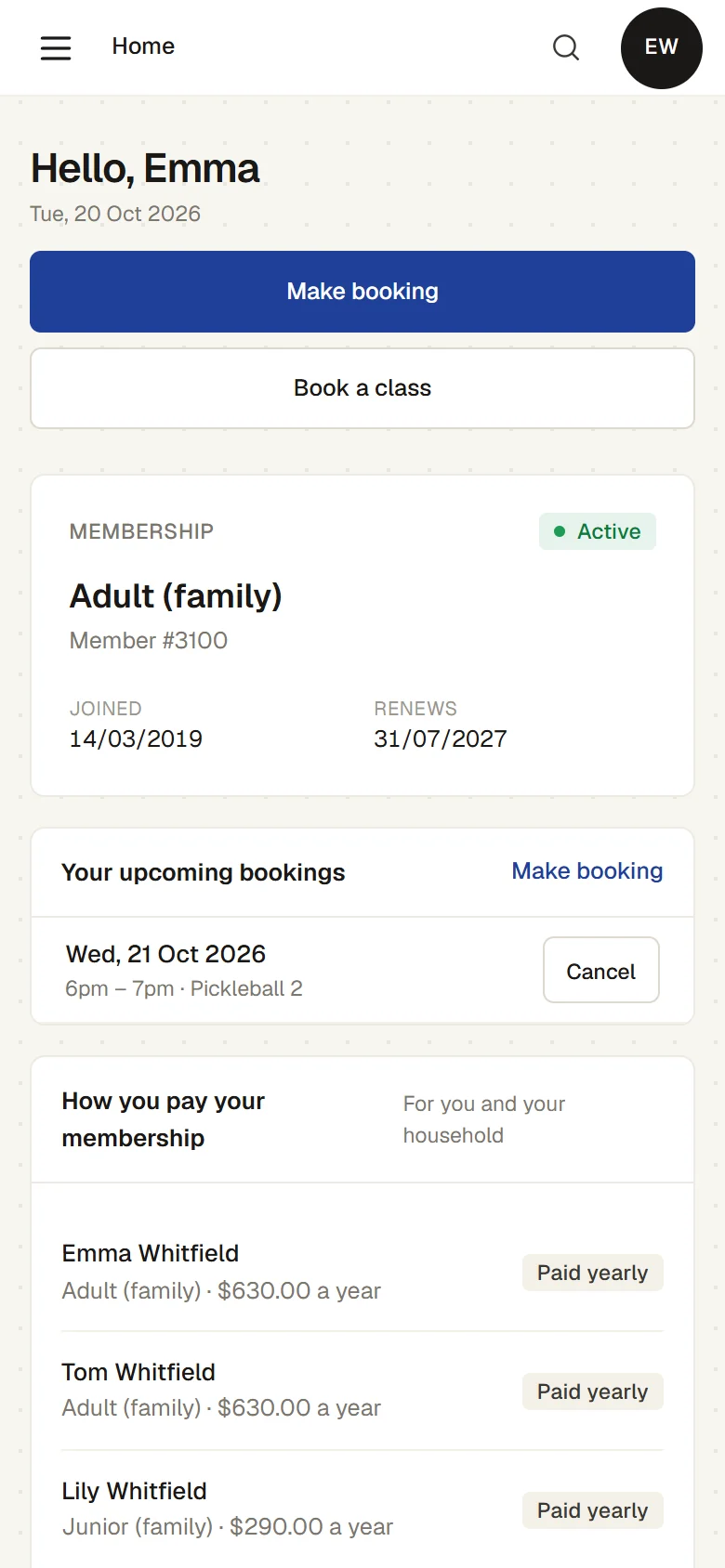
  • A portal for every member.Members see their membership, book courts and classes, see their invoices and choose which emails they get, from any phone. There is no app to download.
  • Your club’s own website.A page for pickleball and every part of the club, with the pickleball sessions, the join form and function enquiries live from the club system.
  • Changed by clicking or by asking.Type over the words on a page, swap a picture, or ask the AI for a change, on a private draft.
  • Checked before it goes live.An approver sees exactly what changed before it is published, and an earlier version can be put back.
The club website’s pickleball page, Coming up in pickleball, live from the club’s booking system: Tuesday’s introduction full with a waitlist, Thursday’s social pickleball on all four courts with Ask for a place, and Sunday’s introduction opening for booking on Thursday
A member’s portal on a phone: an Adult (family) membership, Active, renewing 31 July 2027, and a pickleball court booked for Wednesday 21 October, 6pm to 7pm, on Pickleball 2
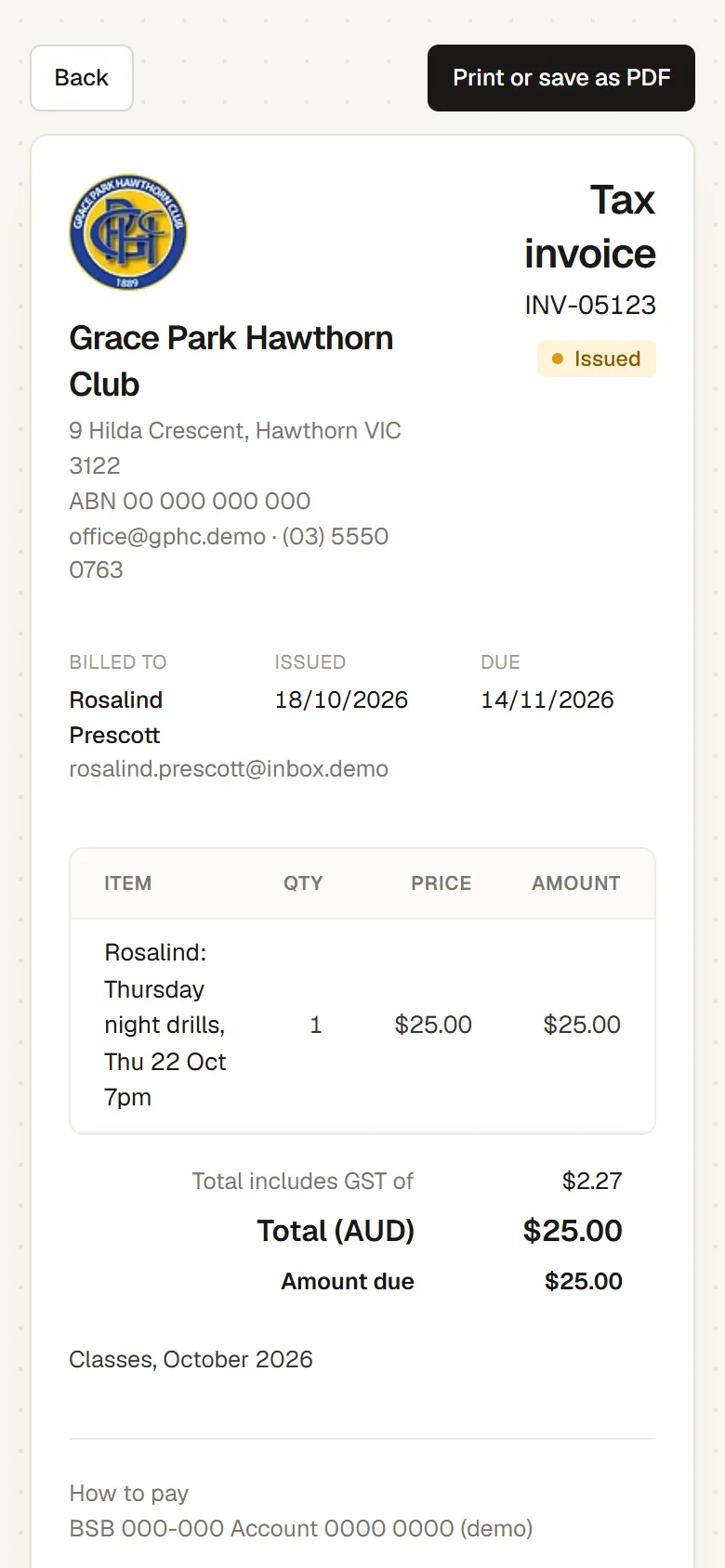
A tax invoice on a member’s phone: $25.00 for a Thursday night drills session, issued 18 October and due 14 November, with Print or save as PDF
05

Email members by level or interest

Tell the beginners about the next clinic, or everyone about a working bee. Messages are built from a template or drafted by AI, and sent to the members you choose, with each person’s email choices respected.
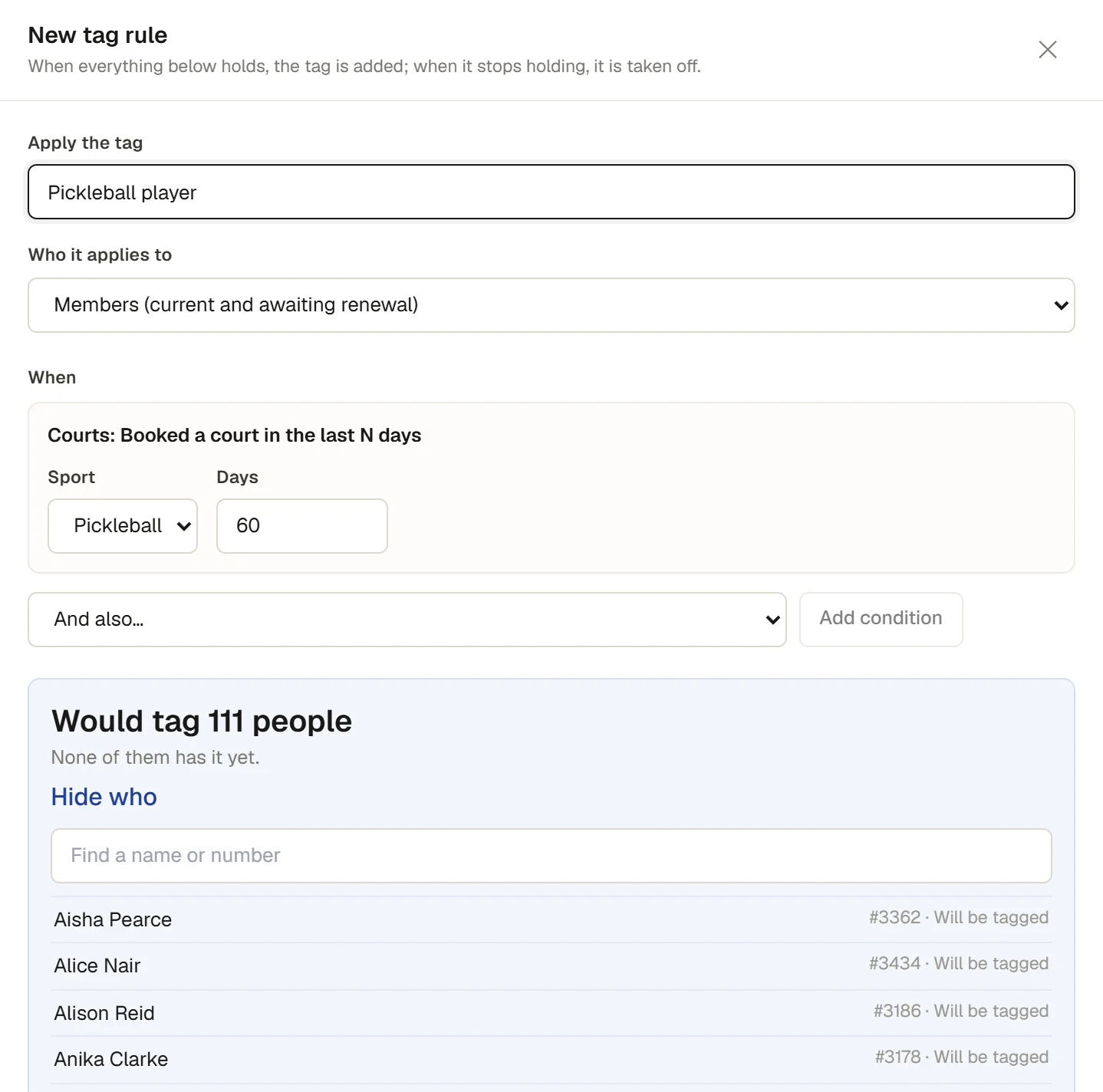
  • Tags for level and interest.Tag members by hand, or let a rule keep a tag up to date, for example everyone who has booked a pickleball court in the last 60 days.
  • Saved Members filters.Save a filter such as current members tagged “Beginner” and send to it.
  • Drafted with AI, edited in place.Describe the message, or start from a template, and change the words on the page.
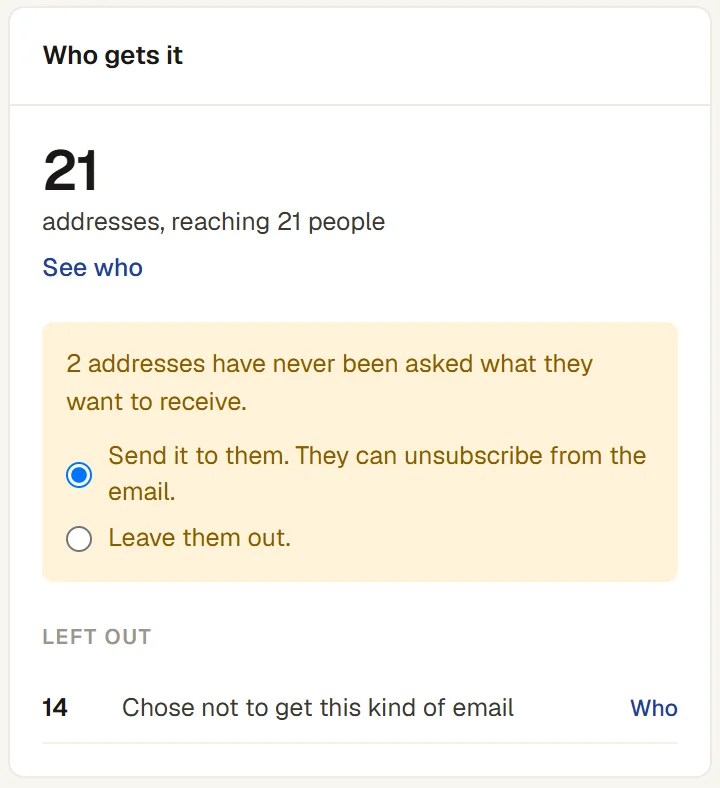
  • Unsubscribes and bounces handled.Optional emails carry an unsubscribe link, and an address that bounces is stopped.
A tag rule that gives the tag Pickleball player to every member who booked a pickleball court in the last 60 days: it would tag 111 people, listed by name and member number
Who gets a message to members tagged Pickleball beginner: 21 addresses reaching 21 people, and 14 left out because they chose not to get this kind of email
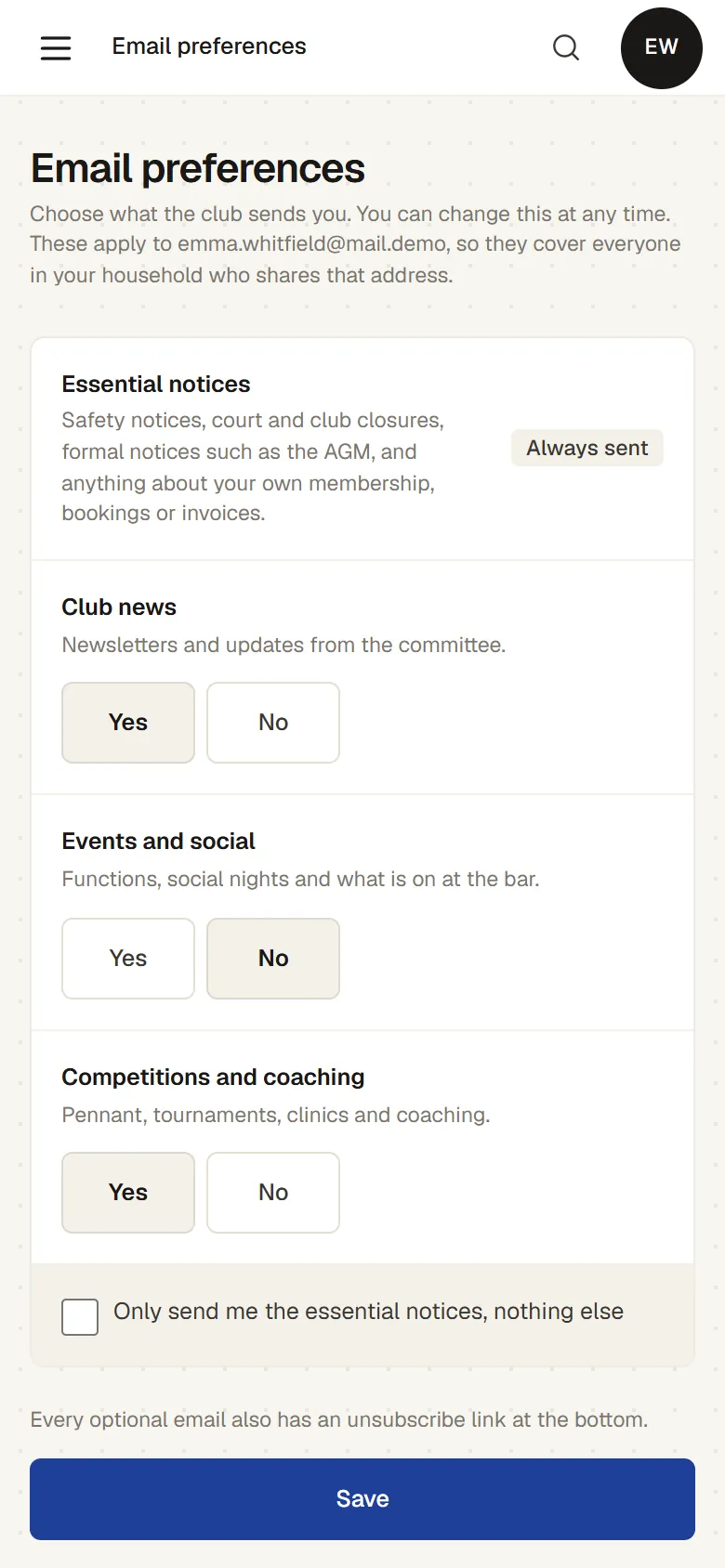
A member’s email preferences on a phone: essential notices always sent, and Yes or No for club news, events and social, and competitions and coaching
06

Paddle hire, the pro shop and the bar till

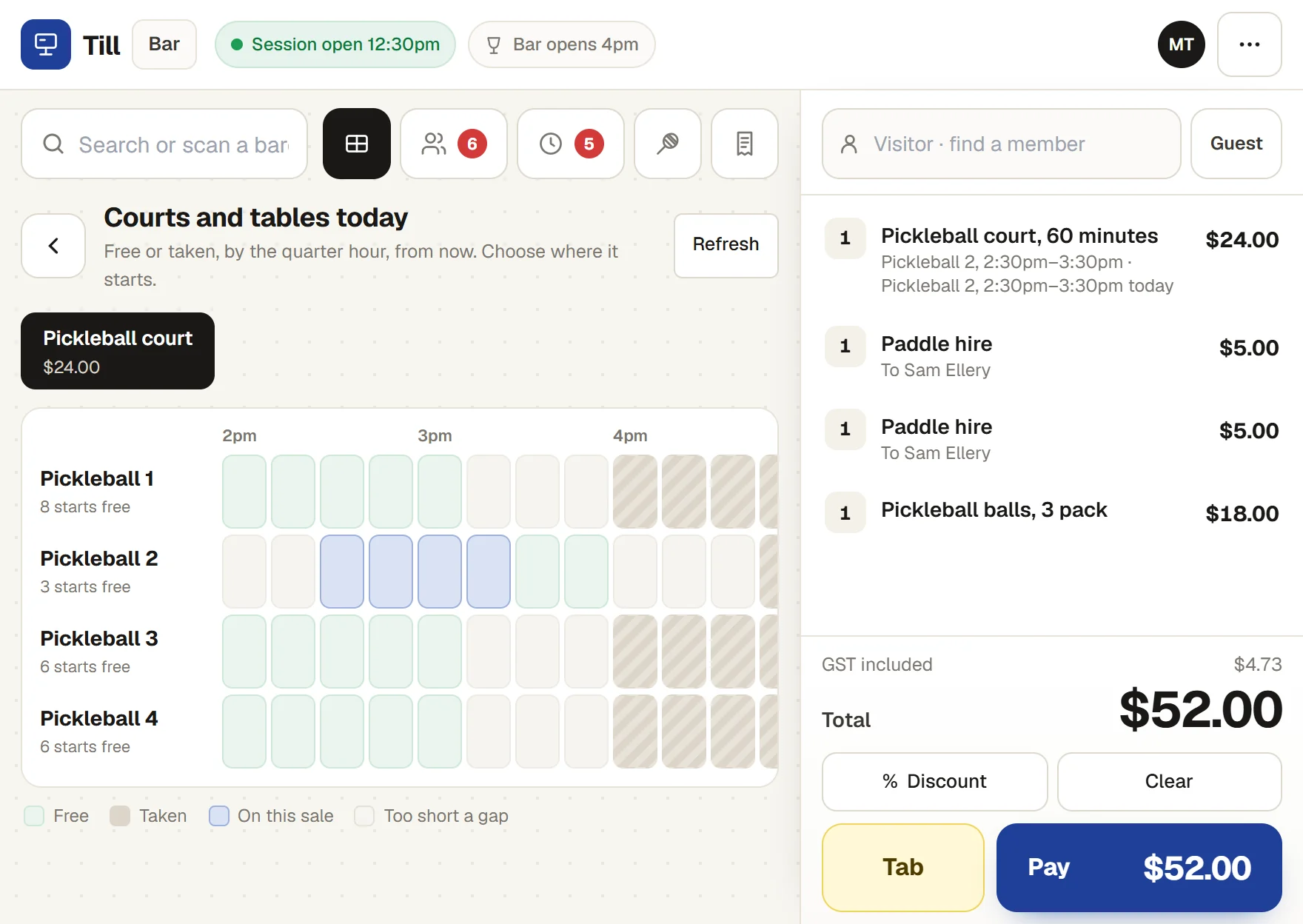
Hire out paddles, sell balls and gear with member prices and stock counts, and take walk-in court time at the same till as the bar. The Sales page and the dashboard show what it took.
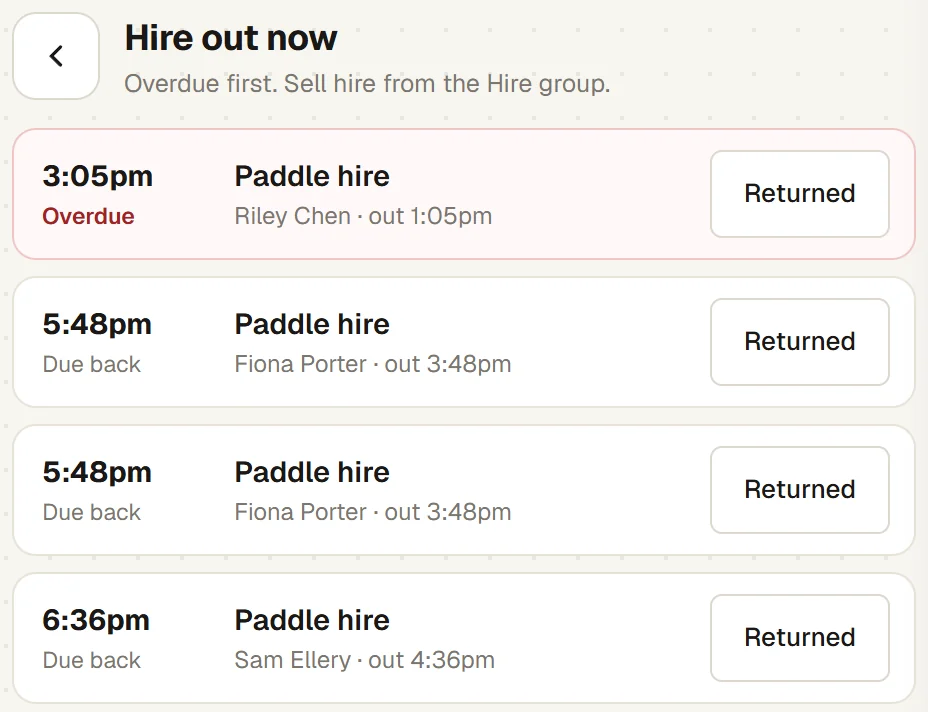
  • Hire and returns.Hire a paddle to a named person, see what is out and what is overdue, and mark it returned.
  • Court time at the till.A walk-in court sold at the till goes straight onto the calendar, and guest fees owing today are taken there too.
  • Member prices and accounts.Members pay the member price, and can charge to their account or use prepaid credit.
  • Works offline.The till keeps selling cash, EFTPOS and account sales if the connection drops.
The bar till selling a walk-in: Pickleball 2 from 2:30pm to 3:30pm chosen on the courts grid, two paddles hired to Sam Ellery and a pack of pickleball balls, $52.00 to pay
Hire out now at the till: a paddle hired to Riley Chen overdue since 3:05pm, and the others due back at 5:48pm and 6:36pm, each with a Returned button
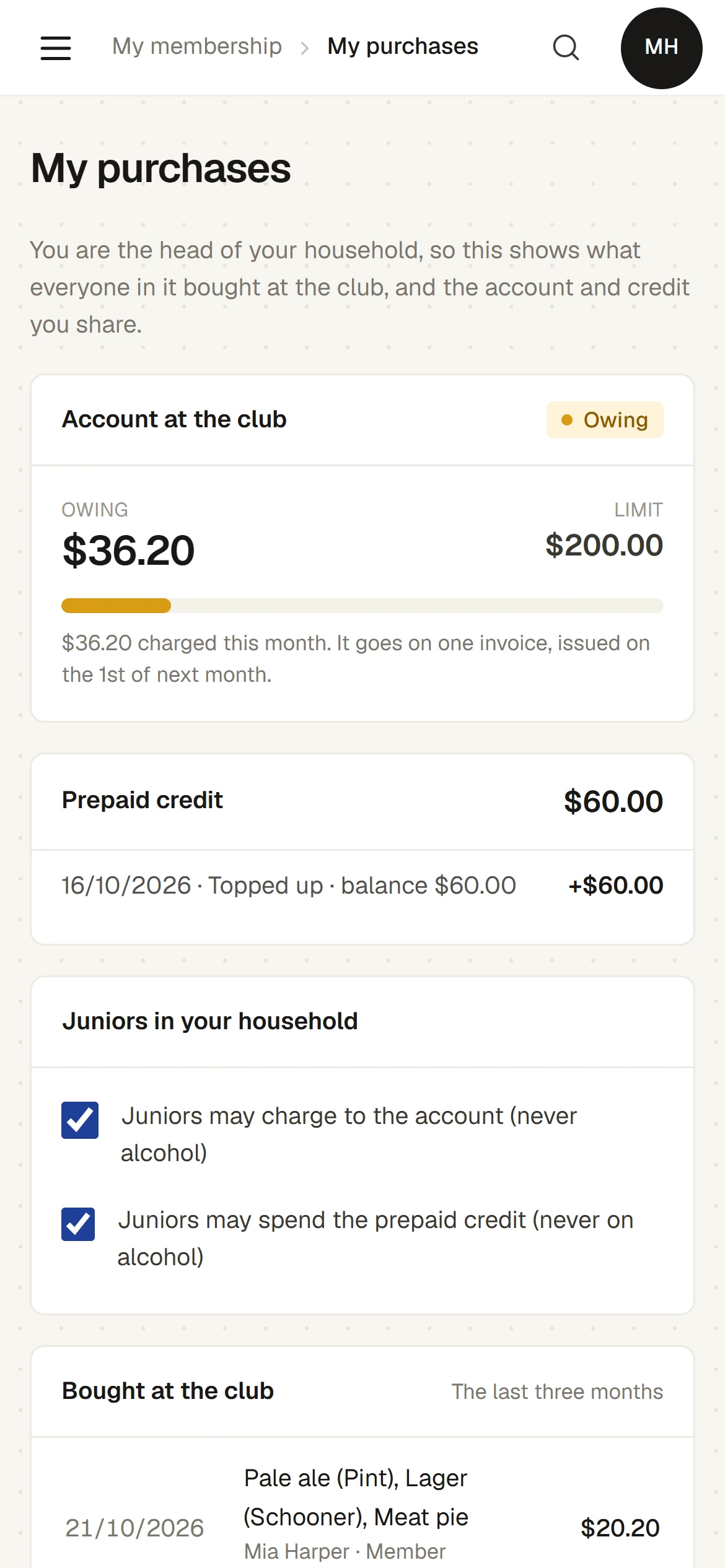
My purchases on a member’s phone: $36.20 owing on the club account against a $200.00 limit, $60.00 of prepaid credit, and whether juniors in the household may charge to the account or spend the credit
07

Reports on court use and income

See how busy the pickleball courts are by day and hour, and what pickleball brings in, before you add courts or change the timetable.
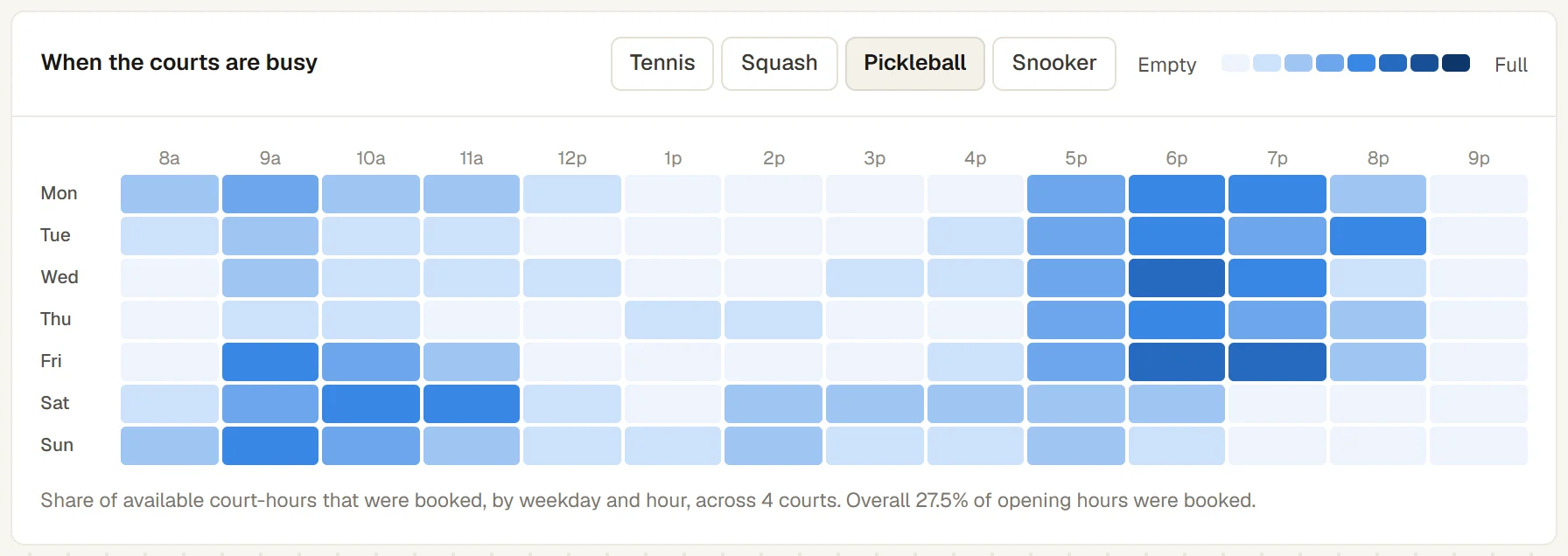
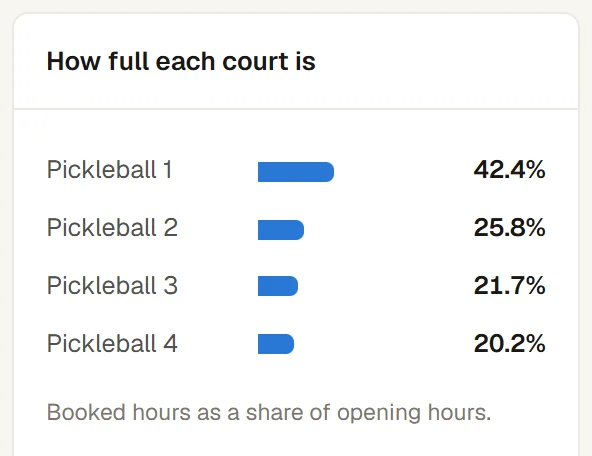
  • Court use.The share of open hours booked, by court, day and hour, with closed time left out.
  • Income by sport.Pickleball court hire shown apart from tennis, squash, classes and the bar.
  • Widgets on the dashboard.Add the figures you want to your own dashboard, and print or download a report page.
  • An assistant for questions.Ask the AI Report Assistant in plain words, and it shows the figures it used.
When the courts are busy, with Pickleball chosen: the share of court-hours booked by weekday and hour across four courts, busiest on weekday evenings and weekend mornings, 27.5% of opening hours booked overall
How full each court is: Pickleball 1 42.4%, Pickleball 2 25.8%, Pickleball 3 21.7% and Pickleball 4 20.2% of opening hours booked

Running pickleball beside tennis or squash

Each sport has its own courts, opening hours, booking grid and usual booking length, and its own tab on the calendar and the court board. A membership can include one sport or several. How far ahead members can book, the longest booking and the peak times are one set of rules for the whole club.

THE CLUB SYSTEM

Features

MEMBERSHIP MANAGEMENT

End-to-end membership management.

Fully integrated and customisable membership applications, including optional elections, proposers and references.

See this in action

    The club’s online membership application, choosing a membership category with its fees

    The real product, captured from the demo. Invented club and people.

    CHANGING OVER

    Moving your pickleball club to Sports Club OS

    We bring your members, payments and bookings across, set the club up with you, and show the office and committee around before anything is switched on. If your members are in a spreadsheet, we work from that. We also read SportLogic and inTennis exports.

    How changing over works ↗   Leaving SportLogic? ↗

    ON ITS WAY

    Online card payments and the Xero connection are being built. Until then, payments are recorded against each invoice.

    QUESTIONS

    Common questions
    from pickleball clubs

    Is it only a pickleball court booking system?

    No. Court booking is one part. The same pickleball club management system runs membership and renewals, clinics and social sessions, paddle hire and the bar till, functions, staff rosters and the club’s finance, with one member list.

    Can members book pickleball courts from their phone?

    Yes. Sports Club OS is a web page at the club’s own address, so there is no app to download. Members book, move and cancel their own courts under the club’s rules, and add guests with the fee shown before the booking is made.

    Can we run pickleball and tennis on it?

    Yes. Pickleball is a sport of its own, with its own courts, opening hours, booking grid and usual booking length, and its own tab on the calendar and the court board. A membership can include pickleball only or several sports. How far ahead members can book, the longest booking and the peak times are one set of rules for the whole club, and a membership can have its own weekly limit.

    Can one tennis court be booked as several pickleball courts?

    Not yet. Each pickleball court is a court of its own on the calendar, and Sports Club OS does not link it to the tennis court it is lined on, so a booking on one does not block the other. The office can close or hold the tennis court and the pickleball courts together for a session, a clinic or an event.

    Can we run beginner clinics and social sessions?

    Yes. Each session has a number of places, a fee for members and one for visitors, and a waitlist. A class can give a first session free. The coach takes the roll on a phone, and visitors can ask for a place on the club’s public What’s on page. A session holds the courts it uses. Sports Club OS does not run a paddle queue: it does not assign players to courts or rotate partners during open play.

    Can it run pickleball ladders, round robins or tournaments?

    Yes. Competitions run ladders, box leagues, round robins and knockouts in pickleball, as well as squash, tennis, padel, badminton and snooker. A phone scores each point by the USA Pickleball rules, side-out to 11 by default with the server’s number, and the court’s TV follows. Every result moves the club’s pickleball rating. Rally scoring and other formats are options the club switches on. Team ties, and timed matches, are not built.

    Is there a free pickleball scorer?

    Yes. The free match scorer scores pickleball, singles or doubles, on any phone in the browser, with no account, and lets others watch with a code. Try the free match scorer.

    Does it connect to DUPR?

    No. Results are not sent to DUPR and ratings are not read in. A club can keep each member’s DUPR ID in an extra field on the member record.

    Can members pay by card online?

    Not yet. Card payments are being built. Today invoices are paid by bank transfer or at the club, and the club records the payment. Visitors pay at the desk or the bar till; there is no public page for booking and paying for a court.

    What does it cost?

    Every plan has every feature, priced by the number of members, from A$215 a month + GST for up to 300 members. See the plans.

    BOOK A WALKTHROUGH

    Get a personalised walkthrough for your pickleball club

    Thirty minutes on a video call with Adam, who built Sports Club OS. He shows the jobs you name on a made-up club, and you get a firm price and a plain answer on anything it does not do yet.

    Book my walkthrough

    We use these details only to reply to you. See the privacy policy.

    Rather write it yourself? Email hello@sportsclubos.net.