
The club system / Functions and Events
FUNCTIONS AND EVENTS · FULL DETAILS
Everything about functions and venue hire
Enquiries, quotes, holds, deposits, the bond, the function sheet and the night’s staff.
THE FULL WALKTHROUGH
Every part of Functions and Events, start to finish
A longer, slower look at the real pages, in chapters. Press a chapter to jump to it.
What it is
Functions and Events runs venue hire from start to finish. An enquiry comes from your website, a quote goes out the same day, the hirer accepts online, and the deposit, the courts, the roster and the function sheet all follow.
A hirer does not need to be a member. Prices never appear in public: amounts are first seen on the hirer’s own quote.
Everything it does
- A public venue page
- Your rooms and their capacities, and which days are free or to ask about, with an enquiry form. Nobody sees who has a room.
- On the club’s own website
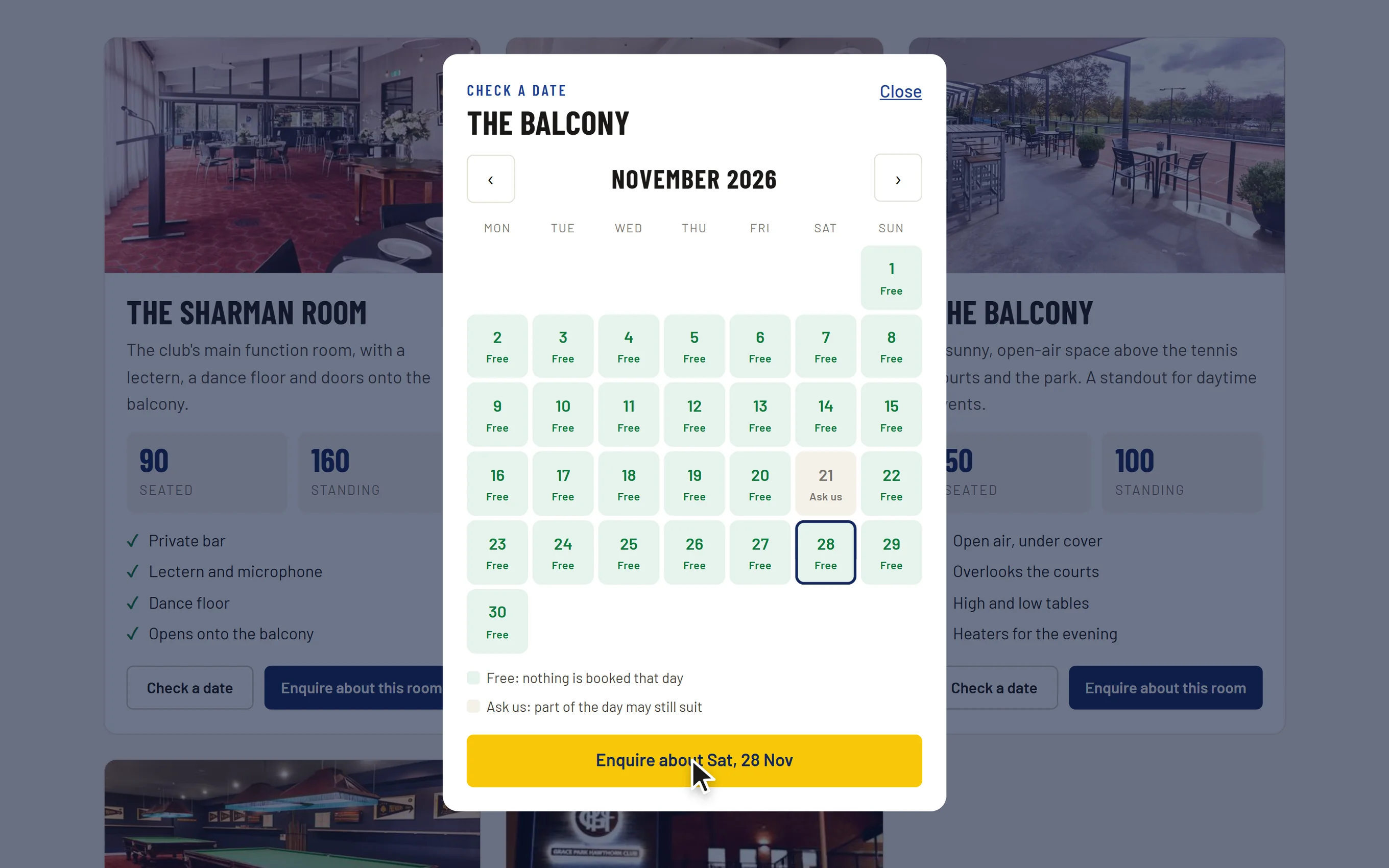
- The functions page on the club’s website shows each room, and a calendar where a visitor chooses a day and sees Free or Ask us. Its enquiry form lands on the functions board. It is drawn in the website’s own design, and no prices are shown.
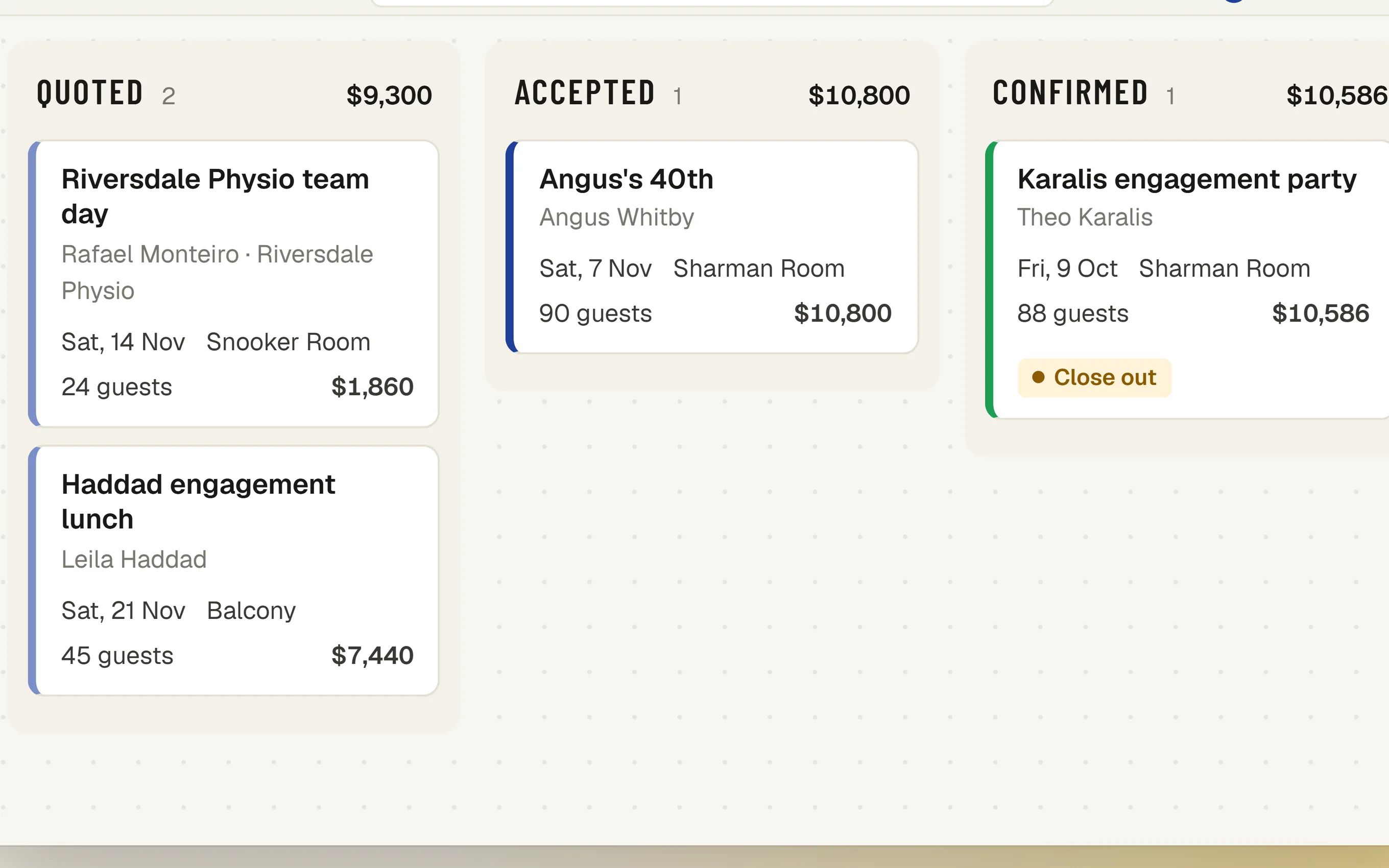
- A board of every function
- New, quoted, accepted, confirmed and completed, with lost and cancelled kept apart, and a calendar and list view.
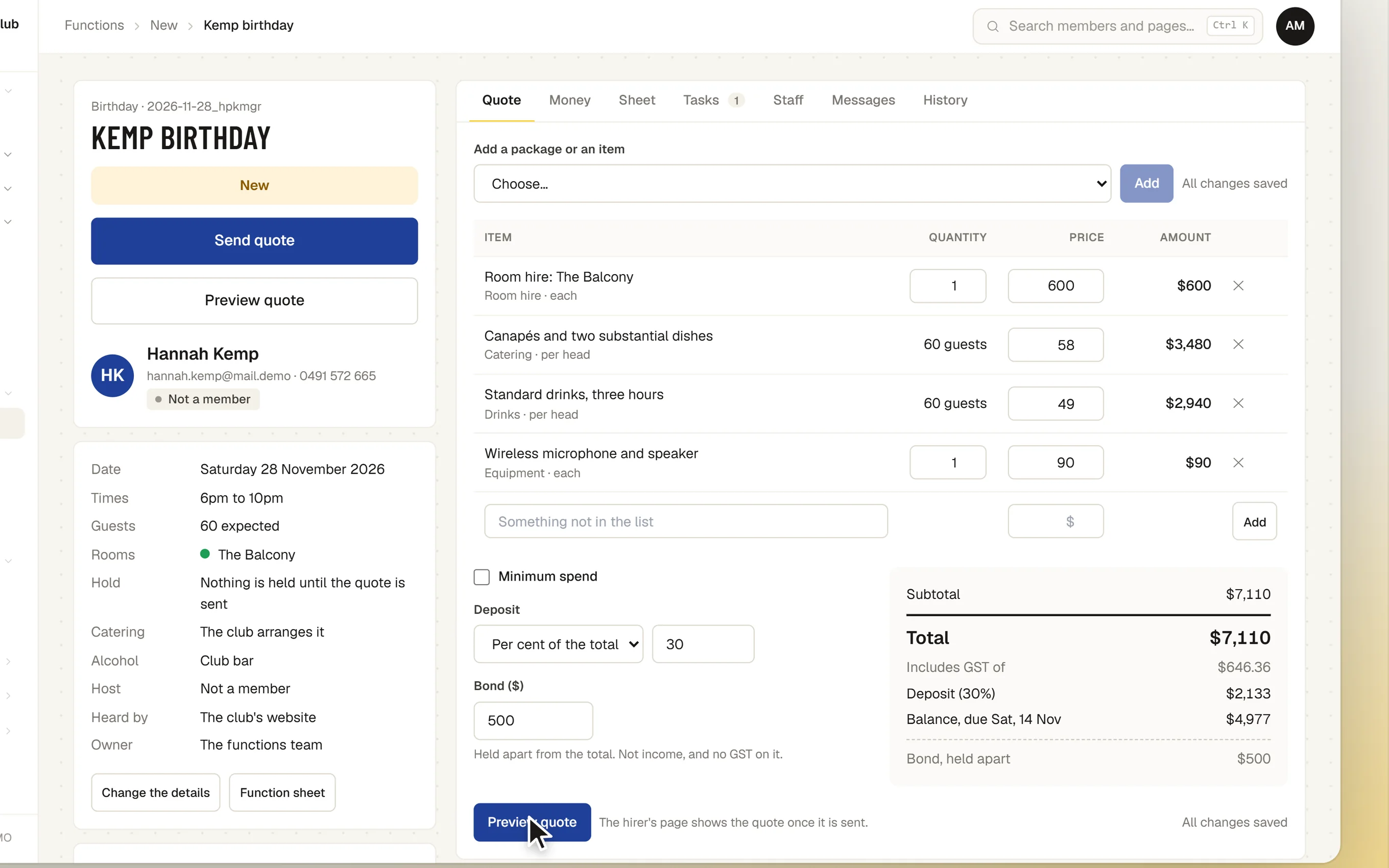
- Quotes
- Built from your packages and items, with totals and GST worked out, saved as you go, and previewed before sending.
- Holds
- Sending the quote holds the rooms until a date you choose. A hold past its date lapses by itself.
- Clashes checked
- Two functions cannot be confirmed for one room at the same time.
- The hirer’s own page
- The quote with one Accept button, then their invoices, final numbers up to the cut-off, the plan and messages.
- Deposits and invoices
- Accepting raises the deposit invoice; paying it confirms the function. Invoices are kept in step as the quote changes.
- The bond
- Held apart from the takings: never in a total, an invoice or the income report.
- Courts
- A confirmed function closes the courts its room needs, and they show as closed everywhere.
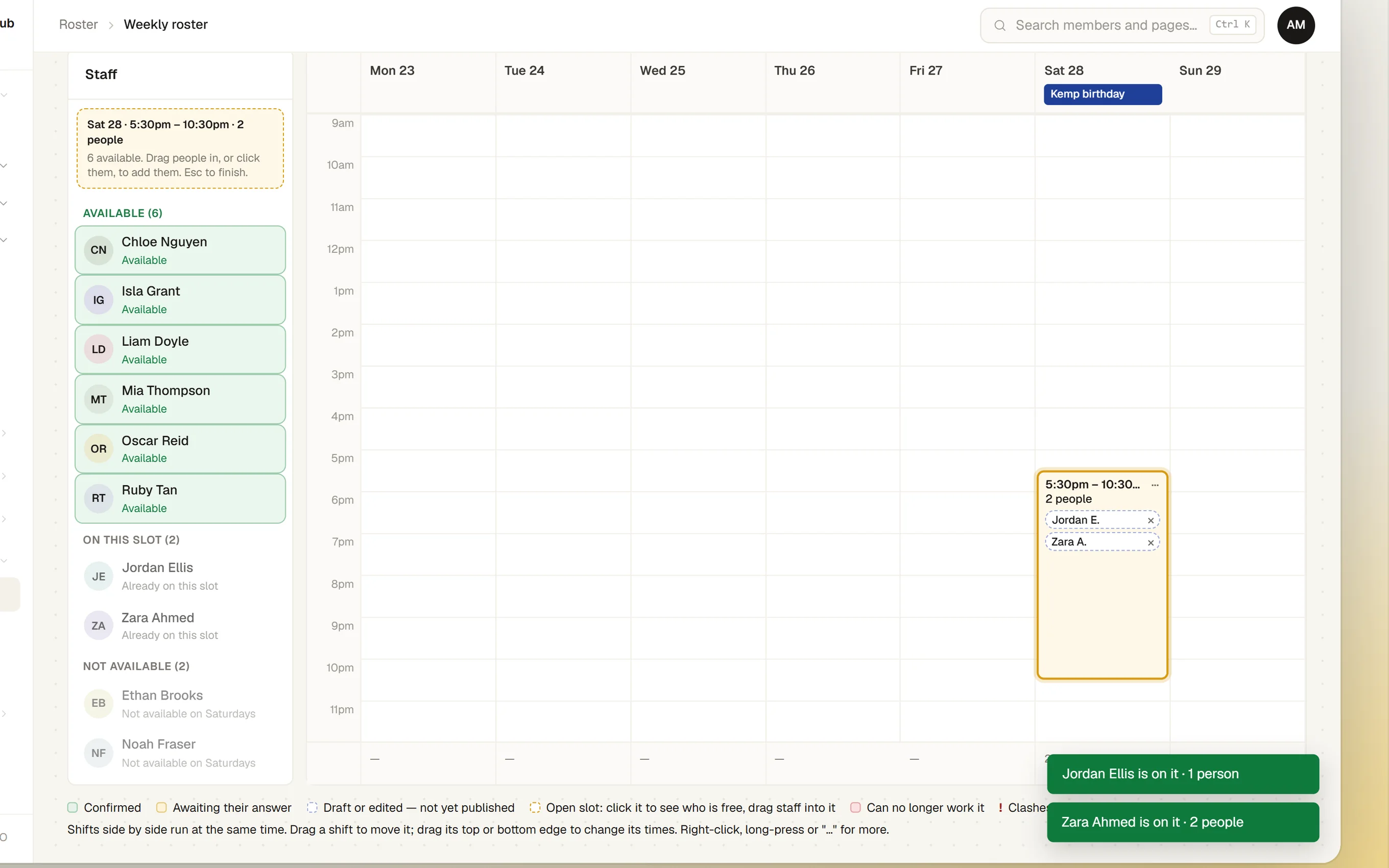
- Staff on the roster
- Confirming a function puts an open slot on the staff roster for its date and times, named after the function, with the number of staff it needs. If the function’s date, times or staff numbers change, the slot changes with it. The roster manager fills it like any other slot.
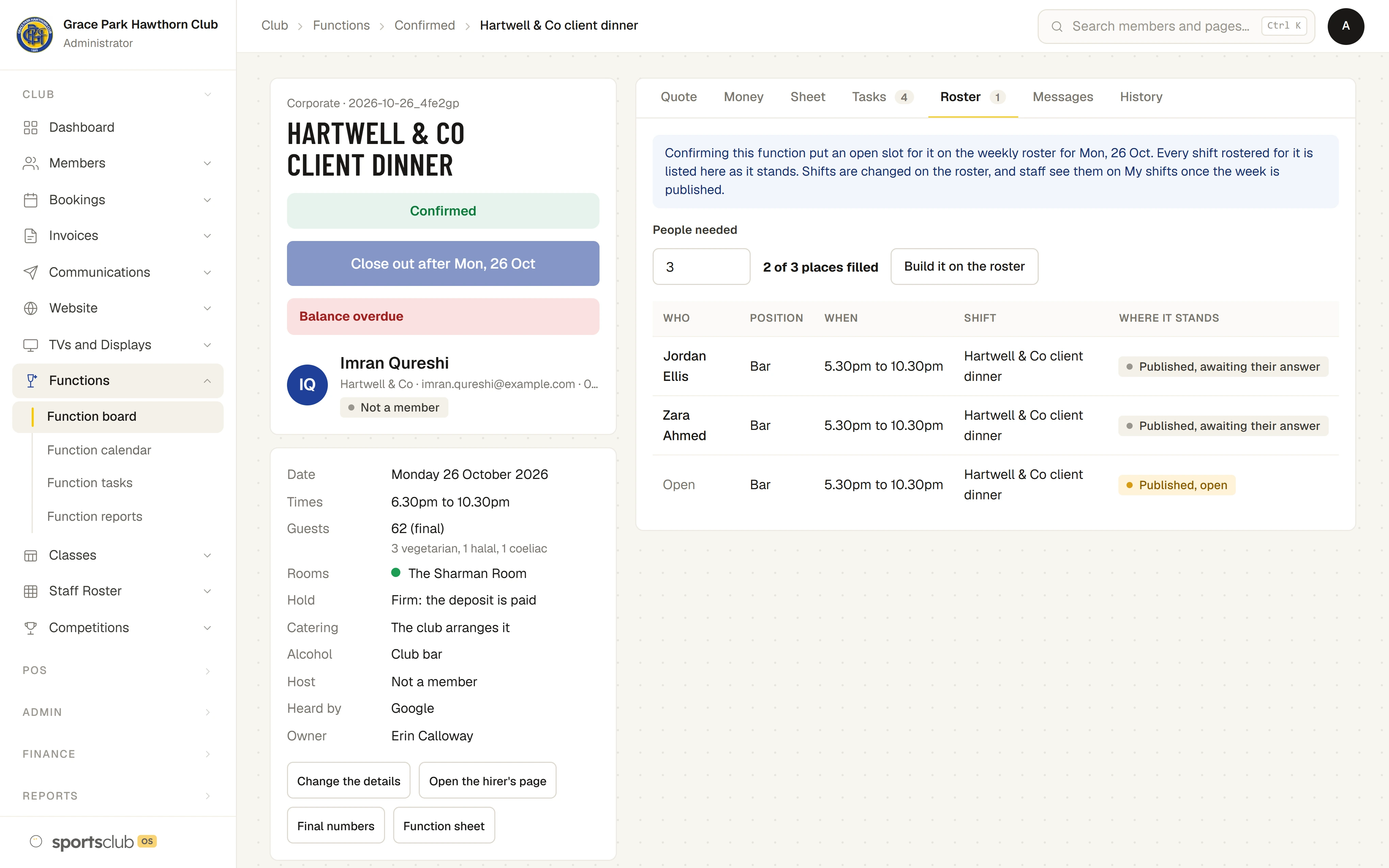
- The function’s Roster tab
- Everyone rostered for the function, with their position, times and whether they have confirmed.
- A welcome on the club’s TVs
- “Create screen for this event” makes a welcome display for the function, filled in from it: the name, the occasion, the rooms, the date and times. The wording is edited beside the preview. A TV shows it on the day only, and never shows an amount, the hirer or guest numbers.
- The function sheet
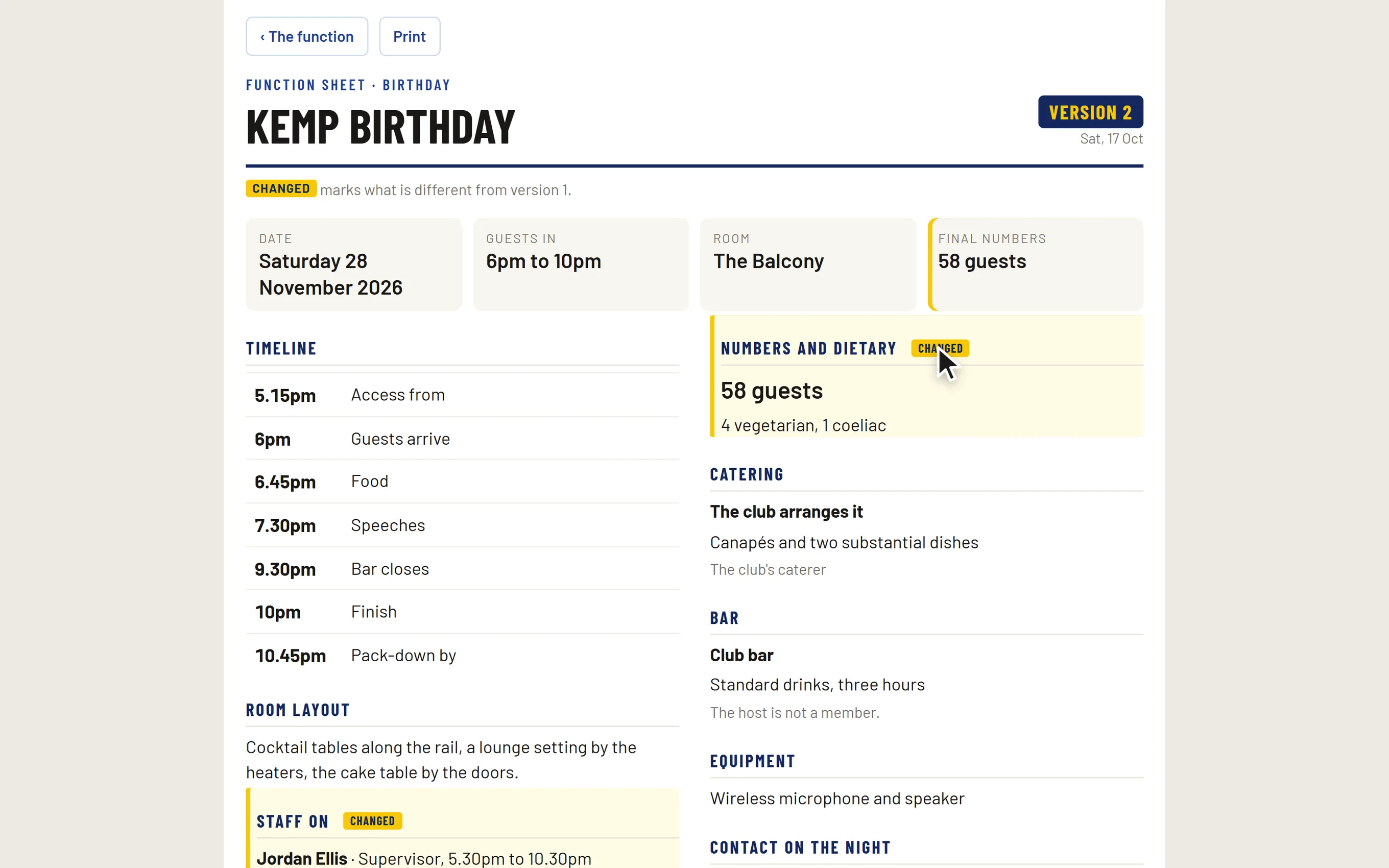
- One page for everyone working the night, on a phone or printed: times, numbers, dietary needs, the bar, who is on.
- Tasks
- What needs doing for each function and when, so nothing is missed.
- Reports
- Enquiries won and lost, with reasons, and income from functions.
- A foyer screen
- Tonight’s functions on a screen for the foyer.
How it works
- An enquiry arrives. From the form on your venue page, or entered by the office.
- Send a quote. From your packages. The room is held until the date you set.
- The hirer accepts. Online, from their link. The deposit invoice is raised.
- The deposit is paid. The function is confirmed: courts closed, and an open slot for its staff on the roster.
- On the night. Everyone works from the same function sheet. Afterwards, the balance and the bond.
The screens
Real screens from Sports Club OS, on an invented club.
Settings and options
- Rooms
- Each room’s name, capacity and the courts it closes, and whether it is offered on the public venue page.
- Items and packages
- What you sell, at what price, and the packages they make up.
- Terms and rules
- Deposit, bond, hold length, final-numbers cut-off and your terms of hire.
Who can do what
| Who | What they can do |
|---|---|
| Functions | Everything about functions: enquiries, quotes, invoices for functions, closing courts, and the settings. |
| Administrator | The same. |
| Bar Manager | Sees every function. |
| Staff on the night | Open that function’s sheet from their shift, and nothing else. |
| The hirer | Their own quote and function page, from their link. |
These are the starting roles. The club can change what each role may do on its Roles & permissions page, give a person several roles, and take a role away when they step down. The server checks every request against those roles, so a hidden button is never the only protection.
What gets sent
| To | What |
|---|---|
| The hirer | Their quote and a link to their own function page, and the emails that follow it: their invoices and answers to their messages. |
| The functions team | New enquiries, acceptances and questions from hirers. |
Questions
Can hirers pay by card online?
Not yet. Today payments are recorded against their invoices. Card payment, and a card held for the bond, are coming.
Are our prices on the public page?
No. Rooms and capacities only. Amounts first appear on the hirer’s own quote.
Does the hirer have to be a member?
No. A new hirer is kept as a contact, with no membership.
Can a function close the courts?
Yes. A confirmed function closes the courts its room needs, and they show as closed everywhere.
Does a function go on the staff roster?
Yes. Confirming it puts an open slot on the roster for the function’s date and times, with the number of staff it needs, and the slot follows any change to them. The roster manager puts people on it and publishes as usual.
Can we welcome guests on the club’s TVs?
Yes. “Create screen for this event” makes a welcome display from the function, and you edit the wording beside the preview. The TV shows it on the function’s day, with no amounts, hirer or guest numbers.
On its way
Card payment, and a card held for the bond.
Functions that run past midnight.
Works with
 Staff and Volunteers
 Sport Booking Management
 Membership Management
BOOK A WALKTHROUGH
Get a personalised walkthrough and demo
Book a walkthrough and bring the jobs that take your office the longest.