
How to
Match and explain bank lines
Confirm suggested matches, match bank lines to recorded money by ticking both sides, explain lines that are not club income, and unmatch.
Who this is for: Anyone with “Reconcile the bank account” or “See bank statements and the reconciliation” (by default: Administrator, Reporting, Treasurer).
Every bank line is either money Sports Club OS recorded, or something else. Match the first kind to the recorded money it was. Explain the rest. Sports Club OS suggests matches, and nothing is matched until you press a button.
Before you start
- You need to be able to reconcile the bank account. The Treasurer and Administrator roles can by default.
- Import the statement first: Import a bank statement.
Confirm a suggestion
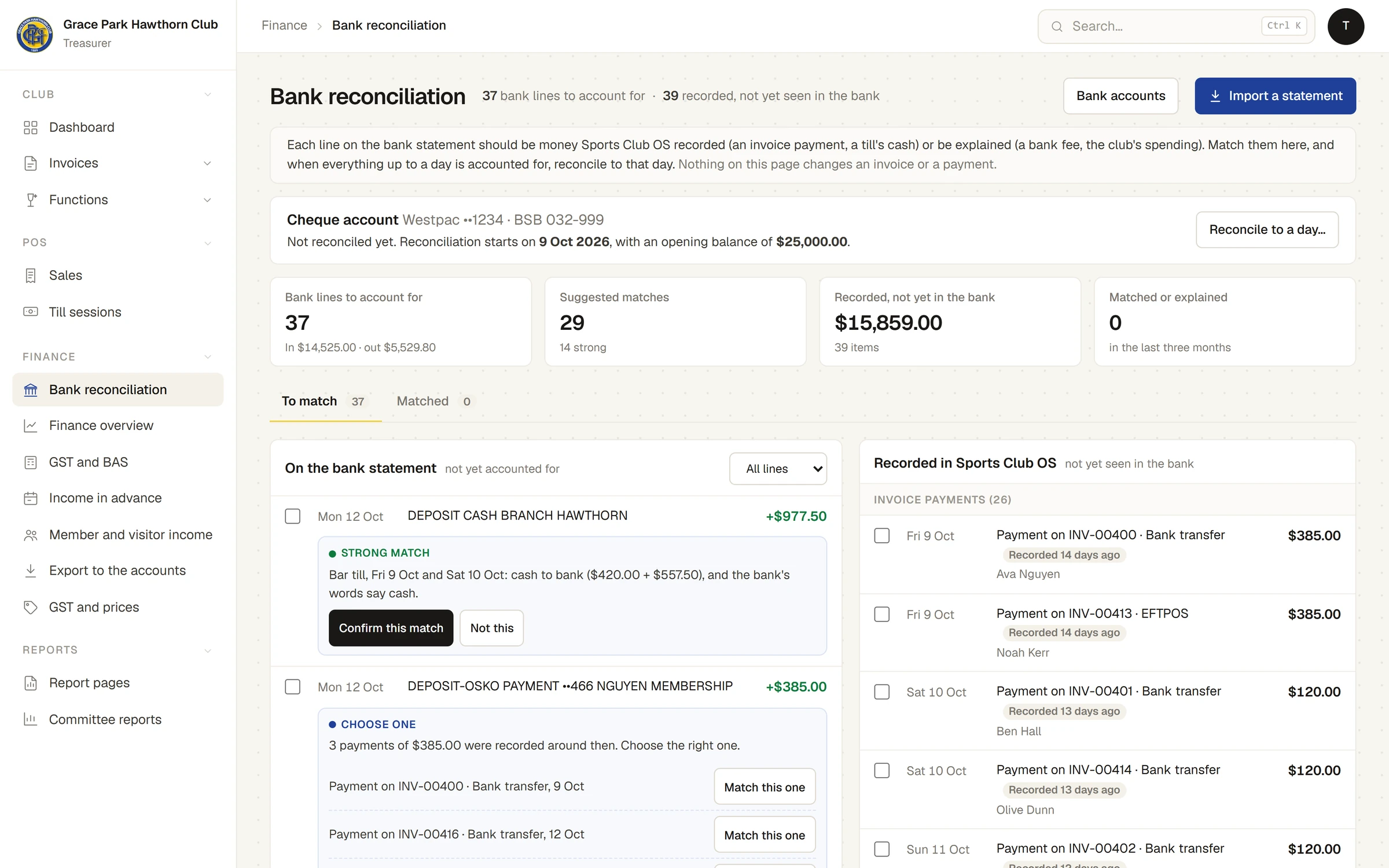
- Open on the To match tab. The bank lines are on the left, oldest first. All lines, Money in or Money out narrows them.
- Under a line, a suggestion says how well it fits, and why:
- Strong match: the invoice number is in the bank's words, or the line is till cash (one session, or two to four in a row) and the bank's words say cash.
- Likely match: a payment of the same amount recorded around then, or till cash where the bank's words do not say cash. A merchant settlement is offered card payments only.
- Possible match: several payments recorded around then that add up to the line.
- Choose one: two or more answers fit equally. Each is listed with Match this one.
- Record the payment first: the invoice number is in the bank's words, but no payment of this amount is recorded on it.
- Press Confirm this match, or Match this one beside the right answer. A message says Matched, and the line and the money leave To match.
- If the suggestion is wrong, press Not this (or None of these). The next suggestion shows, if there is one. This is remembered only until you leave the page.
Pointing at a line lights the recorded money its suggestion would take, on the right.
Match by hand
- Tick one or more bank lines on the left, and the recorded money they were on the right. One deposit can cover several payments, or several lines one payment.
- The bar at the bottom shows both sides, for example Bank: 2 lines · $180.00, Recorded: 1 · $180.00, and the Difference.
- When the difference is nothing, press Match. It cannot be pressed while the two sides differ.
A match must balance to the cent. Up to 40 bank lines go in one match. Clear takes the ticks off.
Money that reached the bank but was never recorded
Recording a payment is done on the invoice, never here.
- Under the line, Record the payment first names the invoice and what is owing. Press Open and the invoice's number to open it.
- Record the payment on the invoice: Record a payment.
- Come back to Bank reconciliation. The payment is now recorded money, and the line can be matched to it.
Explain a line
For a line that is not money recorded in Sports Club OS: a supplier paid, wages, a bank fee, interest.
- Press Explain this payment out… (or Explain this line… for money in) under the line. To explain several at once, tick them and press Explain… in the bar.
- Choose what it is:
- Spending not kept in Sports Club OS: suppliers, wages, refunds paid by the office.
- Bank fee: an account or merchant fee taken by the bank.
- Transfer between the club's accounts
- Interest
- Refund not in Sports Club OS
- Function bond held or returned: a hirer's bond, which is never club income.
- Something else
- Type a Note. It is needed for all but spending and a bank fee.
- Press Save. A message says Explained.
The line is then accounted for, and nothing is added to the club's income.
The money on the right
Recorded in Sports Club OS lists money recorded and not yet seen in the bank, under Invoice payments (each with the invoice, how it was paid and who paid) and Till cash, by session (each session's count less its float). Anything recorded more than a week ago says, for example, Recorded 9 days ago, and the figure at the top counts those over 14 days old. A payment recorded after its period was reconciled is marked so.
Unmatch
- Open the Matched tab. It lists the last three months' matches and explanations: the bank's words, what each was matched to or explained as, who did it and when, and whether it was suggested.
- Press Unmatch. A message says Unmatched: the line and the money are open again.
A match in a reconciled period says Locked and cannot be unmatched until the period is reopened.
If something goes wrong
- "The bank lines come to $… and the recorded money to $…: a difference of $…." The two sides differ. Tick the rest of the money, or the right line.
- "One of those bank lines is already matched. Reload." or "Someone matched one of these at the same moment. Reload." Someone else matched it. Reload the page.
- "That line is in the reconciled period (to …), so it cannot be changed." Reopen the period first. See Reconcile to a date, and reopen it.
- "Add a note to say what this … was." That kind of explanation needs a note.
Last checked in release 2026.10.23, on 23 October 2026.