
Overview
What Functions does
Venue hire from the first enquiry to the day after: quotes, holds, the hirer accepting online, deposit and balance invoices, the bond and the function sheet.
Who this is for: Anyone with “See functions and enquiries” or “Run functions” or “Function rooms, prices and terms” (by default: Administrator, Bar Manager, Functions, Reporting, Treasurer).
Functions is how a club hires out its rooms for birthdays, engagements, corporate days, presentation nights and celebrations of life. An enquiry comes in from the club's public venue page or is typed in by the office. The office builds a quote from the club's packages and items and sends it, which holds the rooms. The hirer accepts on their own page, a deposit invoice is made, and paying it confirms the function. On the day, the function sheet tells the bar and the caterer what is happening; afterwards the office closes it out, and the bond is returned.
Who uses it
- The Functions role runs functions: enquiries, quotes, invoices, close-out, and the rooms, items and terms. The Administrator can do all of this too.
- The Bar Manager can see functions and their sheets by default, but not change them.
- Staff rostered on a function can open that function's sheet from My shifts, and nothing else of Functions.
- Hirers use the public venue page to enquire, and their own link to see the quote, accept it, see their invoices, give final numbers and write to the club. They need no login.
Your club can change who does what on Roles & permissions.
Its pages
| Page | Where | What it is for |
|---|---|---|
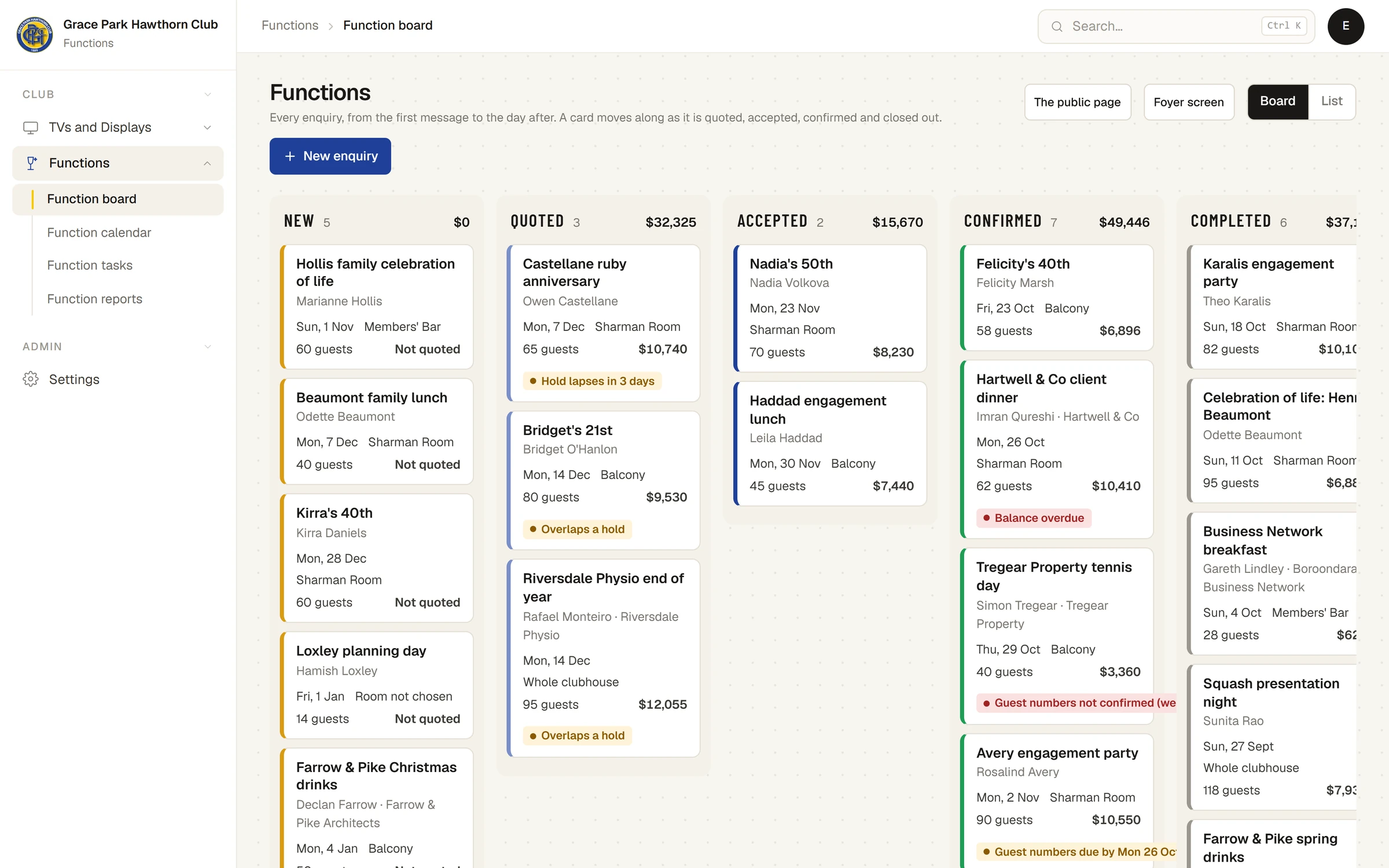
| Function board | Every function by stage, as cards, or as a list to search. Open a function to work on it. | |
| A function | Press a card | Its details on the left; tabs Quote, Money, Sheet, Tasks, Roster, Messages and History on the right. |
| Function calendar | The month or the week by room, coloured by status or room. | |
| Function tasks | Everything due across every open function. | |
| Function reports | Enquiries, conversion, booked income, lost reasons, how people heard. | |
| Function sheet | Function sheet on a function | The run sheet for the day, for a phone or printed on A4. |
| Settings | , Functions tab | Rooms, items and packages, deposit and hold rules, and terms. |
| The public page | The public page on the board | The venue page for visitors, with each room and Free or Ask us days. |
| Foyer screen | Foyer screen on the board | Today's and the week's functions for a TV, by kind of occasion, naming none. |
The stages
A function moves through New, Quoted, Accepted, Confirmed and Completed, or ends Lost (with a reason) or Cancelled. The board's columns are the first five; lost and cancelled functions are in the list.
- New: an enquiry. Nothing is held.
- Quoted: the quote has been sent. The rooms are held, tentatively, until a date.
- Accepted: the hirer accepted. A deposit invoice has been made.
- Confirmed: the deposit is paid. The rooms are booked, the courts it needs are closed, and its staff go on the roster.
- Completed: closed out after the day.
See How holds, acceptance and the deposit work.
What it connects to
- Invoices: the deposit, balance and any extras are ordinary Sports Club OS invoices, kept in step with the quote.
- Members and contacts: a hirer is a contact. An enquiry from an address the club already holds uses that record; otherwise a new contact is made, tagged Function hirer, with no membership. A host who is a member gets member prices.
- Bookings: a confirmed function can close courts on the booking calendar.
- The roster: a confirmed function puts an open slot for its staff on the weekly roster. See The function's staff on the roster.
- The club's TVs: a function can be welcomed on the TVs on its day, if the office switches it on. See Welcome a function on the club's TVs.
- The till: a function's bar tab can be charged from the till and goes onto its invoices.
What it does not do
- No prices appear in public. A visitor sees rooms, capacities and whether a day is Free or Ask us; amounts first appear on the quote, behind the hirer's own link.
- The bond is held apart: it is never in a total, the GST, an invoice or the income figures.
- Two confirmations of one room in the same second are not prevented. Each move is checked for clashes when it is made.
Articles
- Tasks: From an enquiry to a quote, Confirm a function, Close out a function, and the bond, Find a function: the board, the list and the calendar, Keep on top of function tasks, Welcome a function on the club's TVs.
- How it works: How holds, acceptance and the deposit work, The function sheet, The function's staff on the roster, The public venue page and enquiry form, Function reports.
- Settings: Function settings: rooms, items, packages, rules and terms.
Last checked in release 2026.10.23, on 23 October 2026.