
How to
Book a class for yourself or your household (members)
Find a class on the timetable, book a place for yourself or someone in your household, and cancel it again. The button says what will pay before you press it.
Who this is for: Anyone with “Book classes for your household” (by default: Member).
Members book classes on Classes, which shows everything at the club you can join on one timetable. You book for yourself or for anyone in your household, and you can cancel from the same place.
Before you start
- You need to be a member whose sign-in is linked to your membership. Everyone in your household appears by first name, so you can book for them.
- Some classes are for members only, for adults or juniors, or for some memberships only. A class that is not for you, or for the person you are booking for, says who it is for instead of a button, for example Juniors 9 to 12 or Members only.
Find a class
- Open , or press Book a class on your Home page.
- Choose a day on the strip of seven days, or move a week with the arrows. A grey dot under a day means classes are on; a gold dot means you or someone in your household is booked. Back to today returns to today.
- To narrow the list, press Activity, For, Level, Coach or Time of day and choose one. Clear takes the filters off.
- On a wider screen, Week shows the whole week at once. Day goes back to a single day.
Each row shows the time and length, the class, the coach, the place, who runs it if it is an outside business, and on the right where you stand: a button to book, or a line such as 3 places left, You are booked, Full or Booking opens Saturday 17 October. A cancelled session stays in the list, struck through, with the reason.
Book a place
- Press the class's row. Its page opens at the side (the whole screen on a phone), with the photograph, a line that says when it runs, what it costs and who it is for, and this session's date and time.
- Under For, choose who the place is for: Me, or someone in your household. The button changes to say what they would pay.
- Press the button. It always says how the place is paid for:
- Book: included: your membership includes it.
- Book with Squad 10-pass (6 left): one session comes off your household's pass.
- Book: $22 on your account: the fee goes on your next invoice from the club.
- Book: $25, pay Front Wall Squash: the coaching business that runs the class takes payment itself.
- Book: first session free: your first session of that class is free.
- If there is more than one way to pay (a pass or your account, for example), a panel asks How would you like to pay?, with the cheapest chosen. Choose one and press Confirm.
A strip at the foot says, for example, Booked: Circuit, Saturday 8am. Undo is there for ten seconds and cancels the booking free. Add to calendar saves a calendar file, and Share copies the link to the class's page on the public What's on page.
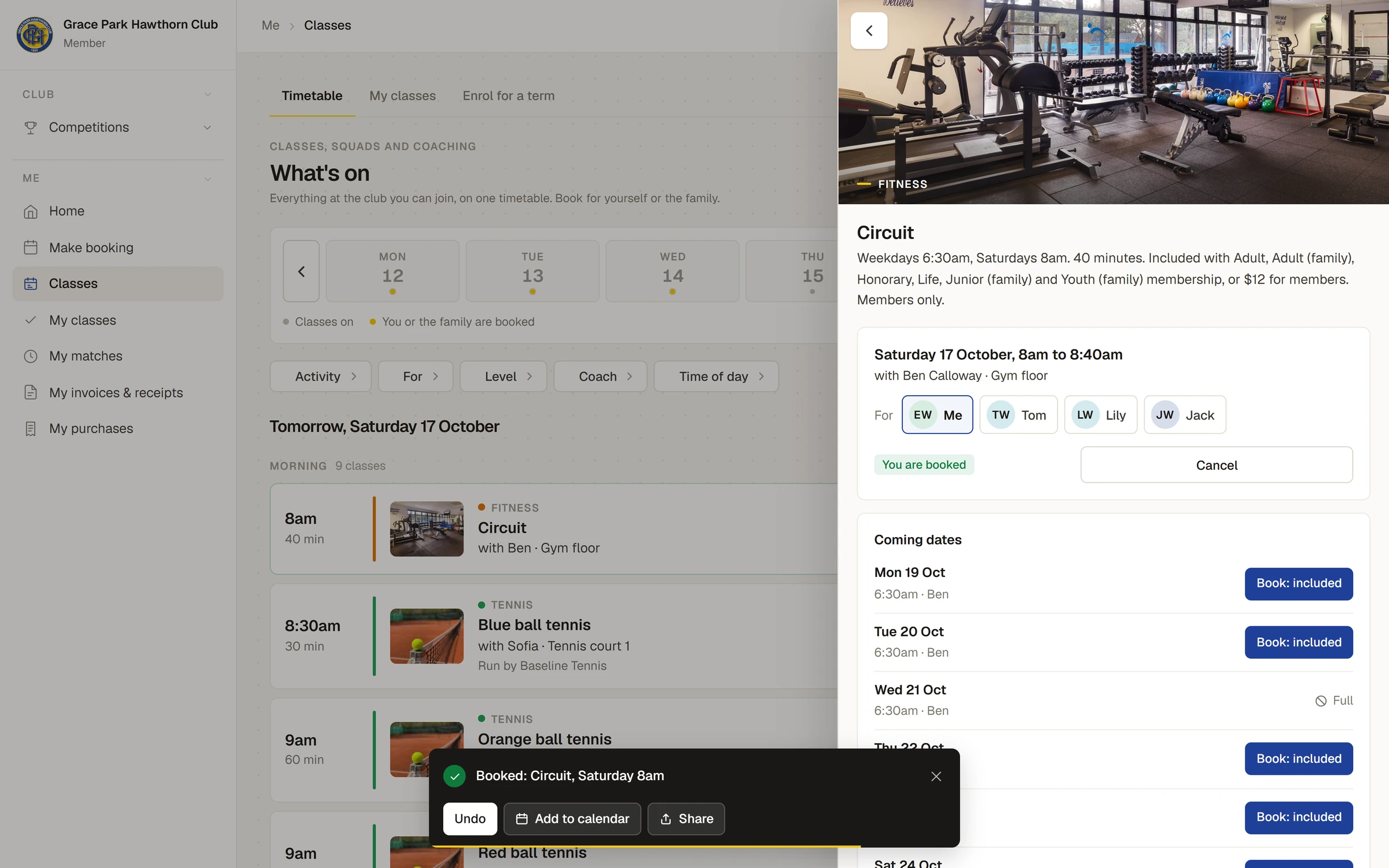
You can also press the button on a row without opening the class. The class's page has Coming dates, the next six sessions, each with its own button, so you can book several at once.
You get an email saying the place is booked. A class you are booked into shows You are booked, or for someone else Jack is booked, and is on .
Cancel a place
- Press Cancel on the class, on the timetable or on My classes.
- A panel says what will happen before you confirm. Before the free-cancelling time it says, for example, You can cancel free until 9pm. There is nothing to pay. A pass session goes back on the pass, and an account fee comes off your account.
- Press Cancel my place, or Keep it.
After the free-cancelling time the panel says so, for example It is less than 12 hours before the start, so Front Wall Squash may still ask for the $25., and the button is Cancel anyway. Depending on your club's settings, a late cancel uses the pass session or the fee still applies. There are no extra fees. You cannot cancel a session that has already started.
Cancelling a session of a term program is different: see Enrol your child for a term.
My classes
is your household's own page:
- Needs an answer: a place offered to you from a waitlist, a term place held for your child, a make-up credit to spend, and any session of yours the club has cancelled.
- Coming up: every booking of the household for the next two weeks, with whose it is and Cancel. A button under the list shows the rest.
- The family: a card for each person. For a child, their stage, the groups they are in, how many sessions they have come to, make-up credits and the coach's latest note.
- Passes: the household's passes, with sessions left and when each expires.
- On your account: what classes booked one at a time have put on your account this month. The club sends one invoice.
- Past: the last eight weeks, with whether each person came.
Tell the coach about a medical condition
On My classes, each person's card has Coaches see. Press Add a note or an emergency contact and fill in Anything the coach should know (asthma, an allergy, an injury), Emergency contact and Their phone number. Only the coach taking the class and the office see it, on the roll.
If something goes wrong
- The row says Full. Every place is taken. If the class has a waitlist, the button is Join the waitlist; see Waitlists and offered places.
- The row says Booking has closed. The session has started, or it is past the time the class stops taking bookings.
- The row says, for example, "Mia has Junior squash at this time". That person is already booked into something at the same time. Sports Club OS refuses a second booking at the same time.
- There is no button, only who the class is for. No price applies to the person chosen. Choose someone else under For, or ask the club office.
Last checked in release 2026.10.23, on 23 October 2026.