
How to
Sign off a cash-up
Check each closed till session on Till sessions, its count, variance, sales, tabs and corrections, and sign it off with a note.
Who this is for: Anyone with “Run the till” or “See sales and till sessions” (by default: Administrator, Bar Manager, Reporting, Treasurer).
Each till session ends with a blind count: the person closing counts the drawer before being told what it should hold. A manager then checks each cash-up on Till sessions and signs it off, so every drawer's count has been looked at by someone other than the person who counted it.
Before you start
- Seeing till sessions is for the Bar Manager, Reporting and Treasurer roles by default. Signing off is for the Bar Manager. Your club can change this on Roles & permissions.
- A session can be signed off once it has been closed on the till.
Find the sessions to sign off
- Open . It shows the last 30 days; change From and To for others.
- The figures at the top show Open now, Not signed off ("Waiting for a manager"), the Variance over the days shown, and the number of Sessions. Press Not signed off to list only those.
- Each row shows the till, who opened it and when it closed, the float, what the drawer was Expected to hold, what was Counted, the Variance and the status: Open, Not signed off or Signed off. Rows not signed off have a gold edge.
Filters narrows the list by status, till, who opened it and variance (short, over or exact). Export CSV downloads the sessions shown.
Check a session and sign it off
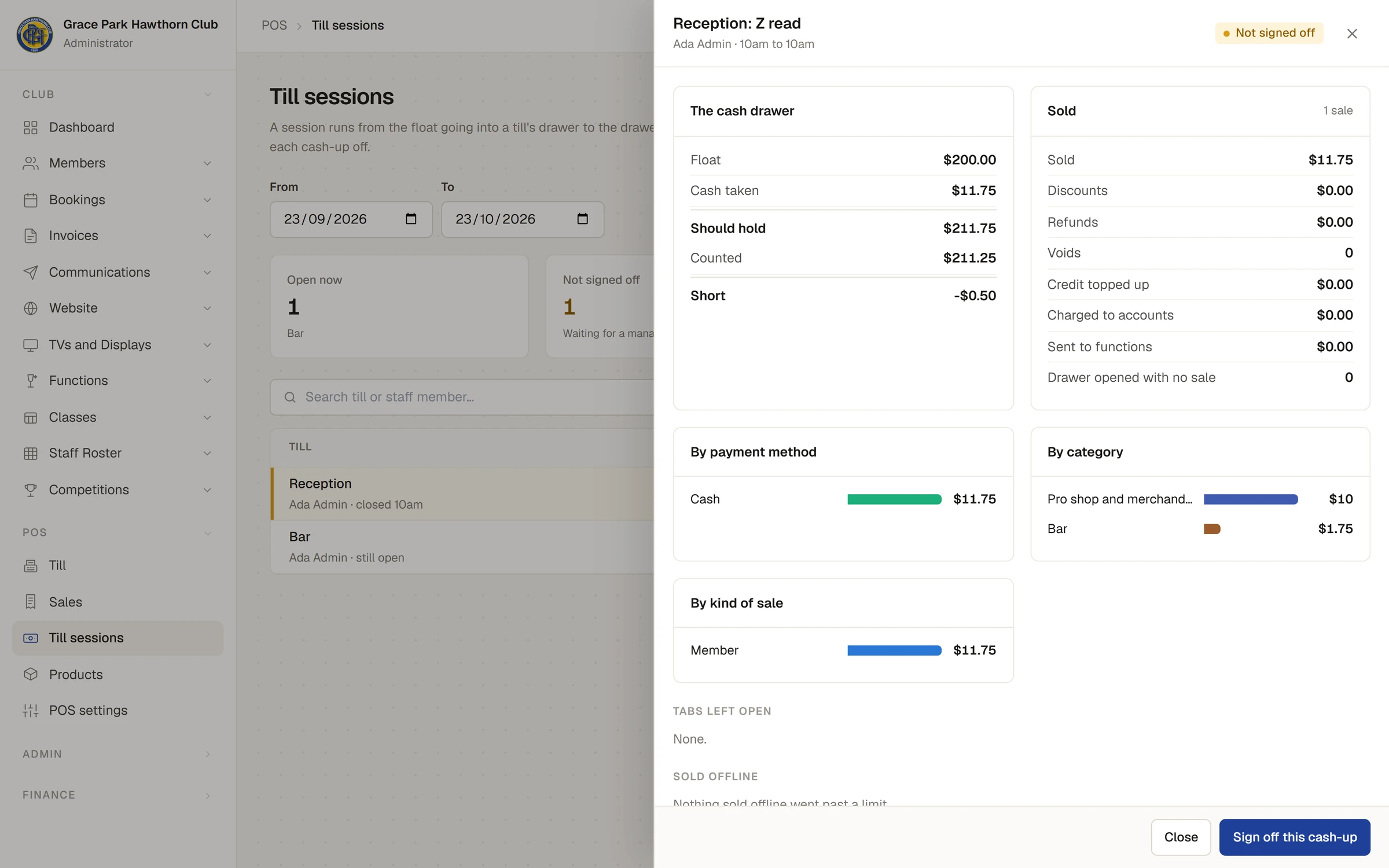
- Press a session. Its Z read opens in a side panel.
- Check The cash drawer: the float, cash taken, any cash paid in and out, what it Should hold, what was Counted, and whether it was Short, Over or Exact.
- Check Sold: sales, discounts, refunds, voids, credit topped up, Charged to accounts, Sent to functions and Drawer opened with no sale, with bars by payment method, category and kind of sale.
- Look at what was left over: Tabs left open, Sold offline (anything sold offline past an account limit or stock), Equipment out, Payments corrected and Cash paid in and out, each with who and why. The closer's note shows under Notes and sign-off.
- Type a note in Note with the sign-off if there is anything to record, for example how a shortfall was explained.
- Press Sign off this cash-up. A message says Cash-up signed off, and the session shows who signed it off and when.
A session still open shows its X read so far instead, and says It can be signed off once it is closed on the till. Someone who can see sessions but not sign them off sees Waiting for a manager to sign it off.
What variance means
The variance is what was counted less what the drawer should hold. A negative figure is short, a positive one over. The drawer should hold the float, plus cash taken on the session's sales less change given, less cash refunded from the drawer, plus cash paid in, less cash paid out.
EFTPOS is not counted in the drawer. Compare the session's EFTPOS figure with the terminal's settlement for the day yourself.
On the Dashboard
The Bar and shop widget shows the last cash-up's variance, and, opened out, lists the cash-ups not signed off for a week. See Your Dashboard and its widgets.
Last checked in release 2026.10.23, on 23 October 2026.