
How it works
What happened to a message: delivered, bounced, complained
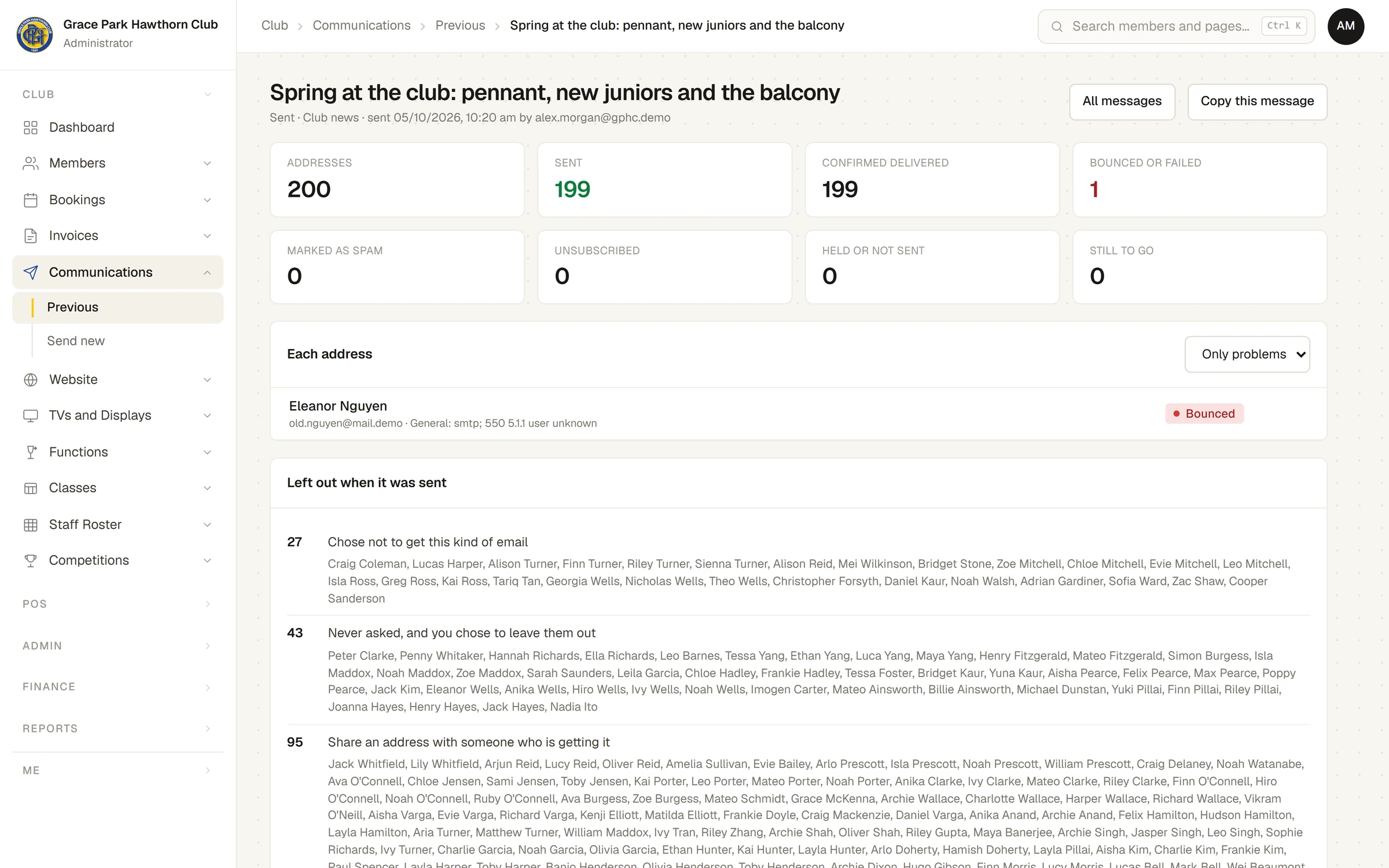
After a message is sent, its page shows what happened to every address: sent, delivered, bounced, marked as spam or unsubscribed, and who was left out.
Who this is for: Anyone with “Send communications” (by default: Administrator).
Once a message is sent, open it from . The same page that held the draft now shows what happened: a set of totals, the result for each address, and who was left out and why. The page keeps itself up to date while the message is going out, and results that arrive later (a bounce a few minutes after sending, an unsubscribe days later) are added as they come.
Under its heading, the message says its state (Sending, Sent or Stopped), its kind, and a date and a name after the word "sent". For a message that was stopped, the date and name are still those of the person who pressed Send, even though the addresses that show Stopped were sent nothing.
The totals
| Total | What it counts |
|---|---|
| Addresses | How many addresses the message was queued for. |
| Sent | Emails handed to the mail system, delivered or not yet confirmed. |
| Confirmed delivered | Emails the person's mail server accepted. |
| Bounced or failed | Emails that could not be delivered, or could not be sent. |
| Marked as spam | People who reported the email as spam. |
| Unsubscribed | People who used the email's unsubscribe link. |
| Held or not sent | Emails stopped, skipped or not sent. |
| Still to go | Emails not yet sent. |
Each address
Each address lists every address with the person it went to (and the others who share it), and what happened. Choose Only problems to see only the addresses that bounced, failed, were marked as spam or unsubscribed. If you can see members, each name links to the member's page.
| Shown | What it means |
|---|---|
| Waiting | Not sent yet: the hold is still running, or sending has not reached it. |
| Sent | Handed to the mail system. |
| Delivered | The person's mail server accepted it. It may still be in their junk folder. |
| Bounced | The address does not exist or refused it for good. Sports Club OS stops sending to that address. |
| Not delivered | It could not be delivered this time (a full mailbox, a server that was down). The address is not stopped. |
| Marked as spam | The person reported it as spam. Sports Club OS stops sending to that address. |
| Failed | It could not be sent. The reason is shown beside the address. |
| Stopped | The message was stopped before this email went. |
| Skipped | The person unsubscribed, or the address stopped working, between pressing Send and this email going, so it was not sent. |
| Unsubscribed | A separate mark beside the address: the person used this email's unsubscribe link. |
The reason a mail server gave, such as "user unknown", is shown under the address.
Left out when it was sent
Left out when it was sent gives the count for each reason someone was not on the list (chose not to get this kind, never asked and left out, shares an address, no email address, address stopped working, or an address of the kind never sent to), and, if you can see members, their names. See Who a message goes to, and who is left out.
A member's own history
On a member's page, the Email preferences card lists the latest messages sent to their address, with what happened to each. That is the quickest way to answer "did they get it?" for one person.
When an address stops working
A bounce that means the address does not exist, and a spam report, both stop all sending to that address, essential notices included, until the office clears it on the member's page. See An email address is marked blocked.
What it does not show
- Whether anyone opened or read the email. Sports Club OS does not track opening.
- Every spam report. Some mail programs, Gmail among them, do not tell the sender when someone marks an email as spam, so Marked as spam can be lower than the true number.
The message itself
At the foot of the page, The message shows what was sent. A sent message cannot be changed. Copy this message makes a new draft from it.
Last checked in release 2026.10.23, on 23 October 2026.