
Overview
What Invoices does
Every invoice the club raises, whatever raised it: what is owed, payments recorded against it, what is overdue, and the invoice as it prints.
Who this is for: Anyone with “See all invoices and payments” or “Raise invoices and record payments” (by default: Administrator, Head Coach, Casual Staff, Reporting, Treasurer).
Invoices holds every invoice the club raises, whether the office raised it by hand or another part of Sports Club OS raised it: a membership renewal, a monthly membership, a function's deposit, a term of classes, a month of bar charges. Each invoice says who it is billed to, what it is for, the GST in it, what has been paid and what is still owed. The office records payments against it, and it prints as a tax invoice.
Who uses it
- The club office raises and changes invoices, records payments and voids invoices raised by mistake. The Administrator, Head Coach, Casual Staff and Treasurer roles can by default.
- People who read the figures see every invoice and its payments, and change nothing. The Reporting role can by default.
- Members see their own invoices on My invoices & receipts. See See your invoices and receipts.
Your club can change who does what on Roles & permissions.
Its pages
| Page | Where | What it is for |
|---|---|---|
| Invoices | Every invoice, newest first, with a search box, the Filters panel, what is owed by age, Export debtors CSV and New invoice. | |
| Unpaid invoices | Every issued invoice with something still owing, and the stage each has come to on the club's reminder schedule. | |
| The printable invoice | Print / PDF on any invoice | The invoice laid out for paper or a PDF. |
| Invoice reminders | , the Invoice reminders tab | The reminder schedule. No reminder is sent yet. |
An invoice's status
- Draft: started and not issued. Nothing is owed on a draft.
- Issued: owed, and not yet due or due today.
- Overdue: issued, and the due date has passed. Nobody sets this: Sports Club OS works it out each day from the due date.
- Paid: payments recorded on it add up to its total.
- Void: raised by mistake and no longer owed. It stays on record with its number.
An issued invoice with part of it paid stays Issued (or Overdue) until the rest is paid. Its Balance is what is left.
The Invoices page
At the top, four boxes add up what issued invoices still owe: Not yet due, 1–30 days overdue, 31–60 days overdue and Over 60 days, each with how many invoices.
The list shows Number, Billed to, Issued, Due, Total, Balance and Status, 100 at a time, with Show more below. A renewal invoice carries a Renewal chip. The search box finds an invoice number, a name or the words of an item. The Filters panel narrows the list by Status, For (membership or other), Month issued, Paid by, Amount and Billed to.
Export debtors CSV downloads every issued invoice with the person's email address, the dates, the days overdue, the total and the balance, as a spreadsheet.
Opening an invoice
There are two ways to open an invoice from its row:
- The arrow at the start of the row opens the invoice out underneath, in place. Several can be open at once. It shows the invoice as it prints, What has happened to it, and About this invoice: the member or contact (a link to their page, for someone who can see members), what it Came from where Sports Club OS knows (a membership renewal, a membership application, a function, classes, or the system the club used before), the payments, and the buttons Record payment, Open invoice and Print / PDF.
- Anywhere else on the row opens the invoice in a side panel, where payments are recorded and the invoice is changed, issued or voided.
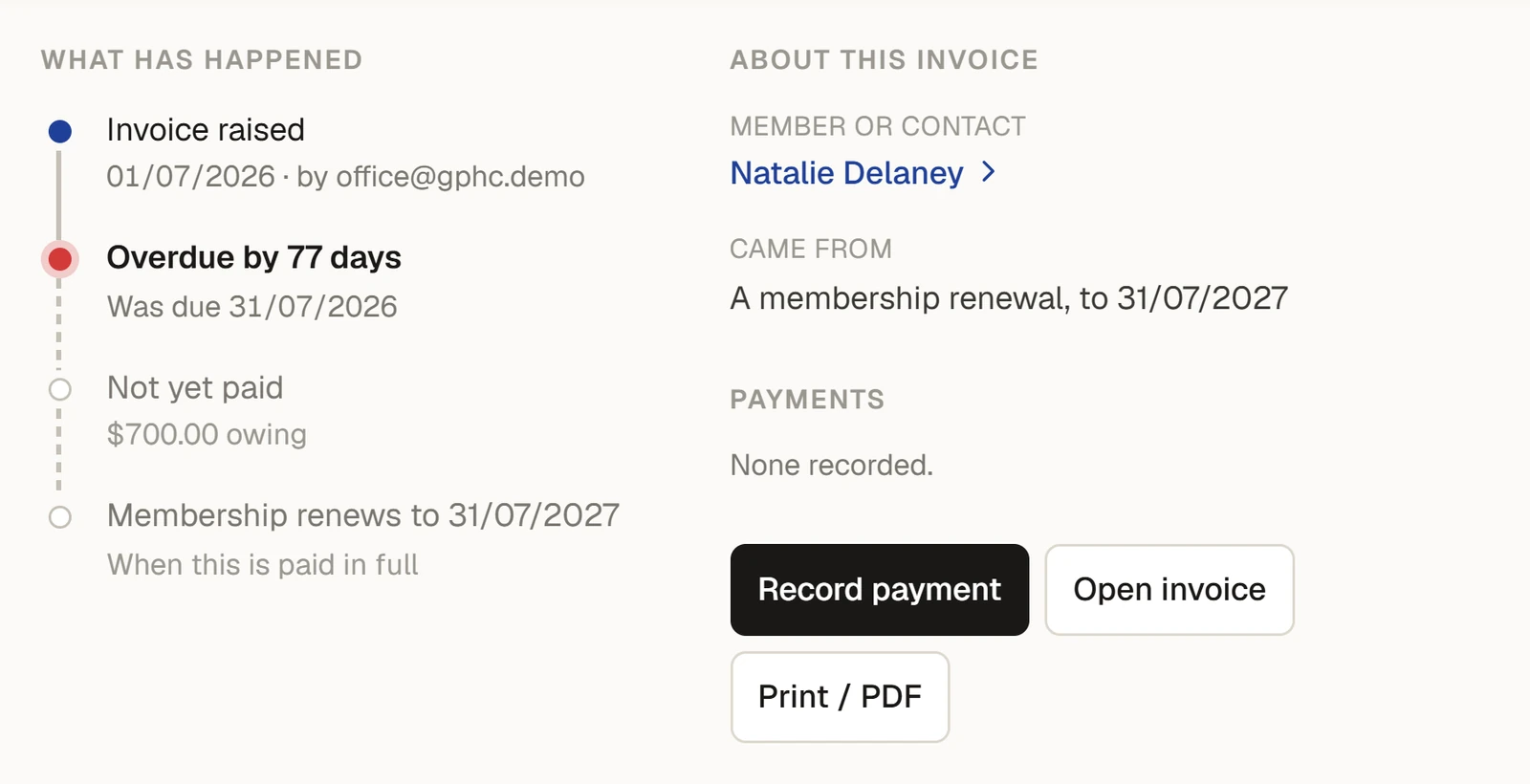
What has happened is made from the invoice's own dates and payments: Invoice raised (and who raised it), Last changed, each Payment of … with its method, Fell due, Paid in full, Voided, and for a renewal Membership renewed to …. Below those, in grey, is what is still to come: Due in … days, Not yet paid with the amount owing, and for a renewal Membership renews to … once it is paid in full. An overdue invoice says Overdue by … days.
If the details cannot be fetched, the area says This invoice could not be loaded. with Try again.
Where invoices come from
| Raised by | How |
|---|---|
| The office | New invoice on the Invoices page. See Raise an invoice. |
| Renewals | The Renewals page (), or automatically for members on Auto renew and invoice. Paying a renewal invoice in full moves the member's expiry to the new date and makes them Active. See Raise renewal invoices. |
| Monthly membership | One invoice a month for a household that pays monthly, a line for each person. See Paying yearly or monthly: how it works. |
| Membership applications | The first invoice when the committee's election is recorded. See Record the committee's election. |
| Functions | The deposit and balance of a function hire. See What Functions does. |
| Classes | Term fees, passes, and classes charged to a household's account each month. See What Classes does. |
| The till | A household's bar and shop charges for the month, on one invoice. See Charge to a member's account. |
Each invoice line has a category (membership, court hire, bar and so on) and a GST code. They decide where the income is counted in the reports and on the BAS. See Invoice line categories and GST codes.
What it does not do
- There are no credit notes, and no refunds on an invoice.
- A payment cannot be taken back off an invoice once it is recorded, and an invoice with a payment on it can no longer be changed or voided.
Articles
- Tasks: Raise an invoice, Record a payment, Change or void an invoice, See what is still owing, Print an invoice or save it as a PDF.
- How it works: The reminder schedule, Invoice line categories and GST codes.
- Related: How GST is worked out, and how prices are entered, Why is the GST a cent different from 1/11?, What Bank reconciliation does, What Finance does, See your invoices and receipts.
Last checked in release 2026.10.23, on 23 October 2026.