
How it works
Terms and enrolment
How terms, groups, enrolment, the fee for joining late, the family discount, term invoices, copying a term and re-enrolment work.
Who this is for: Anyone with “Run classes” or “Book and take rolls for anyone” (by default: Administrator, Head Coach, Casual Staff).
A term is a run of weeks a person enrols in once: its first and last day, and any week off. A group is a class that runs for the term, such as Orange ball tennis on Saturdays at 9am. A parent enrols a child in a group once, and the child is booked into every session that is left. Courses and school holiday camps work the same way, without a term.
Where it is
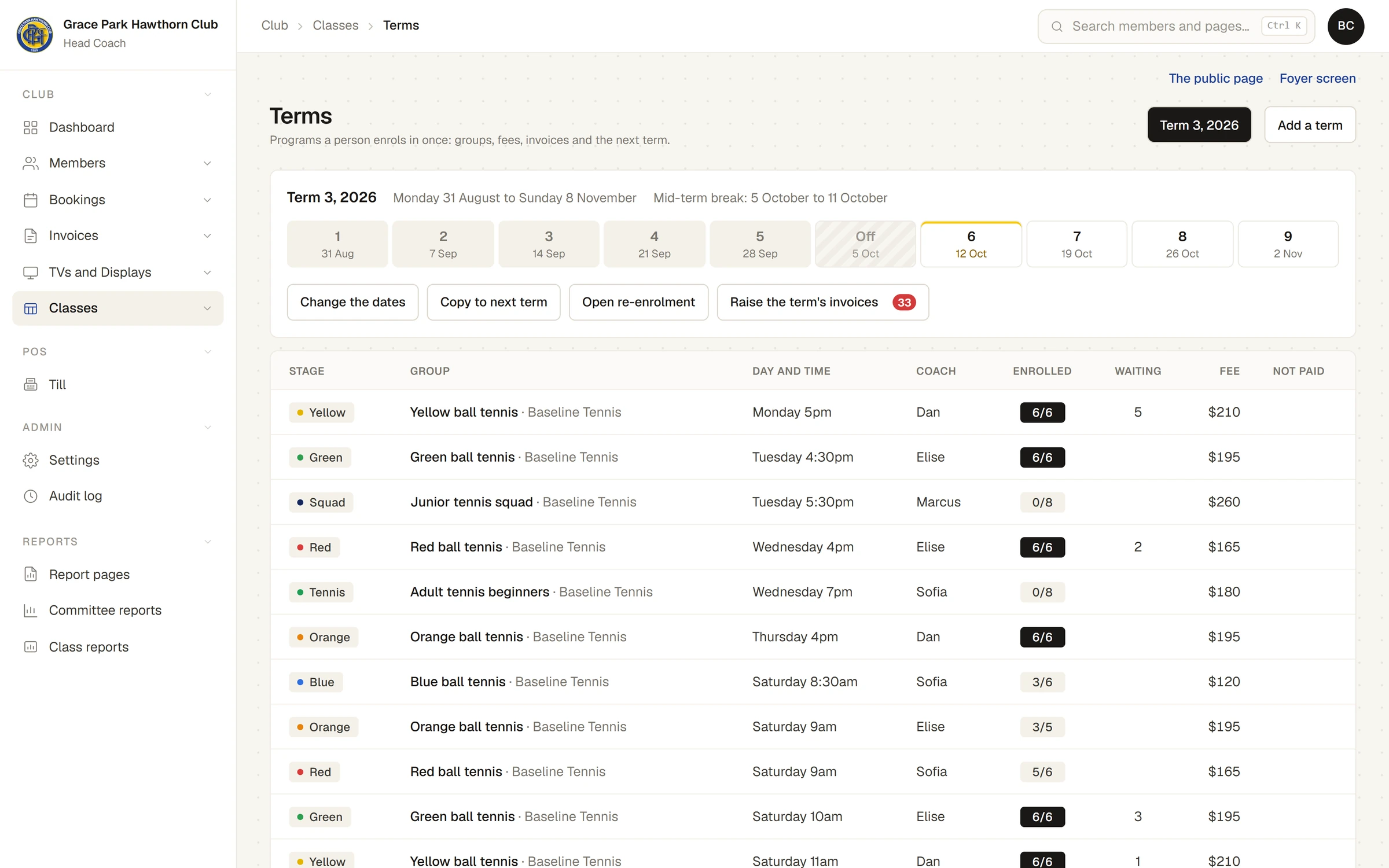
Terms is a button on . It shows one term at a time, chosen by its name at the top, with:
- the term's dates and its break, and a strip of its weeks, numbered, with Off for the break and this week marked;
- Change the dates, Copy to next term, Open re-enrolment and Raise the term's invoices, for whoever runs classes;
- the term's groups: stage, group, day and time, coach, how many are enrolled, how many are waiting, the fee, and how many have not paid;
- Invoices raised for this term, once there are some.
Add a term asks for its name, first day, last day, and a week off. Groups are put into a term with New class: choose For a term in step 2. See Make a class and put it on the timetable.
Enrolling
A parent enrols from Enrol for a term, a child at a time or several children in one go: see Enrol your child for a term. The office can enrol someone too: press a group's row on Terms, then Enrol someone, find the person and press Enrol.
Each child is checked against the group's ages on the term's first day. A child who is too young or too old for a group is told so, for example Lily cannot join: juniors 8 to 10.
The fee for joining late
Joining after the term has started costs the term fee for the sessions that are left: the fee times the sessions left, divided by the sessions in the term, rounded to the dollar. For example, joining a $195 group in week 6 of 9 with 4 sessions left costs $87. The enrolment says so: Joining in week 6: 4 of 9 sessions.
The family discount
The second and later people of a household in the same term, course or camp get the family discount off their fee, taken from the cheaper fees. Adults count as well as children. The enrolment shows it, for example Family discount, 10%: $9 off.
A full group
A full group takes the child onto its waitlist, which costs nothing. When a place comes up, it is offered to the first person waiting and held for two days. The parent takes it from My classes. A place not taken by then goes to the next person.
A group's page
Press a group's row on Terms. Its page lists each child with their age, their attendance session by session, how many they came to, their fee, and whether it is Not invoiced, Not paid or Paid. A child with a medical note is marked.
- Enrol someone puts another child in the group.
- Roll for the next session opens its roll.
- Withdraw, then press again, takes a child out of the group. Their coming sessions are cancelled.
- Places held for current students and Waiting, in order show below, with Confirm for them beside a held place.
Missing a session
A parent who says ahead that a child will miss a session presses Cancel on it. The panel asks Tell the coach … cannot come?, and the button is Yes, away for this one. The term fee does not change. If they told the club far enough ahead, the child gets a make-up credit to use in another session at the same stage. See Passes, credits and make-ups.
Term invoices
Term fees for groups whose provider has the club collect the money go on invoices, raised by the term:
- On Terms, press Raise the term's invoices. The count beside it is how many households have enrolments not yet invoiced.
- The panel lists one invoice a household, with a line a child, for example Aisha: Orange ball tennis, Thursday 4pm (6 of 9 sessions), less $13 family discount: $117. Nothing is made until you press the button.
- Press Raise 12 invoices.
Each household's head gets an invoice, and an email saying it is ready. Enrolments made later appear in the panel next time. Groups run by a business that collects its own money are not invoiced.
When a family pays, press Mark as paid, then Press again: paid, beside its invoice under Invoices raised for this term, or record the payment on the Invoices page; Sports Club OS notices a payment recorded there.
Raising term invoices and marking them paid also needs permission to raise invoices and record payments. The Head Coach has both by default.
The next term
Copy to next term
- Press Copy to next term.
- Type the new term's Name, First day, Last day, and a week off (A week off, from and to).
- The panel lists every group that will be made, on the same day and time, with the sentence of its dates, for example Every Saturday at 9am from 28 November, 9 sessions, not 2 January.
- Press Make the new term.
The groups are made with no one in them.
Open re-enrolment
Once the next term has been copied from this one, Open re-enrolment on the new term offers each current student the same group first. Their place is held for a number of days, then opens to everyone. The panel lists who will be offered what. Press Hold the places and tell the parents.
Each parent is told, for example "Mia's place in Orange ball tennis, Saturday 9am for Term 4 is held until 2 November. Confirm it in My classes." The place shows on their My classes under Needs an answer. A place not confirmed by then is released and the parent is told.
If the term was not copied from another, the panel says This term was not copied from another, so there are no current students to offer places to. Copy it to the next term first.
What it does not do
Last checked in release 2026.10.23, on 23 October 2026.