
How to
Open and close a till session, and count the drawer
Count the float into the drawer to open a till session, record cash paid in or out, and close it with a blind count that shows the variance only afterwards.
Who this is for: Anyone with “Use the till” (by default: Administrator, Head Coach, Casual Staff, Bar Manager, Bar Staff).
A till session runs from the float going into the drawer to the drawer being counted. Cash is taken only while a session is open on that till, so each drawer's cash can be checked against what was sold. When you close, you count the drawer before the till tells you what it should hold.
Before you start
- You need to be able to use the till. The Bar Staff, Bar Manager, Casual Staff and Head Coach roles can by default.
- Check the till's name at the top of the page, beside Till. Each till has its own session. On a computer that is not set up as a PIN till, press ··· at the top right, then Which till is this?…, and choose it. The choice is kept in that browser.
- Opening and closing a session needs the connection.
Open a session
- Open . Beside the till's name, the bar says No session: open one.
- Press it. The dialog Open a session on Bar (or your till's name) asks you to count the float into the drawer, note by note.
- For each note and coin, type how many there are, or press + and −. The Float total adds up as you go.
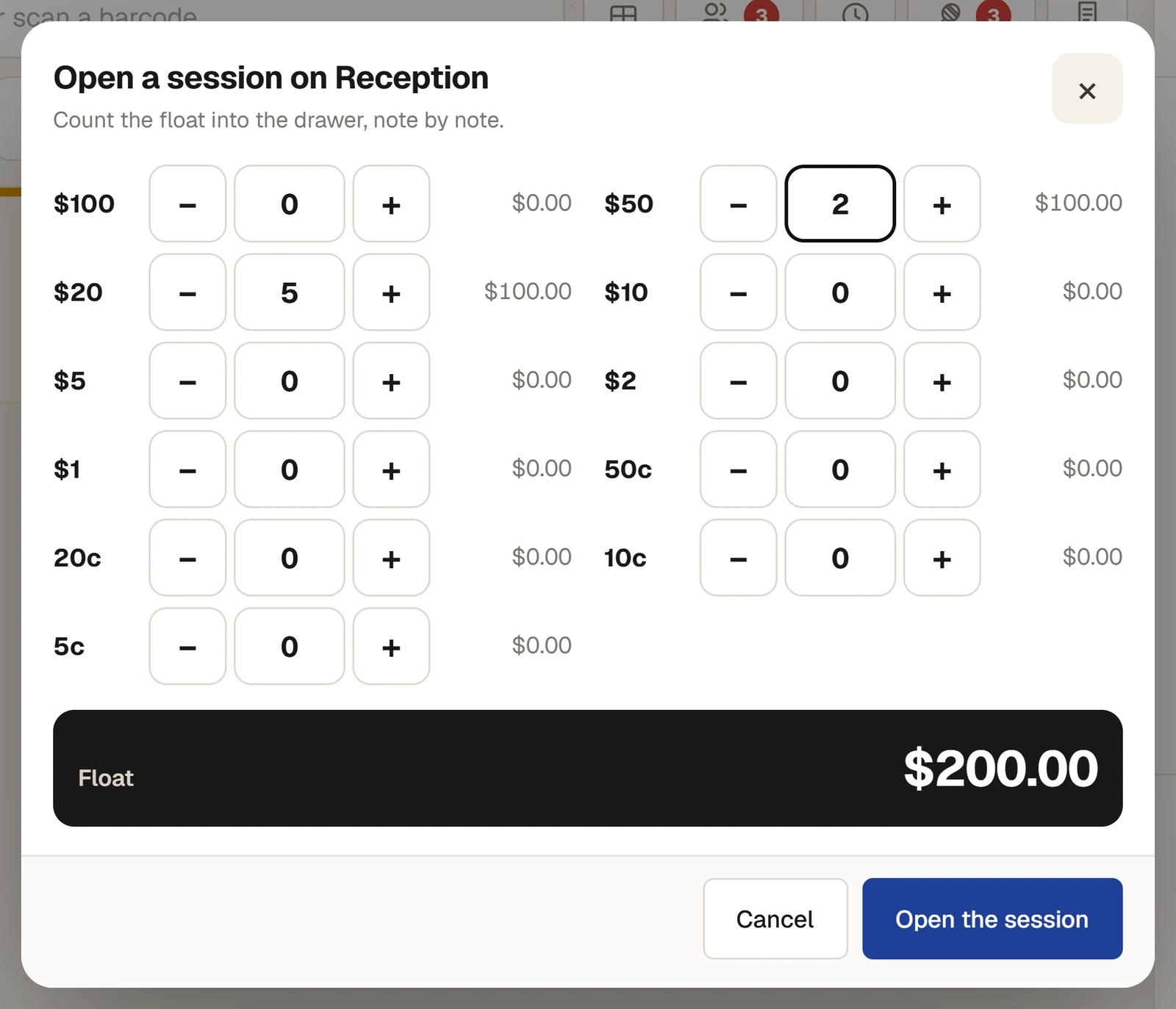
- Press Open the session. A message says, for example, Session open with a float of $200.00, and the bar now says Session open with the time.
A till has one session open at a time. If someone has already opened one, the till says so, for example Bar already has a session open, by Ada Admin.
Cash paid in or out
When cash goes into or comes out of the drawer for something other than a sale, record it so the count still adds up.
- Press ··· at the top right, then Cash paid in… or Cash paid out….
- Type the amount, and choose or type what it is for: More change or Float top-up going in; Ice, Milk and supplies, Change to the office or Cleaning going out.
- Press Record it. It is recorded on the session with the reason and your name.
For anyone who can: “Voids, refunds and overrides”
Open the drawer (no sale)… in the same menu opens the drawer without a sale, with a reason. It is recorded on the session and counted in the cash-up. The drawer opens by itself only on a till with a receipt printer that opens it; otherwise open it by hand.
For anyone who can: “See sales and till sessions”
X read (figures so far) in the same menu shows the session's figures without closing it: what was taken by each method, what was sold by category and by kind of sale, refunds, voids, and the cash the drawer should hold.
Close the session
- Press ···, then Close the session…. If the sale on screen is not finished, the till asks whether to put it on a tab or clear it first.
- The dialog Close the session: count the drawer says: Count everything in the drawer before seeing what was expected. The till shows it after. Count every note and coin, as when opening.
- If there is anything the manager should know, type it in Note for the manager (optional).
- Press Close and show the Z read.
The till then shows The session is closed: what the drawer was Expected to hold, what was Counted, and the Variance, with the Z read below. A manager signs it off on Till sessions. See Sign off a cash-up.
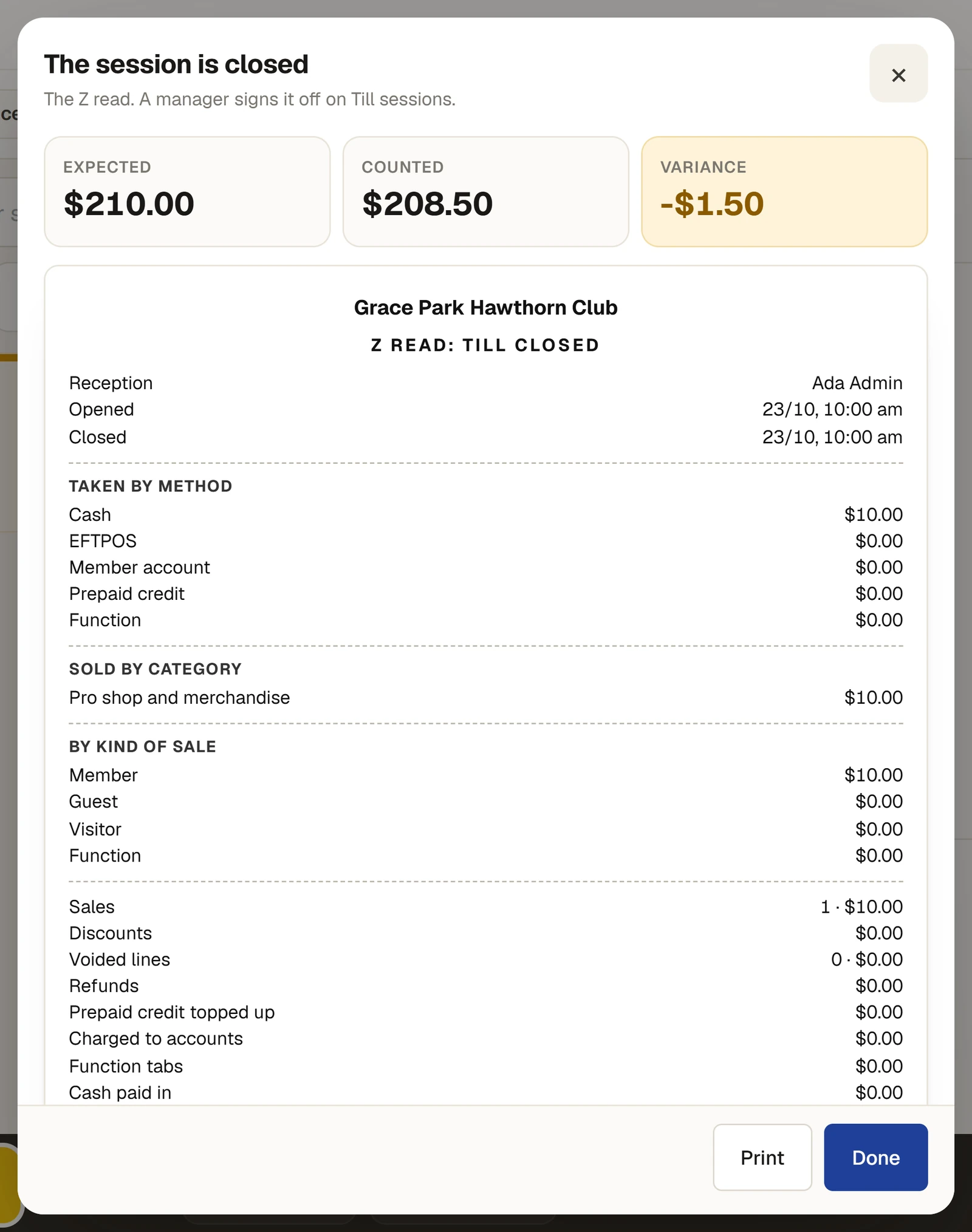
Press Print to print the Z read, or Done.
What the drawer should hold
The float, plus the cash taken on this session's sales (less the change given), less cash refunded from this drawer, plus cash paid in, less cash paid out. A payment corrected from cash to EFTPOS, or the other way, follows the correction.
Tabs left open at closing
- A visitor's or a guest's tab must be paid before the session closes. The close dialog lists them under Tabs to pay first; press one to pay it.
- A member's tab goes onto their household account, even if that takes the account over its limit. The cash-up says so. If it cannot go on the account at all (the membership is no longer current, for example), the till says why: take payment for it, then close.
- A function's tab is left open. The till warns that it is still open.
If something goes wrong
- "This is Ada Admin's session: they close it, or a manager does." A session is closed by whoever opened it, or by someone who may give overrides.
- "This till holds 2 sales not yet sent. Wait for the connection, then close." The till sold while the connection was down. It sends them first; close once they have gone. See Selling while the connection is down.
- "Open a session to take cash" on the Cash button. No session is open on this till. Open one, or take the payment another way.
Last checked in release 2026.10.23, on 23 October 2026.