
How to
Use the BAS worksheet
See G1, 1A and G3 for a quarter or a month, check every sale behind them, mark the period lodged once the club has lodged, and set the basis.
Who this is for: Anyone with “See the finance figures” or “GST codes, price entry and accounts” (by default: Administrator, Treasurer).
The BAS worksheet gives the sales side of the club's business activity statement for a quarter or a month: total sales (G1), GST on sales (1A) and GST-free sales (G3), with every sale behind them. Once the club has lodged its BAS, mark the period lodged here, so any later change to it shows up.
Before you start
- You need to be able to see the finance figures. Marking a period lodged, reopening one and changing the BAS settings need the permission to change GST codes, price entry and accounts. The Treasurer and Administrator can do both by default.
- Check the BAS settings with the club's accountant first (below).
Read the worksheet
- Open . It opens on the period you are in now, marked (this period).
- Choose the period under Period, for example July to September 2026 (Q1 2026–27). Quarters are calendar quarters (January to March, April to June and so on), numbered the ATO's way from the start of the club's financial year.
- The line under the heading says the period and its basis, for example on the cash basis: GST on money received in the period.
- Read the four figures:
- G1 Total sales: every sale, taxable, GST-free and input-taxed, including or excluding GST as the club has chosen. Anything coded "not a sale" is left out.
- 1A GST on sales: the GST in those sales, from invoices and the till.
- G3 GST-free sales: the GST-free part of G1. Simpler BAS does not ask for it.
- 1B GST on purchases: Not here.
- Check the sales behind them: By where it came from (invoices, the till, and money imported from the system the club used before), By kind of income, and Every sale in the period, each with its date, reference, category, GST code, amount and GST. Show more lists more.
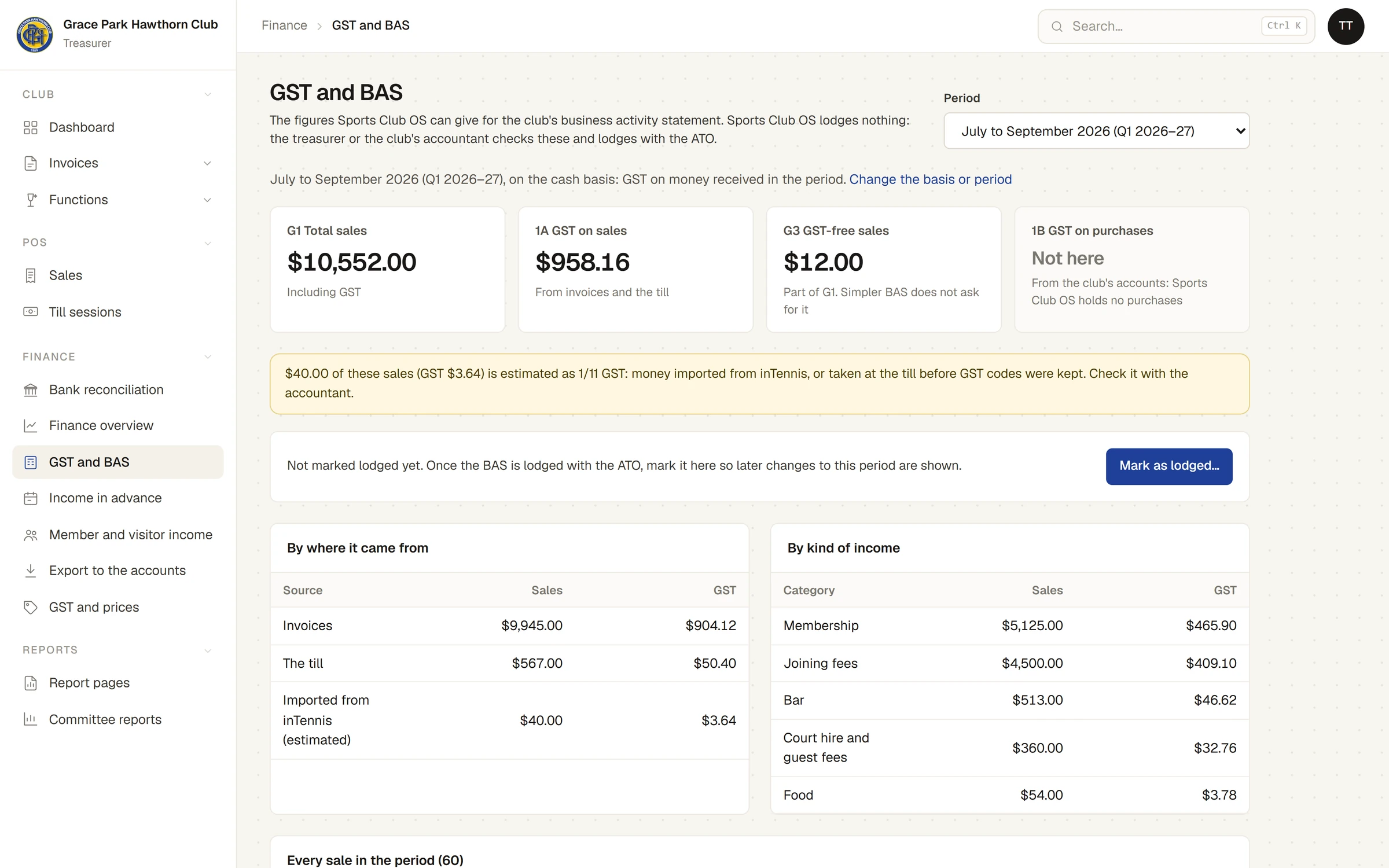
- A warning says how much of the period's sales has estimated GST: money imported from the system the club used before, or taken at the till before GST codes were kept, whose GST is taken as 1/11. Check it with the accountant.
- If the club counts GST only from a set day, a warning says how many items before it are left out.
- At the foot, GST registration gives the sales of the last twelve months excluding GST (input-taxed sales left out), against the $150,000 threshold for not-for-profits.
Mark a period lodged
Do this after the club has lodged its BAS with the ATO.
- Choose the period. It must have ended. A period still running says This period has not ended yet: the figures are so far.
- Press Mark as lodged…. Sports Club OS asks, for example, Mark July to September 2026 (Q1 2026–27) as lodged with G1 $10,552.00 and 1A $958.16? This records that the club lodged it; Sports Club OS does not lodge anything.
- Press OK.
A message says July to September 2026 (Q1 2026–27) marked lodged, and the period shows Marked lodged with the day, who marked it, and its G1 and 1A. The figures are kept as they stood.
Changes to periods already lodged
A lodged period's figures can still change afterwards: a payment recorded later with an earlier date, or an invoice changed or voided. The period then says The figures have changed since: the next period's worksheet lists the difference.
A later period's worksheet lists each lodged period that has changed under Changes to periods already lodged: its G1 and 1A then and now, the difference, and what was recorded since. Include the difference in this period's BAS, or ask the accountant.
Reopen a period
Only the latest period marked lodged can be reopened.
- Choose it and press Reopen….
- Type why it is being reopened, and press OK.
A message says Reopened. The period can be marked lodged again later, with the figures as they then stand.
The BAS settings
On , under BAS:
- Basis: Cash: GST when money is received (the starting choice), or Accrual: GST when invoiced (or paid first). On the accrual basis an invoice's GST falls on the day it was issued, or the day it was first paid if that was earlier, and the till's sales on their day.
- Period: Quarterly (the starting choice) or Monthly.
- G1 total sales: Including GST (the starting choice) or Excluding GST.
- GST counted from: leave it empty to count everything. Items before this day are left out of the BAS.
Press Save. A change of basis, period or G1 takes effect from the start of the next period, so a period is never worked out two ways. The message says when, for example Saved: from 01/01/2027, and the change waiting is shown under the settings. Setting them back to what applies now drops the waiting change.
If something goes wrong
- "A period can be marked lodged only once it has ended." Choose a period that has finished.
- "… is already marked lodged." Someone marked it already.
- "Only the latest period marked lodged (…) can be reopened." Reopen the later one first.
Last checked in release 2026.10.23, on 23 October 2026.