
How it works
Missed monthly payments: what happens and what does not
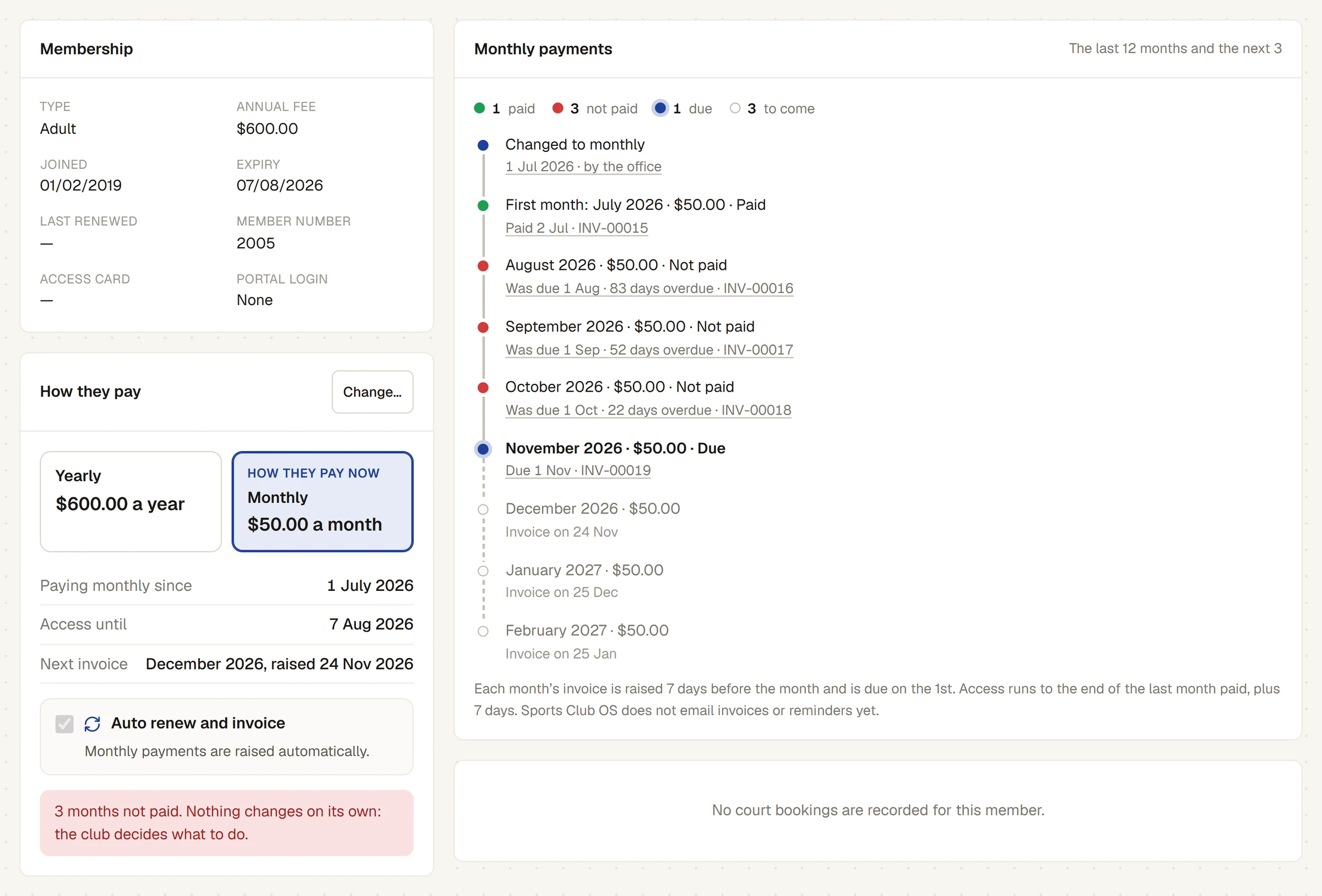
When a monthly invoice is not paid, the member's access stops at the end of their last paid month plus 7 days. Nothing is emailed and nothing else changes.
Who this is for: Anyone with “See members and contacts” or “See all invoices and payments” (by default: Administrator, Head Coach, Casual Staff, Reporting, Treasurer).
A monthly invoice that is still unpaid after its due date, the 1st of its month, is a missed month. Sports Club OS does very little about it, on purpose: the club decides what to do.
What happens
- Access stops at the end of the last month paid, plus 7 days. The member's Access until date does not move on. Once it passes, they show as Expired, and online booking pauses, as it does for a yearly member who has not renewed.
- Only an unbroken run of paid months counts. If September is missed and October is paid, access still stops 7 days after August: paying a later month does not carry them past the missed one.
- The month shows as Not paid in the member's Monthly payments timeline, for example September 2026 · $50.00 · Not paid, Was due 1 Sep · 52 days overdue, and is counted under not paid at the top.
- Once 2 or more months are not paid, the member's page says so under How they pay, for example: 3 months not paid. Nothing changes on its own: the club decides what to do.
- The next months are still raised. Invoices keep coming, a month at a time, while their status is Active.
What does not happen
- Nothing is emailed or texted, to the member or the office.
- Their status is not changed. They stay Active, shown as Expired once their access date passes.
- No invoice is voided, and no late fee is added.
- Nothing is charged to a card. Sports Club OS does not take card payments.
When the missed month is paid
Record the payment on the invoice as usual, on the Invoices page. Access then moves on to the end of the unbroken run of paid months, plus 7 days. If they have also paid the months after it, their access jumps to the end of those, and they show as Active again.
What the club can do
- Contact the member yourself. Their page lists the unpaid invoices under Invoices & payments.
- Set their status to Suspended, Lapsed or Cancelled when the club decides to. Monthly invoices are raised only for people whose status is Active.
- Move them back to yearly, if that is what they want. Unpaid months from the change onwards are replaced; an earlier missed month stays owing. See Change how a member pays.
- Find everyone behind with a tag rule: N or more monthly payments missed, or an invoice D or more days overdue. See How tag rules work.
- See what is owing on .
Last checked in release 2026.10.23, on 23 October 2026.