
How it works
The function's staff on the roster
Confirming a function puts an open slot for its staff on the weekly roster. What the function changes on it, and the Roster tab.
Who this is for: Anyone with “See functions and enquiries” or “Run functions” or “Run the bar and events roster” (by default: Administrator, Bar Manager, Functions, Reporting, Treasurer).
When a function is confirmed, Sports Club OS puts an open slot for its staff on the weekly roster. It is an ordinary slot, so the roster manager can fill, rename, resize, move or delete it like any other: see How shifts and slots work. The function keeps the slot's date, times, name and size in step with itself. Everything else about the slot, above all who works it, belongs to the roster.
The slot it makes
Confirming the function makes, on the weekly roster:
- an event for the function on its day, and under it
- an open slot named after the function, for position Bar (or Events, if the club has no Bar position), from the function's Access from time on its sheet (or its start) to its finish, with as many places as People needed, which is 2 unless you change it.
The places are drafts: no staff member sees them until the roster manager fills them and publishes the week. See Publish the week's roster.
What the function changes, and what it leaves alone
The function changes only its own date, times, name, event and People needed, and only when they change on the function. Moving the function's date moves the slot; changing People needed by one makes the slot one place bigger or smaller, never smaller than the places filled.
Everything else is the roster manager's: who is on it, places added, a new name, time or position, or deleting the slot. The function never undoes those.
- Cancelled or lost: the slot is deleted as the roster deletes any slot. Draft places go; published places wait as cancellations until the week is next published, so the people on them are told then.
- Completed: the slot is left as it was.
- A day that has passed is never changed.
The Roster tab
On the function, the Roster tab lists every shift rostered for it: the slot's places, and any other shift the roster manager put under its event. Each row has the person (or Open), the position, the times, the shift's name, and where it stands: Draft, not published, awaiting an answer, confirmed, can't work it, changed, open or cancelled. A number on the tab shows the places not filled.
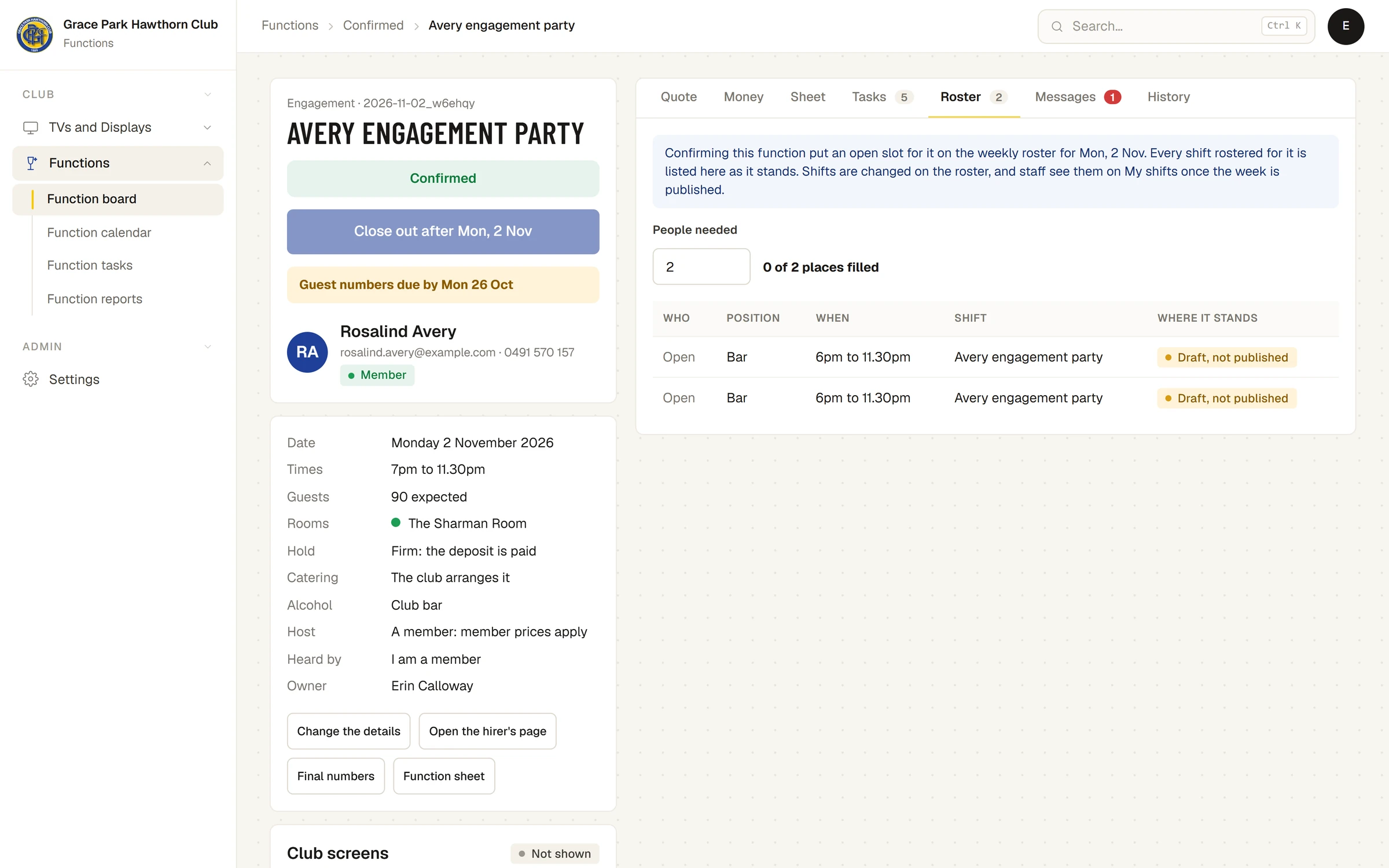
- People needed: type the number, from 1 to 20. Someone who can run functions can change it. It is saved when you press Enter or leave the box.
- Its count reads, for example, 0 of 2 places filled.
- Build it on the roster opens the weekly roster at the function's week. It shows for someone who can run the roster.
Shifts are changed on the roster, not here. Staff see them on My shifts once the week is published.
Warnings
- In the week before the function, the board shows Staff not yet rostered, or, for example, 1 staff place not filled.
- The function sheet says whether staffing is complete. See The function sheet.
What it does not do
There is no staffing rule by guest numbers. People needed is the number you set.
Last checked in release 2026.10.23, on 23 October 2026.