
How to
Print an invoice or save it as a PDF
Open an invoice as it prints, headed Tax invoice or Tax invoice / Receipt, and print it or save it as a PDF to send.
Who this is for: Anyone with “See all invoices and payments” (by default: Administrator, Head Coach, Casual Staff, Reporting, Treasurer).
Every invoice can be opened as it prints: the club's details, who it is billed to, each line with its GST, the total, and how to pay. Print it, or save it as a PDF to send by email yourself.
Open the invoice to print
- Open , or .
- Find the invoice, and either:
- open its row out with the arrow at its start and press Print / PDF, or
- press the row to open its side panel and press Print / PDF.
- The invoice opens on a page of its own, with Back and Print or save as PDF above it.
- Press Print or save as PDF. Your browser's print window opens. Choose a printer, or choose to save as PDF.
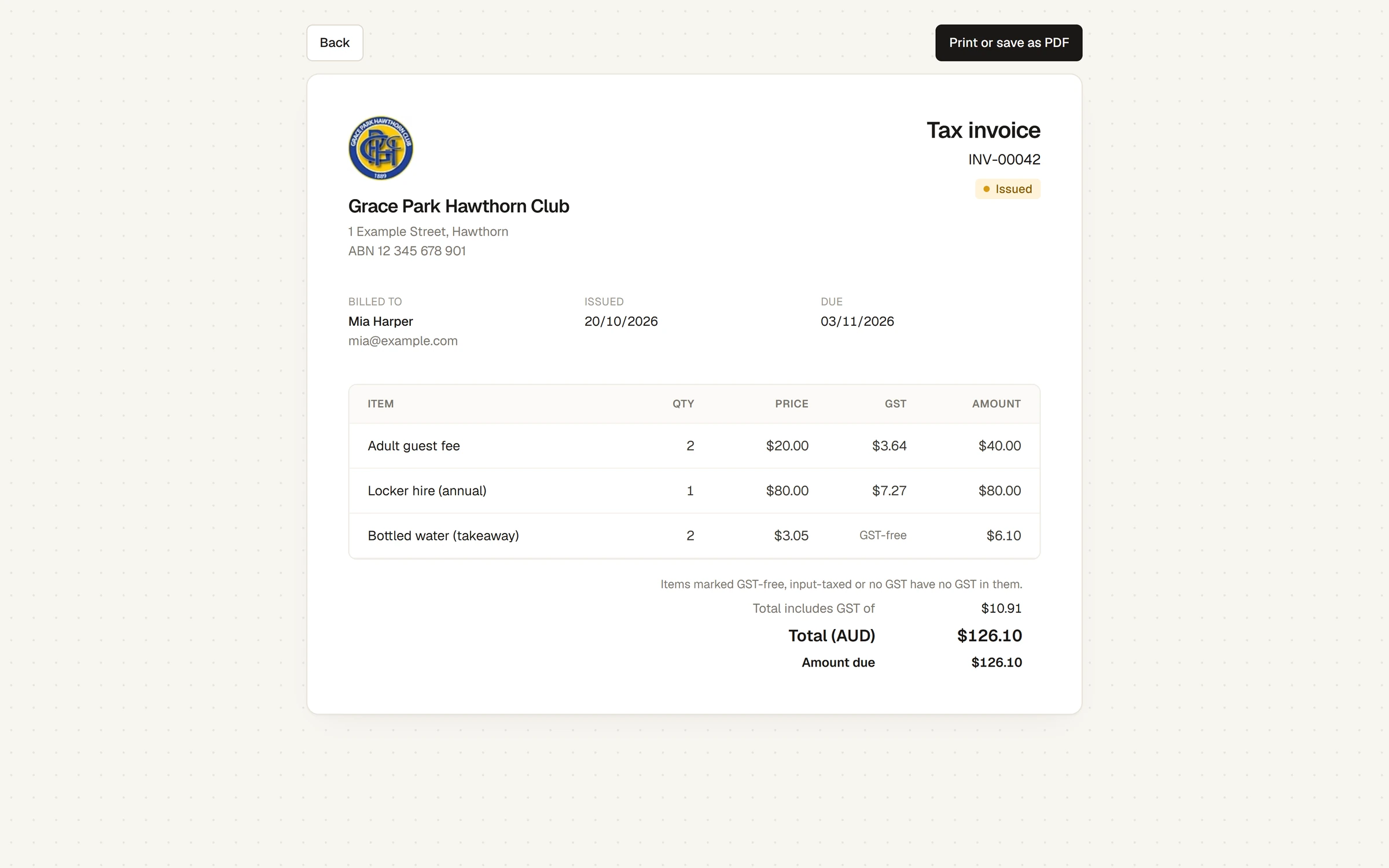
Press Back to return to the list.
What the invoice shows
- The club's logo, name, address and ABN, and its email address and phone number if the club has set them.
- The heading: Tax invoice, Tax invoice / Receipt once it is paid in full, or Draft invoice for a draft. Then its number and its status.
- Billed to, with their email address, and the Issued and Due dates.
- Each line with Qty, Price, GST and Amount. A line that has no GST in it says GST-free, Input-taxed or No GST in the GST column, and a note under the lines says Items marked GST-free, input-taxed or no GST have no GST in them.
- Total includes GST of, Total (AUD), what has been Paid, and the Amount due while it is unpaid.
- Payments received, each with its date, amount and method.
- Notes on the invoice, if any.
- How to pay, with the club's bank details, while it is unpaid; and the club's footer, if it has one.
Members' own copies
Members open and print their own invoices from My invoices & receipts, the same way. See See your invoices and receipts.
If something goes wrong
- A message replaces the invoice. The invoice could not be found, for example because the address was copied wrongly. Open it again from the list.
Last checked in release 2026.10.23, on 23 October 2026.