
How to
Create a competition and take entries
Set up a ladder, box league, round robin or knockout, add players or let members enter, approve requests, then close entries and make the draw.
Who this is for: Anyone with “Run competitions” (by default: Administrator, Sports Convener).
A competition starts with entries open. You add players, or members enter themselves, or members ask and you approve. Nothing is drawn until you close entries: then the draw, boxes, fixtures or ladder are made from the club ratings, and play starts.
Before you start
- You need to be able to run competitions. The Sports Convener and the Administrator can by default.
- Decide the kind of competition and its scoring. See Ladders, boxes, round robins and knockouts.
- For a tournament of several grades or sports, make it part of an event. See Events with several grades and sports.
Create the competition
- Open and press New competition.
- Under Part of an event?, leave No: it stands on its own, choose an event, or choose A new event… and type its name.
- Under Sport, choose Squash, Tennis, Padel, Pickleball, Badminton or Snooker, and Singles or Doubles. Padel is doubles only and snooker singles only. A sport the club has switched off on , Scoring, is not listed.
- Under What kind, choose Ladder, Box league, Round robin or Knockout tournament.
- Type a number of players beside What you will get with. The panel shows what that would give: for a knockout, the size of the draw, the byes, the rounds and matches, and about how long it would take on the courts.
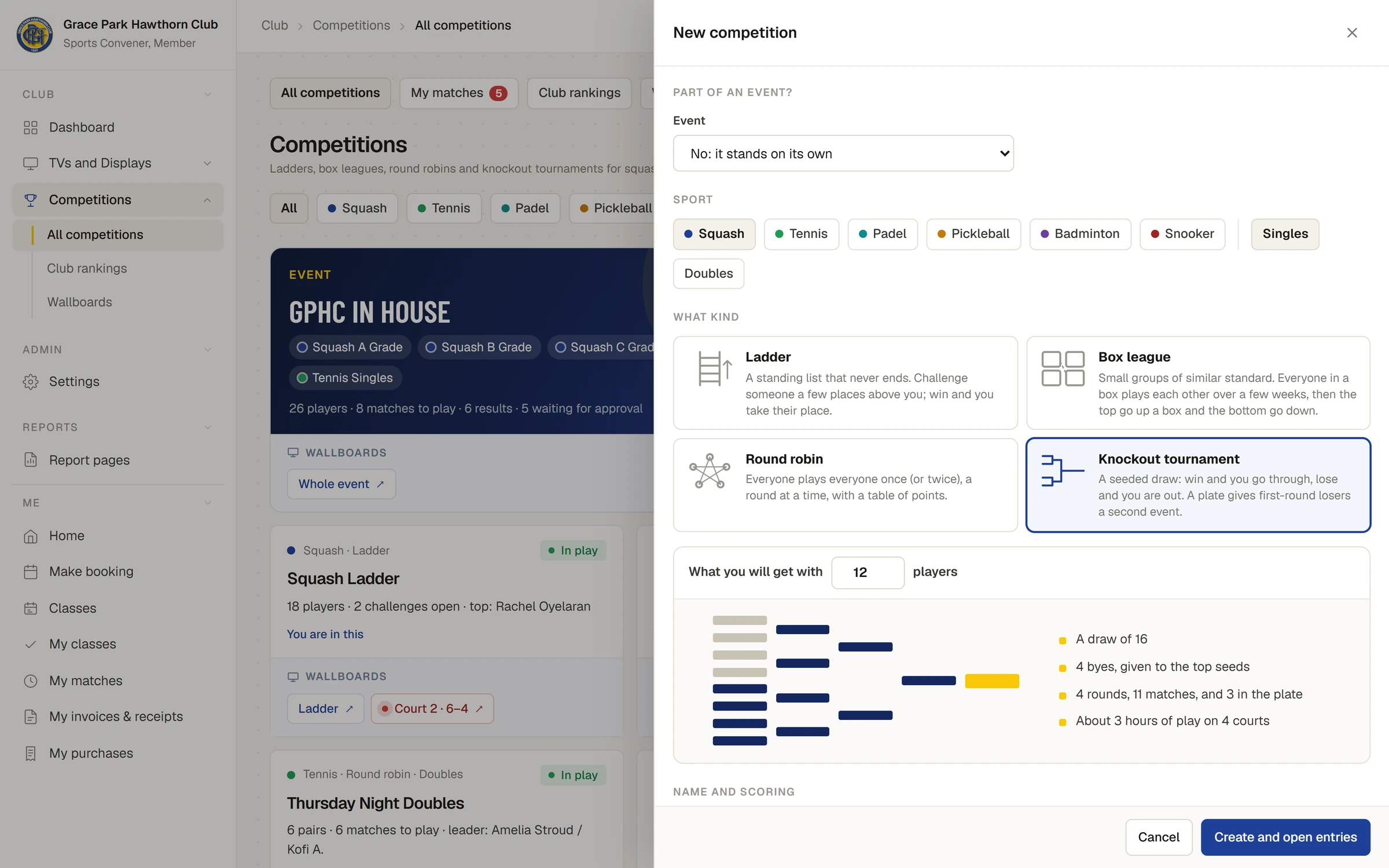
- Under Name and scoring, type a Name (left empty, it is the sport and kind, such as "Squash Knockout tournament"), and choose A match is. Squash, tennis, padel, pickleball and badminton competitions start with the club's default for the sport: its rulebook (for squash, the World Squash Singles Rules 2025), or the club's own rule. Only the choices your club offers are listed, and a setting with one choice is not shown. Where the club offers them, you can also choose the sport's other settings: for squash, what happens at 10-all, Between games, From the warm-up to play, When a player retires, A walkover in the table, Video review and Serves; for the other sports, settings such as At deuce and When a player retires. The line under them says the rules in words, for example Rules: Club rule: 90 seconds between games. The options are set on , Scoring: see Choose the club's scoring rules.
- Tick Members ask to enter, and I approve each one if you want to approve each entry. It is ticked to start with inside an event.
- Under Rules, the usual ones are filled in. Change only what you need.
- Press Create and open entries (or Add to the event). The message says Created; entries are open, and the competition opens on its Players tab.
Take entries
- Add players yourself: press Add from the member list. It lists members whose membership is active, strongest first, each with their member number and club rating in this sport. Type to find a name or number, tick the players, and press Add and the number, for example Add 2. The message says 2 added. For doubles, tick two at a time: each two you tick become a pair.
- Members enter themselves: they press Enter on the competition. Singles only; you enter doubles pairs.
- Members ask to enter: with approval on, each request appears on the Players tab under Waiting for your answer, with the member's club rating beside the ratings already in the competition and the day they asked. Requests also appear on your My matches tab, counted in red.
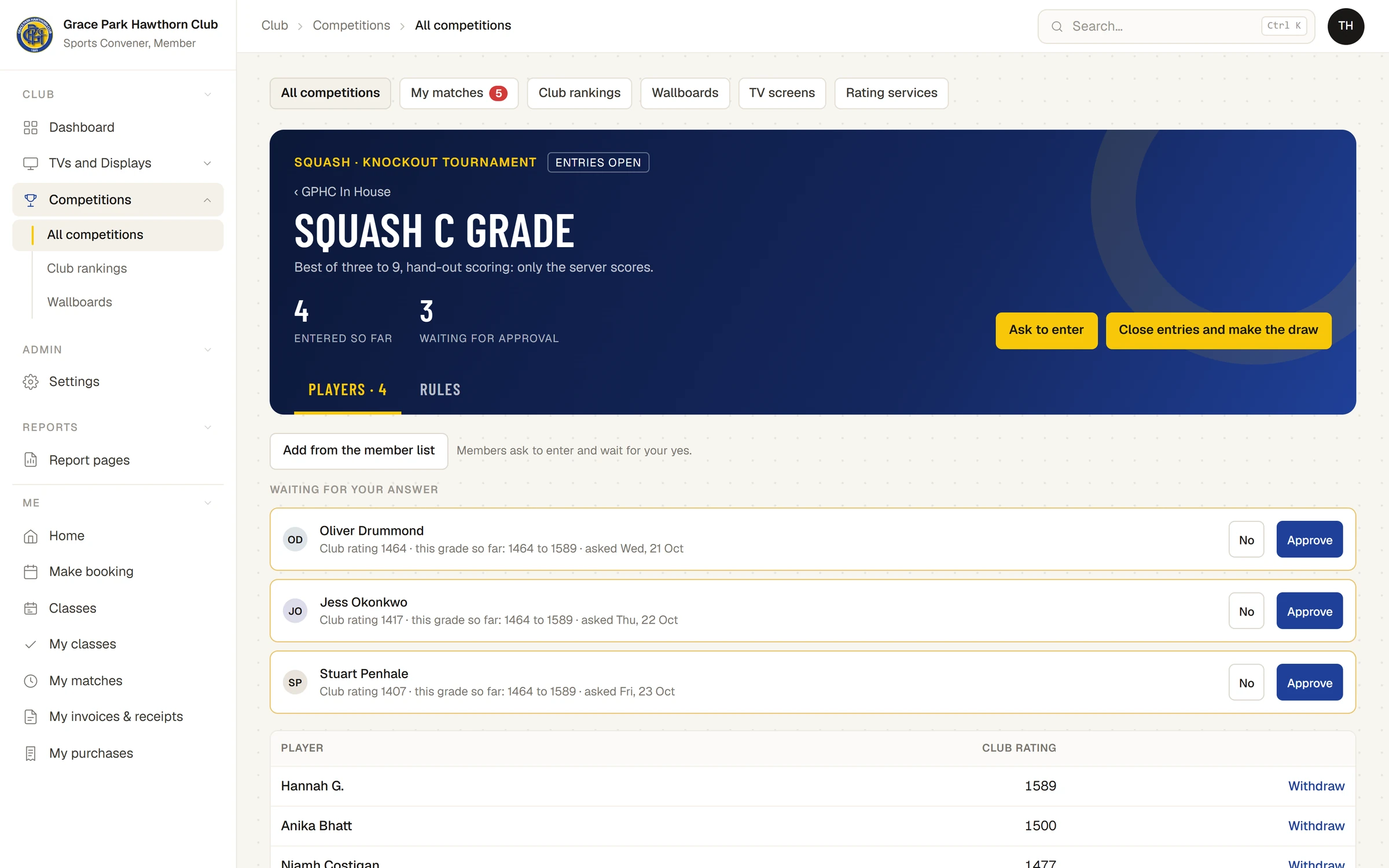
For each request press Approve or No. In an event you can instead choose Put in another grade… to approve them into another grade of the same sport that is still taking entries. The message says, for example, Oliver Drummond is in Squash C Grade.
Withdraw beside a player takes them out while entries are open.
Close entries and make the draw
Press the gold button at the top. It says what it will do:
- Close entries and make the draw for a knockout: The draw is made.
- Close entries and make the boxes for a box league: Boxes made from the club ratings.
- Close entries and make the fixtures for a round robin: Fixtures made.
- Open the ladder for a ladder: The ladder is open.
A knockout or a ladder needs at least 2 entries, and a box league or round robin at least 3. Every request must be answered first.
Once a knockout or a round robin has started, nobody can be added. Players can still join a ladder or box league that is under way: at the bottom of the ladder, or in the bottom box next round.
While it runs
- Set each match's time and court: see Set match times in the order of play.
- Close each round of a box league with Close round (press again to confirm).
- Correct or remove any result, or record a walkover: see Enter a match result.
- Put its board on a TV: see Wallboards and putting a board on a TV.
- The Rules tab has the rules in words and What has happened, the competition's log of results and changes.
A knockout finishes when every match has a result, and a round robin when every match has been played. The winner shows on the competition's card.
If something goes wrong
- "3 still waiting for your answer." Answer every entry request before closing entries.
- "This needs at least 3 entries." Add more players.
- "Only members whose membership is active can be entered." The member's membership has expired or is not active.
- "The draw is made, so nobody can be added now." A knockout or round robin has started.
- "This competition has started. Record a walkover for any match that will not be played." A player cannot be taken out once a knockout, box league or round robin has started.
- "Doubles: choose players two at a time, in the order they pair up." Tick an even number of players.
Last checked in release 2026.10.28, on 28 October 2026.