
How to
Enter a match result
Type in a match's score after it is played. It counts straight away, and either player or the convener can correct it later.
Who this is for: Anyone with “Play in competitions” or “Run competitions” (by default: Administrator, Sports Convener, Member).
After a match, either player types in the score. Any member can enter the result of a match that is ready to play and has none, so a friend or a marker can do it too. The result counts as soon as it is recorded: the table, boxes, ladder or draw moves, and so do both players' club ratings.
If the match was scored point by point on a phone, the result is recorded from the phone and you do not need to type it in. See Score a match point by point on a phone. Under Scoring code on the match, the convener or either player can show the match's code and QR code, so someone else can score it on their phone, signed in or not: see Score or watch a match with its code.
Before you start
- A match is ready when both players are known and the competition is in play. A ladder challenge must have been accepted.
- You need to be able to play in competitions (every member can), or run them.
Enter the result
- Open the match: from , or from the competition's Matches tab, draw, boxes or table.
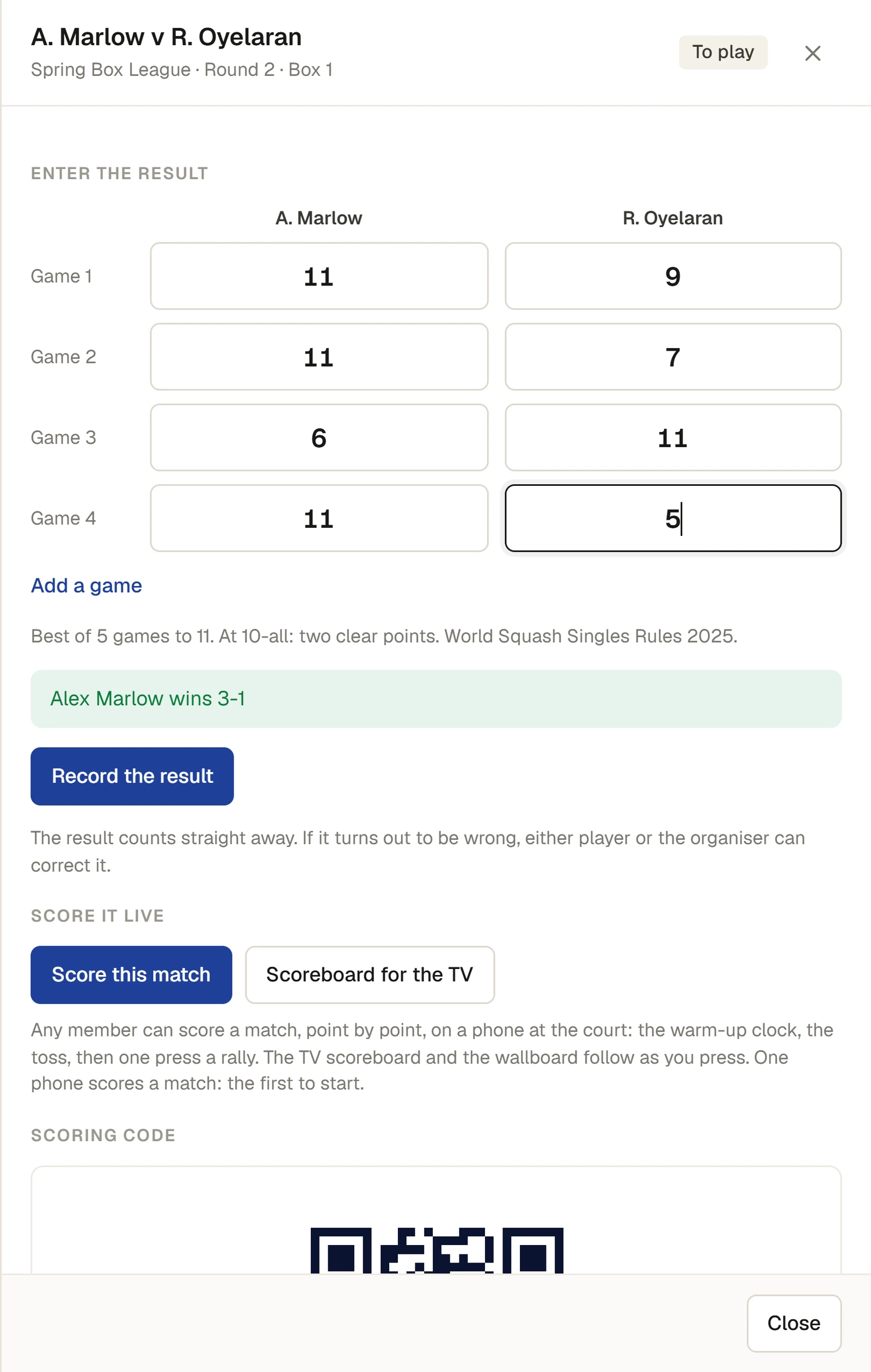
- Under Enter the result, type each game, set or frame, one player in each column:
- Squash: the points in each game, for example 11 and 9.
- Tennis and padel: the games in each set, for example 6 and 4. A match tie-break is typed as its points.
- Pickleball and badminton: the points in each game, for example 11 and 7, or 21 and 18.
- Snooker: one line, the frames each player won.
- Press Add a game (or Add a set) for each one past the first rows.
- Under the rows, the panel checks the score as you type. When it is a complete, possible score it says who won, for example Alex Marlow wins 3-1. Until then it says what is missing, for example Nobody has won 3 games yet.
- Press Record the result. The message Result recorded appears.
The match now shows the score, how far each player's rating moved, the day it was played, and who entered it: entered by and their name, or scored at the court.
Correct a result
A result can be corrected by either player in the match, or by the convener.
- Open the match and press Correct this result.
- Change the score and press Save the correction. The message Result corrected appears, and the match says corrected by and the name.
If the correction changes who won, everything the result did is put right: the table, the boxes, the ladder or the draw, and both ratings. In a knockout this is only possible until the match it led to has been played. After that, correct or remove the later result first.
For the convener
For anyone who can: “Run competitions”
- Remove the result (then Press again to remove it) puts the match back to be played. The message is Result removed; the match is to play again.
- Walkover to either player, under Organiser in an unplayed match, records a match not played. A walkover counts for the competition but not for ratings. A walkover can be changed with It was played: enter the score, or removed with Remove the walkover.
- Every result, correction and removal is recorded in the audit log with who did it and what the score was before.
Retirements and conduct
A match that stopped early because a player retired, or that was awarded for conduct, is recorded from the phone scorer's More menu, which works the score out; see Score a match point by point on a phone. In squash, tennis, padel and badminton the score is kept as played, for example 11-0, 0-3 (retired). Where the competition awards the remaining points (a club option), the game or set in play is finished in the winner's favour and each further game still needed is recorded to nil, for example 11-3, 11-0. Pickleball records a retirement as its rulebook says, and snooker gives the other player every frame still needed. Where a competition awards the remaining points, its Rules tab says so.
If something goes wrong
The panel's checks, word for word, include:
- Game 2: a game is won by two clear points. The score in that game is not possible under the competition's scoring.
- Game 1: games are played to 11. The winner's score is too low.
- Set 1: 6-5 is not a possible set score.
- The match was over after 3 games. A row was typed after the match was already won.
- Best of 3: the winner has 2 frames. For snooker, type the frames each player won.
And from the club:
- "This match already has a result. Correct it instead." Someone entered it first. Open it again and use Correct this result if it is wrong.
- "This match is not ready to be played yet." One player is not known yet, or the challenge has not been accepted.
- "The match this one led to has already been played. Correct or remove that result first." In a knockout, the next round has a result.
- Correct this result is not there. Only the two players and the convener can correct a result.
Last checked in release 2026.10.28, on 28 October 2026.