
How to
Enrol your child for a term (members)
Find the right group for each child on Enrol for a term, see the fees for the sessions left with any family discount, and enrol the whole family in one go.
Who this is for: Anyone with “Book classes for your household” (by default: Member).
Junior groups, courses and holiday camps are enrolled in once, not booked a session at a time. On Enrol for a term you choose a group for each child, see what it costs, and enrol the family together. Each child is then booked into every session that is left.
Before you start
- You need to be a member whose sign-in is linked to your membership. The people in your household are listed by first name.
- A group says the ages it is for. Each child is checked against them on the term's first day.
Choose a group for each child
- Open or , and press the Enrol for a term tab.
- Choose the term at the top, if there is more than one. It shows the week the term is in, for example Week 6 of 9.
- Under the junior pathway, press a colour. Each stage says its ages and what the children learn. A child already at a stage is shown on it, for example Jack is here.
- The stage's groups are listed with the day, time, coach, place, places left and the fee for the sessions left. A child who cannot join says why, for example Lily cannot join: juniors 8 to 10.
- Press Add Jack (or the child's name) beside the group. If the group is full, the button is Waitlist Jack.
- Other programs lists courses and camps, and adult programs, the same way. Add me adds you.
Your enrolment, at the side (at the foot on a phone, with See your enrolment), lists each choice with its fee:
- Joining after the start costs the sessions left, for example Joining in week 6: 4 of 9 sessions, with the full fee struck through.
- The second and later people in the family get the family discount, for example Family discount, 10%: $9 off.
- A full group says Full: join the waitlist. Nothing to pay unless a place comes up. and costs $0.
- Remove takes a choice out.
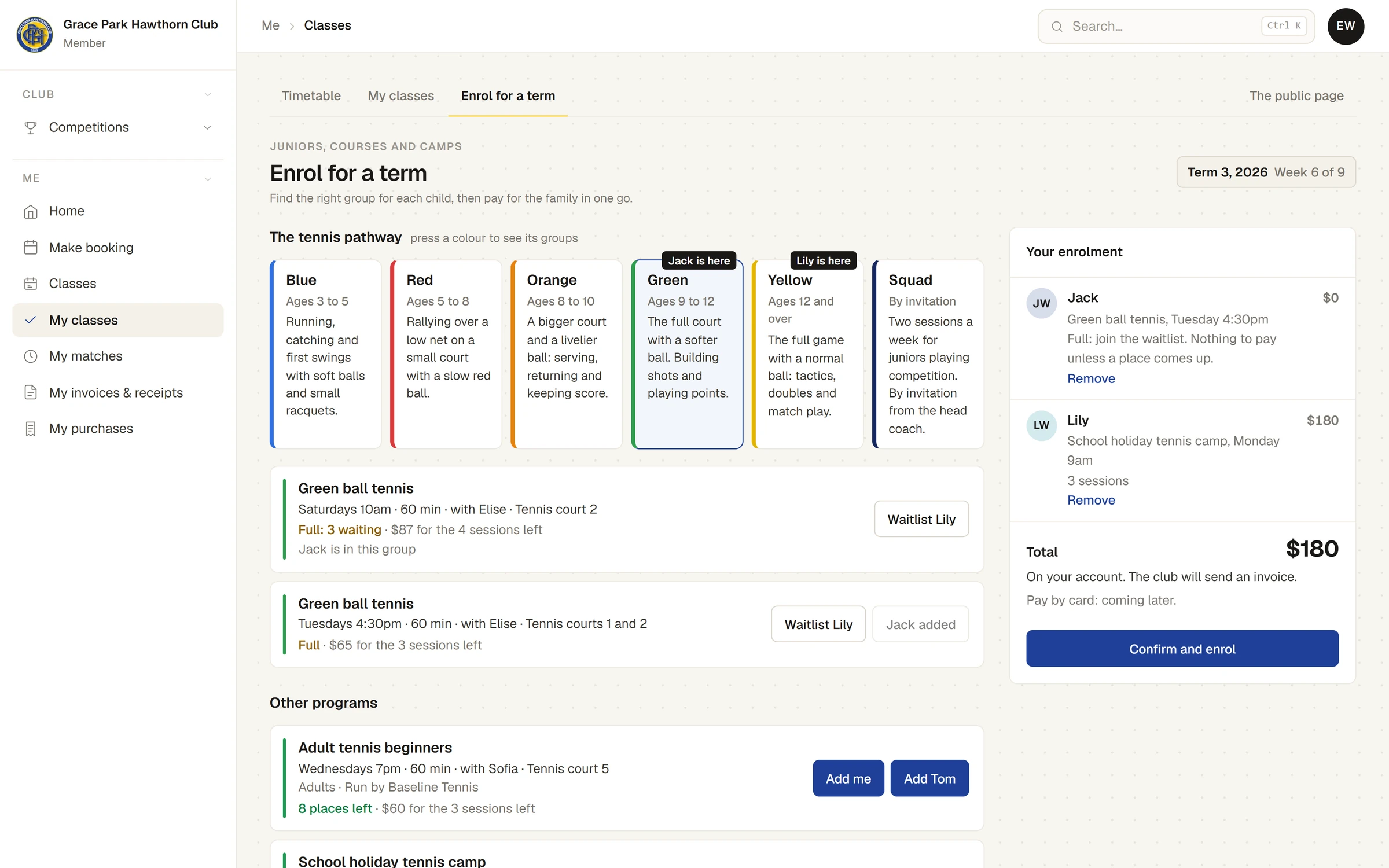
- Read the total and how it will be paid, for example On your account. The club will send an invoice., or the name of the business to pay where it collects its own fees.
- Press Confirm and enrol.
A message says, for example, 2 children enrolled. On your account. The club will send an invoice. You get an email for each child enrolled, and their sessions are on My classes under Coming up, marked Term.
When a waitlist place comes up
If your child is waiting for a full group and a place comes up, it is offered to you and held for two days. You are emailed, and My classes shows it under Needs an answer. Take it there, or it goes to the next person waiting.
When your child will miss a session
- On My classes, press Cancel on the session.
- The panel asks Tell the coach … cannot come? and says whether your child gets a make-up credit.
- Press Yes, away for this one.
The term fee does not change. If you tell the club far enough ahead (24 hours, unless your club has chosen otherwise), your child gets a make-up credit for another session at the same stage. See Passes, credits and make-ups.
How your child is going
On My classes, each child's card shows their stage, their groups with the coach, how many sessions they have come to so far, any make-up credits and the coach's latest note. When a coach moves your child up a stage, you are told, and choose the new group.
Next term
When the club opens re-enrolment, your child's place in the same group next term is held for you for a set number of days. My classes shows it under Needs an answer: confirm it there before the date it gives, or the place is released.
Last checked in release 2026.10.23, on 23 October 2026.