
How to
Score a match point by point on a phone
Score a match at the court on a phone, one press a rally, with the warm-up clock and the toss. The court's TV and the wallboards follow every press.
Who this is for: Anyone with “Play in competitions” or “Run competitions” (by default: Administrator, Sports Convener, Member).
Any member can score a match point by point on a phone at the court: the warm-up clock, the toss, then one press for each rally or point. The score is kept by the club as you go, so the court's scoreboard, the wallboards and anyone else looking follow each press within a few seconds. When the match is over, one press records the result.
This article covers starting the scorer, what every sport shares, squash in detail and snooker. Tennis, padel, pickleball and badminton have their own calls, in Score a tennis or padel match on a phone, Score a pickleball match on a phone and Score a badminton match on a phone.
Before you start
- You need to be signed in on the phone, as any member, or as the convener. Someone with no login can score with the match's code instead: see Score or watch a match with its code.
- One phone scores a match: the first to start. Anyone who opens the match after that watches it, on the same screen with nothing to press.
- The match must be ready to play: both players known, the competition in play, and for a ladder, the challenge accepted. It must not have a result already.
Start scoring
- Open the match on the phone: from , or from the competition's draw, boxes, table or Matches tab.
- Under Score it live, press Score this match, then Score now. (Show code shows the match's code large instead, for someone else's phone.) The scorer opens in a new tab, headed with the competition, the round and the court, and the two players.
- It says Ready to play and the scoring, for example Best of 5 games to 11. At 10-all: two clear points. World Squash Singles Rules 2025. A squash competition with rules of the club's own says Club rule: and what differs.
- Press Start the warm-up, with the sport's time: (4 minutes) for squash, (5 minutes) for tennis. The clock counts down, and for squash it calls Half-time: change sides. Or press Skip the warm-up (or Start, for snooker). The first time, the scorer asks Are you sure? Once you've started scoring, you must score this match. Press Start scoring, or Close, let someone else start scoring to leave the match for someone else to start.
- Press Warm-up over: the toss. In squash, the time to the first serve then counts down above the spin, for example To the first serve: 0:59: 1 minute, or 90 seconds if the competition says so.
- Say who won:
- Squash: Who won the spin? Press the winner. They serve first.
- Tennis, padel, pickleball and badminton: the toss, then who serves first, as each sport's article says.
- Snooker: Who breaks first?
Score the match
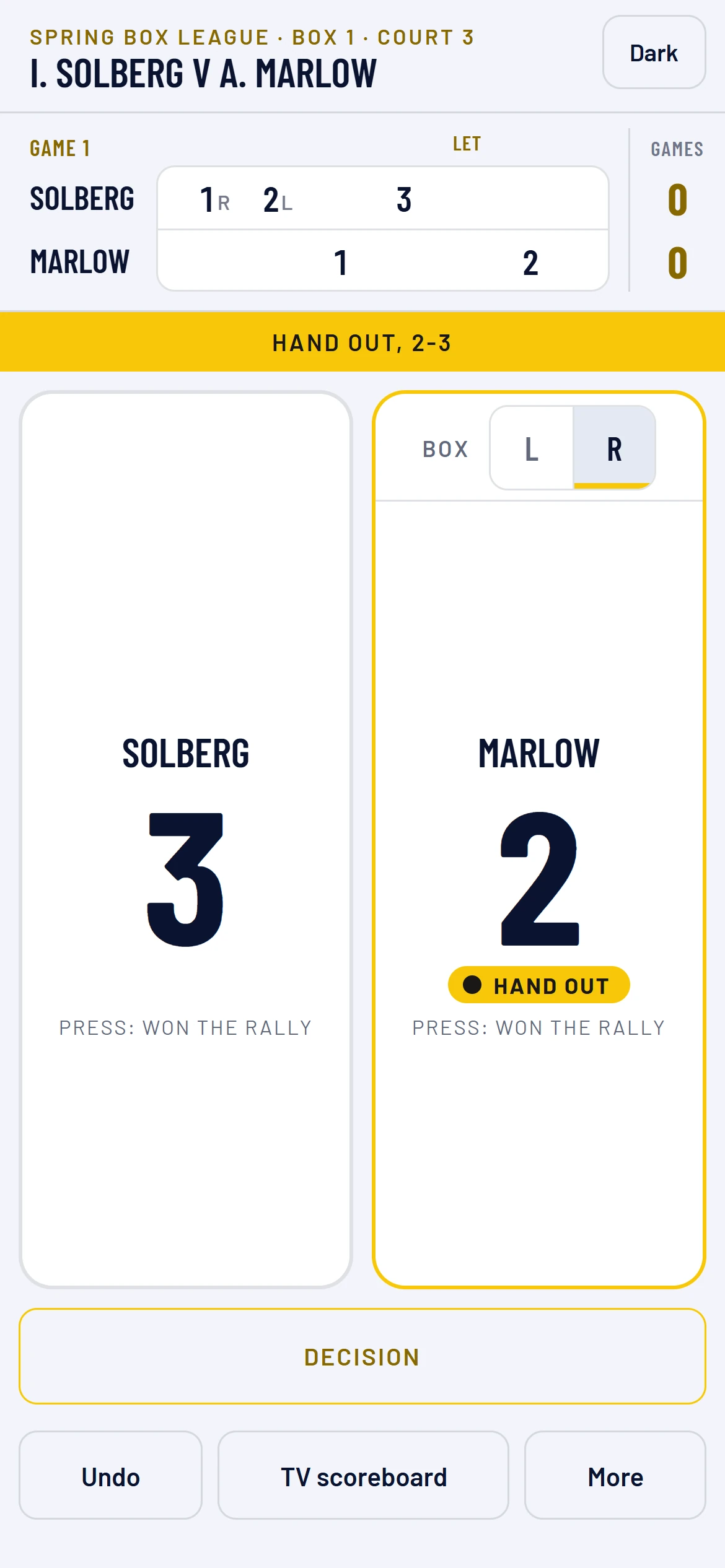
Each player has a large pad with their score. Press a player's pad when they win the rally (in snooker, the frame). The server is marked Serving.
Squash
- The service box. The server's pad has a Box toggle at the top, L | R. It changes box by itself after each rally the server wins. Each hand starts from the box that player last chose, and the first is the right. To change the box, press the other letter; it does not score a point. If a player chooses the left at the start of a hand, their later hands start on the left too.
- Hand out. When the receiver wins the rally, the serve changes and the scorer calls it in gold, for example Hand out, 7-8. The new server's pad says Hand out until the next rally. If the wrong player was serving, press More, then the button that begins Hand out: and names the other player, to serve with no point. That passes the serve with no point scored.
- Decision. Press Decision to record the referee's call. It takes the place of the pads, so nothing scores by accident.
- Yes let replays the rally. Nobody scores and the box stays the same.
- No let asks Who won the rally? Press that player. The rally is lost as played and scores for them. The call reads, for example, No let, hand out, 7-8.
- Stroke to a player gives them the point.
- Back closes the choices without a call.
- Video review, only where the competition uses it: under Video review of the latest decision, press the player asking for it, with the reviews they have left. Then press Decision upheld (the review is used) or Decision overruled (it is kept), and, when overruled, the decision that now stands: Yes let, a stroke, or a no let with the rally to either player. It takes the place of the decision reviewed, and the score changes to match. The break between games has a Review: button for each player, so the decision that ended a game can still be reviewed.
- Fault, only where the competition plays two serves: press Fault for a fault on the first serve; the call says Fault, second serve. Press it again, Fault: second serve lost, for a second fault in a row, and the rally goes to the receiver. If the receiver plays a first fault, press the pad of whoever wins the rally.
- Game ball and match ball. A player's pad is marked Game ball or Match ball when the next rally they win ends the game or the match, and the call ends with it. Both players can have one when the next point wins.
- First 10-all. In a game of two clear points, the first 10-all (14-all, playing to 15) is called 10-all: a player must win by 2 points.
- History. The game so far shows rally by rally, with each let, no let, stroke and hand-out marked. By default it is in the score rows above the pads. Press More, then under History choose Down the middle to show it as a list between the pads instead. The choice is kept on that phone.
All sports
- Undo takes back the last press. Press it again to go further back, and with nothing left it goes back to the spin, so you can choose who serves again. Undo from the game-won screen or the break asks Undo? first, because it reopens the game.
- If the competition lets the players choose at 10-all, the scorer stops and asks: Two clear points or Next point wins. With hand-out scoring, at 8-all the receiver chooses Play to 10 or Play to 9.
- Game ball, Set point and Match ball (or match point) are marked on a player's pad, as the sport calls them.
Between games
When a game is won, the scorer shows Game to the winner and the score, and who leads, for a moment. Then the break takes over the screen: the game's result, a clock, Interval, and Fifteen seconds near the end. In squash the break is two minutes, or 90 seconds in a squash competition that says so. The other sports' breaks, changeovers and intervals are in their own articles. The pads do not score during it. Press Start game 2 (or the next number) when the players are back on court; you do not have to wait for the clock.
Conduct, a retirement, or giving up the score
Press More for the rarer calls: History, the hand-out by hand, and, under each player's name:
- Conduct warning, Conduct stroke, Conduct game and Conduct match (squash). Each but the warning asks you to press again.
- Retired, then Press again: the other player wins.
- Abandon: wipe this score, then Press again: wipe this score, throws the score away. The match goes back to be played.
In squash, a retirement or a match awarded for conduct keeps the score as it was played, as the rules say: the games finished, and the game in play as it stood. The summary says, for example, Marlow wins: Bhatt retired, and the result shows as 11-0, 0-3 (retired). Where the competition awards the remaining points (a club option), the other player is given every point still needed, for example 11-3, 11-0. Tennis, padel and badminton keep the score as played too, unless the competition awards the remaining points; pickleball records a retirement as its rulebook says. In snooker, the other player is given every frame still needed.
Record the result
When the match is won, the scorer shows a summary: the winner and the score, each game, points won and the longest run for each player, and the lets, hand-outs and minutes played. In squash it also shows strokes awarded and no lets against, when there are any. Press Record the result, or Undo last rally if the last press was a mistake. It counts straight away: the table, ladder or draw moves, and so do both club ratings. The summary stays on screen with what the result did: who goes through, or where each player stands on the ladder, in their box or in the table, and each player's club rating change. The match shows scored at the court. The summary is not kept: if you reload the scorer after recording, it shows the plain result. If something is wrong, either player or the convener can correct it from the match; see Enter a match result.
The TV scoreboard
TV scoreboard on the scorer, or Scoreboard for the TV on the match, opens that match's scoreboard: the players, the games, the points now, who is serving and from which box, the clock in the warm-up and between games, and the latest call: a let, a no let, a stroke, a hand-out, game ball or match ball, the game won and the break. It follows every press. To put it on one of the club's TVs, see Wallboards and putting a board on a TV.
Light and Dark at the top of the scorer change its colours on that phone only.
One phone at a time
The phone that starts the warm-up, the toss or play scores the match until it is recorded. Every other phone that opens it says Being scored on another phone: with the scorer's name, and You're watching. It follows the score every few seconds and nothing on it scores. The scoring phone lets the club know every few seconds that it is still there, so the convener can see when it was last seen.
To let someone watch on their own phone, press More, then Let someone else score or watch: the match's QR code and code are shown large to scan. A player or the convener, signed in, can make one there if the match has none. See Score or watch a match with its code.
To hand the scoring to someone else, press More, then Stop scoring, let someone else take over, and press it again to confirm. The score stays as it is, and the next phone to open the match can press Carry on scoring on this phone.
If the scoring phone stops without that (a flat battery, the scorer left), open the scorer on that phone again and carry on. Nobody else can take the match from it, except the convener, signed in: the convener's phone says Take over scoring, then Press again: score on this phone. The old phone then watches, and lists anything it could not send under Not sent from this phone.
If something goes wrong
- "This match is being scored on another phone. You can watch it here." Another phone started first, or the convener took the match over. This phone now watches. Anything it had not sent is listed under Not sent from this phone.
- "Someone else has scored since. The score has been brought up to date." A press was made against an older score, so it was not added. Check the score and carry on.
- "This match is not ready to be played yet." One player is not known yet, or the challenge has not been accepted.
- The match was scored by mistake. Press Abandon on the scoring phone, or the convener presses Not playing after all on the match.
- Match not found. Open the match in Competitions and press Score this match again.
Last checked in release 2026.10.28, on 28 October 2026.