
How it works
Club ratings
How the club rating for each sport starts, moves with every result and seeds draws, and the results file a convener can download for rating services.
Who this is for: Anyone with “Play in competitions” or “Run competitions” (by default: Administrator, Sports Convener, Member).
Each player has a club rating in each sport: squash, tennis, padel, pickleball, badminton and snooker are each rated apart. Every result in any of the club's competitions in that sport moves it. The rating is what seeds a knockout draw, fills the boxes of a box league and orders a new ladder, and it is shown beside each entry so the convener can set grades.
How it starts
Everyone starts at 1500. A club's existing rankings are not brought in, and every competition starts fresh, ordered by rating.
How it moves
- When a match is played, the winner gains points and the loser loses the same number.
- Beating someone rated higher gains more than beating someone rated lower.
- A one-sided score moves it more than a close one: 3-0 counts for more than 3-2.
- It moves in bigger steps over a player's first ten rated matches, then in smaller ones.
- In doubles, each pair is taken as the average of its two players, and both players move.
- Walkovers do not count.
- A match a player retired from, or lost for conduct, counts as a win for the other player, with the score as it was recorded. Where the score was kept as played and the winner had won no more games than the player who retired, it counts as the narrowest win.
- A correction, or a result removed, works every rating in that sport out again from all the results.
Each result shows how far it moved each player's rating, for example +20 and -20.
Where you see it
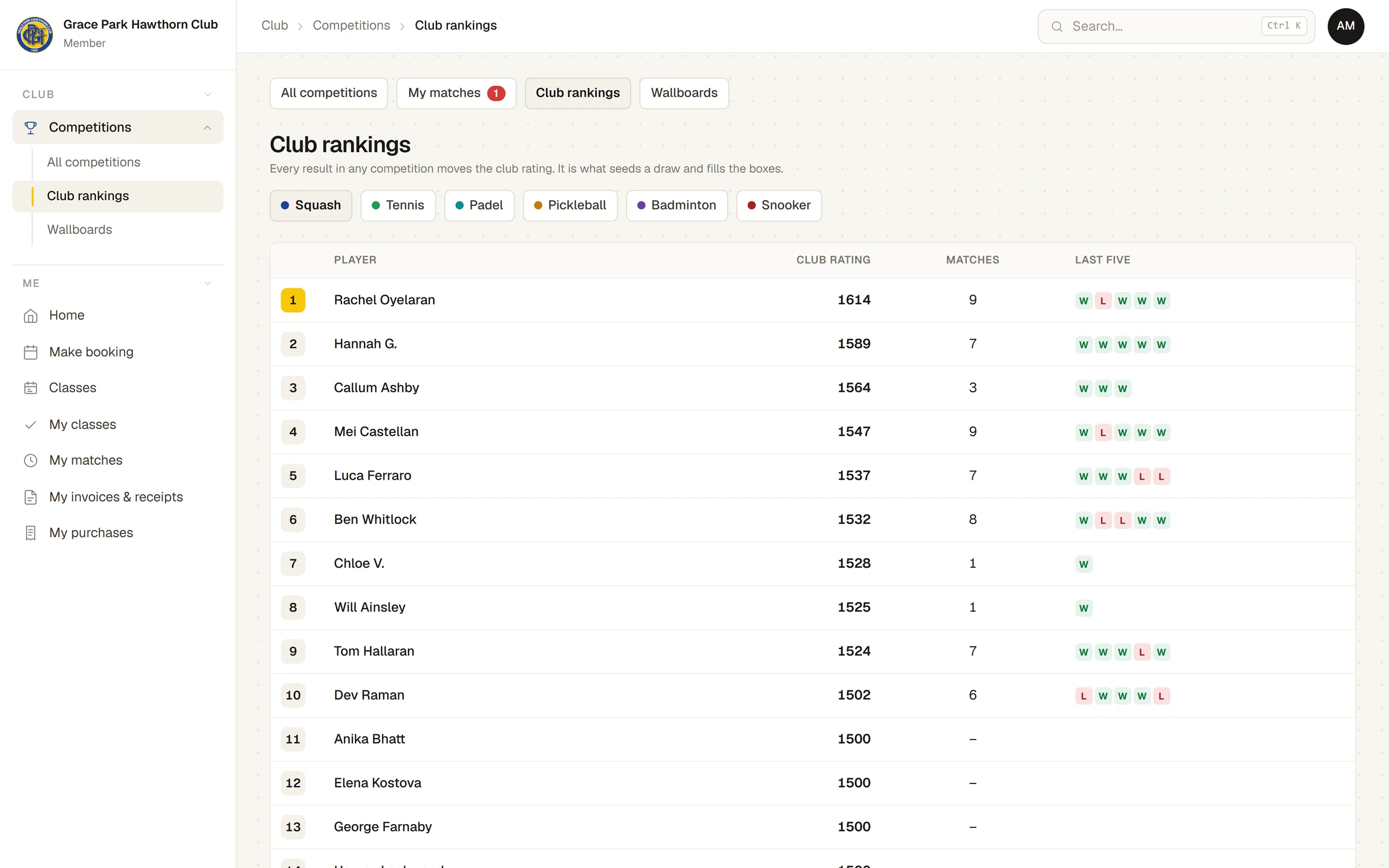
- Club rankings (): each sport's players highest first, with their rating, rated matches and last five results. Choose the sport at the top. Press a name for their results in that sport. A player who has entered but not yet played shows 1500 and no matches.
- My matches: your own rating in each sport you have played.
- On a competition's Players tab and on the ladder, beside each entry; on a request to enter, beside the ratings already in that grade.
- In the convener's list of members to add, beside each name.
The TVs never show ratings.
For anyone who can: “Run competitions”
Rating services and the results file
The Rating services tab at the top of the Competitions page says what connecting to each outside rating service would do and what stands in the way:
- SquashLevels (squash): Needs agreement with SquashLevels. The club's singles results would be published as a feed for SquashLevels to collect.
- UTR Sports (tennis): Needs a partner application. Members would link their UTR account once and results would be posted for them.
- What cannot be connected: Tennis Australia's verified ratings and World Tennis Number, which take results only from Tennis Australia's own software; pennant, which the associations run in their own systems; and snooker, where no rating service takes club results.
Under each service, Download the results file saves the club's results for that sport as a spreadsheet file (squash singles for SquashLevels, tennis for UTR): the date, the competition, each player and the score and winner. Players' ids with the service are not held, so the file has names only, with juniors by first name and initial. Each download is recorded in the audit log.
Last checked in release 2026.10.28, on 28 October 2026.