
How it works
Class reports
How full each class has been, who came, no-shows, late cancels and who waited and missed out, over the last four or eight weeks, by class, coach and provider.
Who this is for: Anyone with “Run classes” (by default: Administrator, Head Coach).
Class reports show how each class has been going: how full it was, who came, who did not, late cancels, and how many people waited and missed out. Use it to decide where a second session is worth adding, or a class needs another time.
Open it
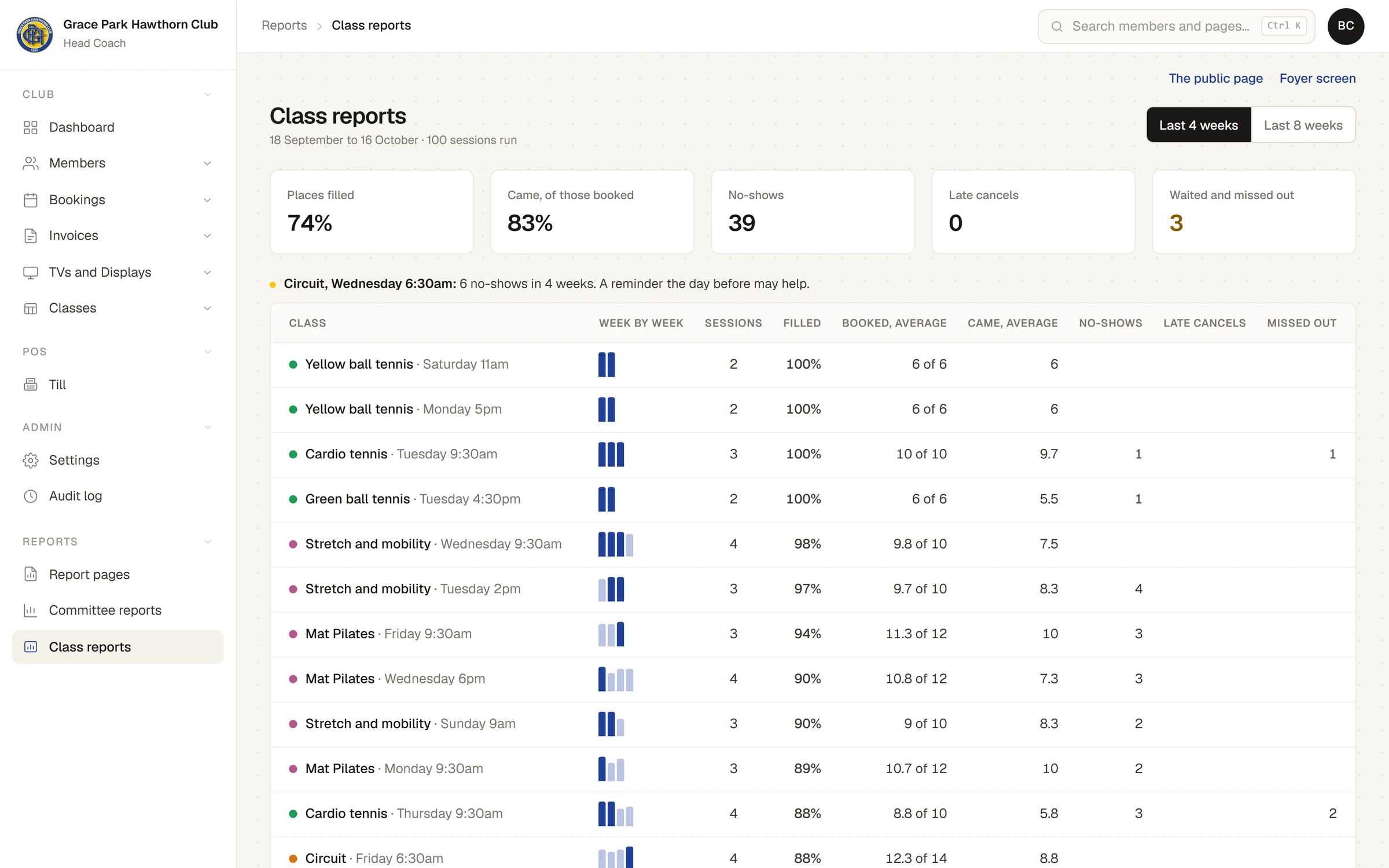
Open . It is for whoever runs classes: the Head Coach by default. Choose Last 4 weeks or Last 8 weeks. The line under the heading gives the dates and how many sessions ran.
What it shows
The totals across every class:
| Figure | What it counts |
|---|---|
| Places filled | Places booked, as a share of the places there were |
| Came, of those booked | People ticked on the roll, as a share of those booked |
| No-shows | People marked on the roll as did not come |
| Late cancels | Places cancelled after the class's free-cancelling time |
| Waited and missed out | People still on a waitlist when the session started, or whose offered place ended without being taken |
A sentence where a class earns one, for example:
- "Full 7 weeks of 8, and 11 people missed out. Worth a second session."
- "Under a third full over 4 weeks. Worth trying another time or day."
- "6 no-shows in 4 weeks. A reminder the day before may help."
A row for each class at each of its times, fullest first: small bars for how full it was week by week (pointing at one gives the date and the numbers), the sessions run, how full it was, the average booked and the average who came, no-shows, late cancels and how many missed out.
By coach and By provider: sessions, how full they were, and who came or missed out.
Listed prices of classes booked one at a time: for each provider, a count of bookings and the sum of their listed prices, split into what went on members' accounts and what was paid to the provider. Term fees are on the Terms page. These are listed prices only, not money received, and there is no pay or share worked out.
Things to know
- Who came is what coaches marked on the roll. A session whose roll was not taken counts its people as booked but not as having come, until the roll is taken.
- Sessions the club cancelled are not counted as run.
- Money actually received for classes is in the club's income reports, under Classes, once an invoice is paid. See the Reports section of the Help centre.
Last checked in release 2026.10.23, on 23 October 2026.