
How to
Versions, and making an earlier one live again
See every version of the club's website that has been live, who sent and approved each, and, as an approver, put an earlier version back.
Who this is for: Anyone with “Change the website” or “Approve and publish the website” (by default: Administrator, Website Editor).
Every version of the club's website that has been live is kept, and none is ever deleted. Versions lists them, newest first, with who sent and who approved each one. An approver can make an earlier version live again, for example to undo a change that went out by mistake.
See the versions
Open . It shows:
- Live now: the version the public sees, when it was published and by whom, and Open the live website. If a draft is open, Go to draft v6 takes you to it; otherwise Start a draft.
- Versions: each version with its date, who sent it and who approved it, and the sender's note. The live one is marked Live. Look at it opens that version in a new tab, as it was published.
- History: every publish, in order, for example Version 6 published in place of version 5, sent by Hannah Brooks and approved by Alex Morgan, 16/10/2026, 6:39 pm. The finals news item, for this weekend. A version made live again says so, with the reason given.
Version numbers can skip: a draft takes the next number when it starts, and a draft thrown away never becomes a version.
Make an earlier version live again
You need to be an approver, with two-factor sign-in turned on, signed in as yourself. See Approve a draft or send it back.
- Open .
- On the version you want, press Make this version live. It says, for example, The public website will show version 5. Version 6 stays in this list and can be made live again.
- Under Why? (kept in the history), type the reason. A reason is needed.
- Press Make version 5 live, then Yes, change the public website now.
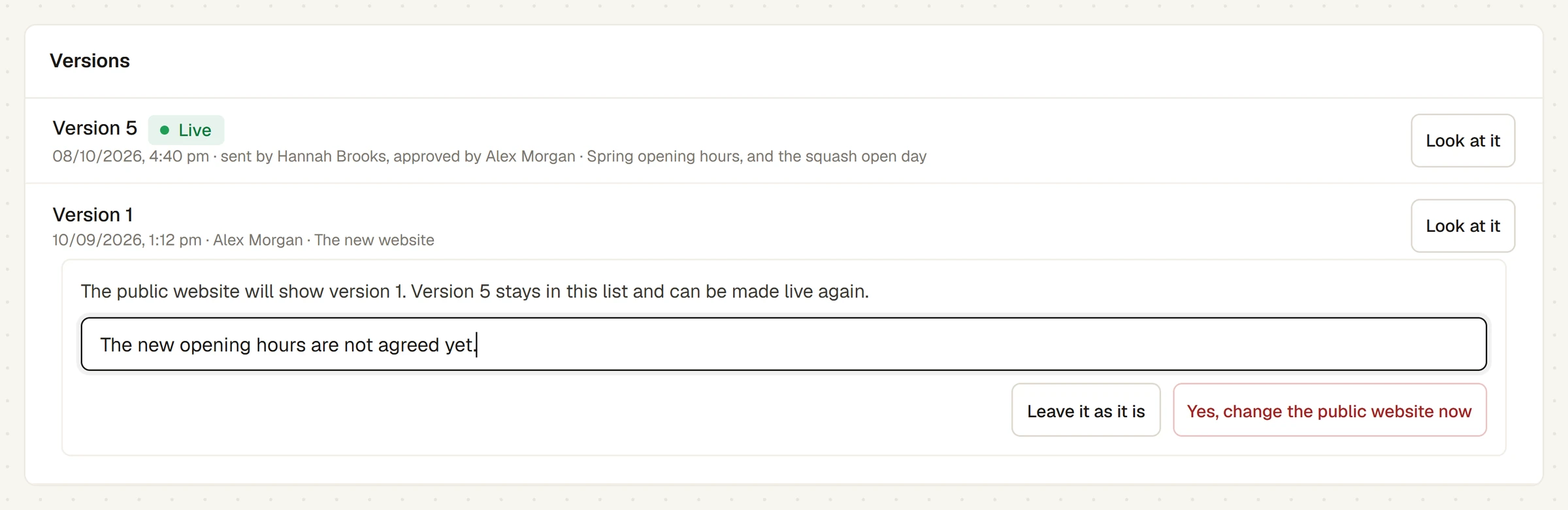
A message says Done. The public website changes within a minute. The earlier version is put back exactly as it was published, and the version you replaced stays in the list.
Press Leave it as it is at any step to stop.
After making a version live again
- A draft started from the version that was live before cannot be sent for approval, because the live website has changed under it. Discard it and start a new one.
- Nobody is emailed about the change. Tell the people who need to know.
Last checked in release 2026.10.23, on 23 October 2026.