
How it works
The court board in the foyer
The court board shows one sport's bookings and free times for the day on a screen in the foyer, with no sign-in, and keeps itself up to date.
Who this is for: Anyone: no sign-in needed.
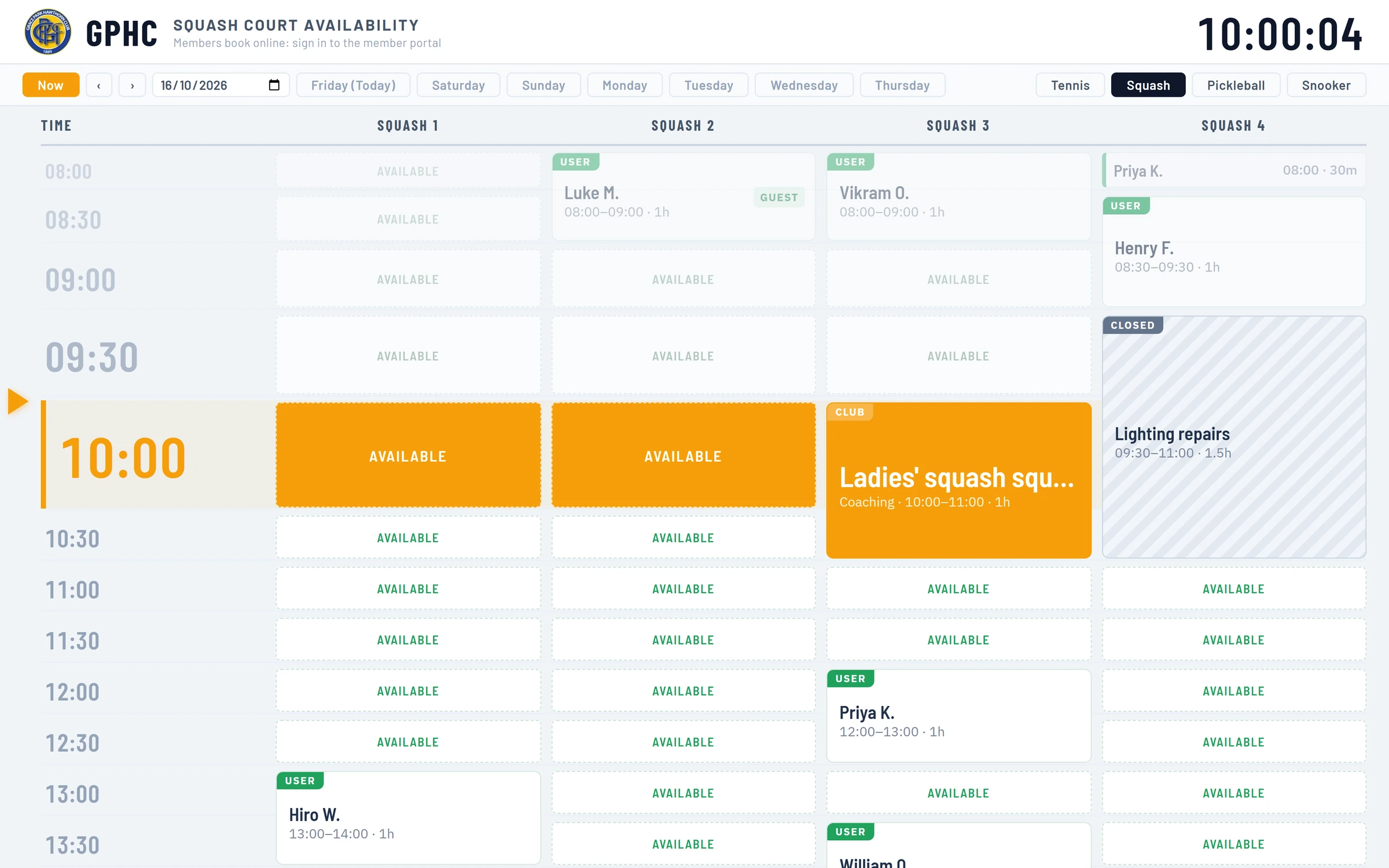
The court board is a page for a screen in the foyer. It shows one sport's courts or tables for the day, side by side: who has each one, when, and which times are free. It needs no sign-in, so a TV can be left on it all day, and it updates itself.
What it shows
- The heading: the club's short name, the sport, for example SQUASH COURT AVAILABILITY, a reminder that members book online, and a clock.
- A column for each court or table, with the time down the side in half-hours. The board uses the 24-hour clock, for example 13:00.
- Each booking as a card across its time, with the name (as the club chooses, below), its times and how long it is. A booking for a club activity shows its description instead, such as "Friday social squash", with its type under it.
- USER: a member booked it online.
- CLUB: the club booked it, on the office calendar.
- GUEST or GUESTS, or G on a short booking: it has non-member guests named, and their fee has not been taken yet.
- PAID GUEST, or PG on a short booking: its guest fee has been taken at the till. See Guests and guest fees.
- Closed times, marked CLOSED with the closure's reason.
- AVAILABLE on each free half-hour.
- The time now: on today's board, the current half-hour is picked out with an arrow beside it, and the board starts two hours before it, so the screen shows what is on now and next rather than the morning.
Guest fees are not taken when a booking is made. They are paid at the club, at the till, and the board says PAID GUEST from then on.
Moving about
Along the top, under the heading:
- Now goes back to the live view of today.
- The arrows and the date box move a day at a time. The day buttons (Friday (Today), Saturday and so on) show the whole of that day.
- The sport buttons on the right change the sport.
The board looks up to a week back and two weeks ahead. Further than that it says Bookings for the day are not shown on this screen.
Keeping up to date
While it shows today, the board reads the bookings again every 30 seconds, so a booking made at the desk or online appears within half a minute. If the connection drops, it keeps the last bookings on screen and adds OFFLINE, last updated and the time, until the connection is back.
Names on the board
Anyone in the foyer can read the board, so the club chooses how members' names show: Full name (Olivia Hartley), First name and initial (Olivia H.), Initials only (OH) or Just "Reserved". It starts at first name and initial.
Only the name, the times and whether there are guests are shown. Never a phone number, email address or anything else about the member.
Putting it on a TV
Each sport has its own court board. To put one on a TV, add the TV on and choose the sport's court board under Showing. The TV then follows whatever is chosen there. See Set up a TV and choose what it shows.
lists each sport's court board, to open and look at. A display's Courts now slide shows who is on each court now and who is next, from the same bookings, as one slide among others.
What it does not do
- It cannot be used to book. Members book on Make booking, from their own phone or computer.
- It shows one sport at a time. For several sports, use a TV for each, or a display that turns between them.
Last checked in release 2026.10.23, on 23 October 2026.