
How to
Close out a function, and the bond
After the day, enter the bar tab and extras, settle the bond, say how any unpaid invoices were paid, and mark the function completed.
Who this is for: Anyone with “Run functions” or “See functions and enquiries” (by default: Administrator, Bar Manager, Functions, Reporting, Treasurer).
On or after the function's day, you close it out. Closing out puts the bar tab and any extras on the final version of the quote, brings the invoices to the final figure, settles the bond, and marks the function Completed.
Before you start
- You need to be able to run functions. The Functions role and the Administrator can by default.
- The function is Confirmed, and its day has come. Before then the button says, for example, Close out after Sat, 21 Nov. From the day after, the board shows Close out.
- Record each payment as it arrives, on the Money tab, the way it was really paid. Closing out marks whatever is still unpaid as paid, and asks you first.
Close out
- Open the function and press Close out (on the function, or at the foot of its Money tab). A panel opens headed Close out.
- Under Bar tab on the night ($), type the figure from the till, if there was a tab. For a bar tab function it shows the limit. "The final invoice follows it." If the till has already charged the function's tab, that figure is on the quote.
- Under Extras on the night, type what each extra was and its amount. Press Another for more.
- If there is a bond, press Return it all or Keep part. For Keep part, type the amount to keep and the reason, "which the hirer is told".
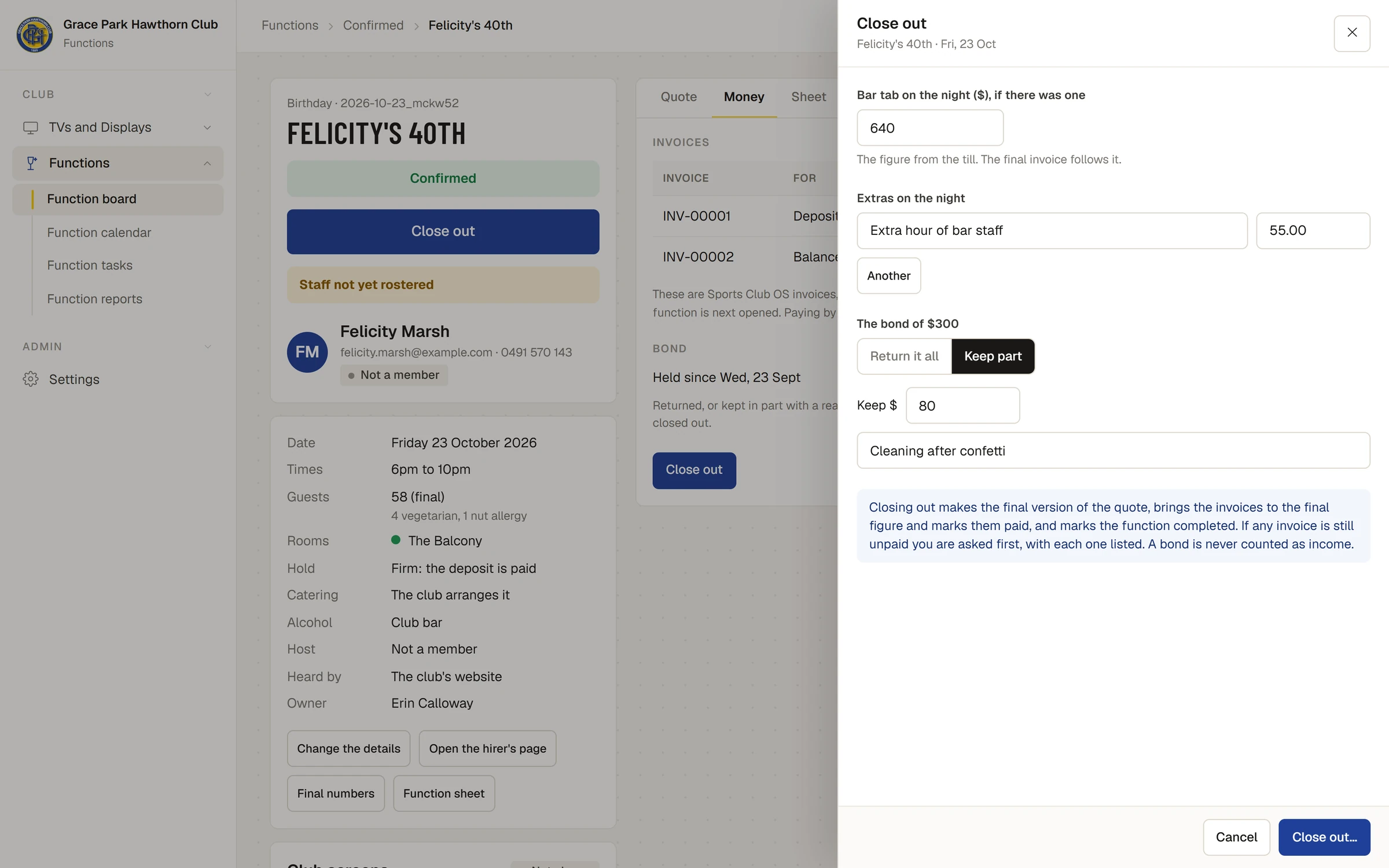
The panel says what happens: "Closing out makes the final version of the quote, brings the invoices to the final figure and marks them paid, and marks the function completed. If any invoice is still unpaid you are asked first, with each one listed. A bond is never counted as income."
- Press the button at the foot. It says Close out… when closing out would mark an invoice paid, and Close out when it would not.
- If any invoice is unpaid, the panel asks Mark this invoice paid? (or Mark these 2 invoices paid?). It lists each invoice at its final figure, the bar tab and extras included: its number (New invoice for one closing out makes), what it is for and its amount, with the total. Under How it was paid, choose Bank transfer, EFTPOS, Card, Cash or Cheque. A line says when they will be recorded as paid: today.
- Press Mark 1 invoice paid and close out (the button gives the number). Cancel goes back to the close-out panel and changes nothing.
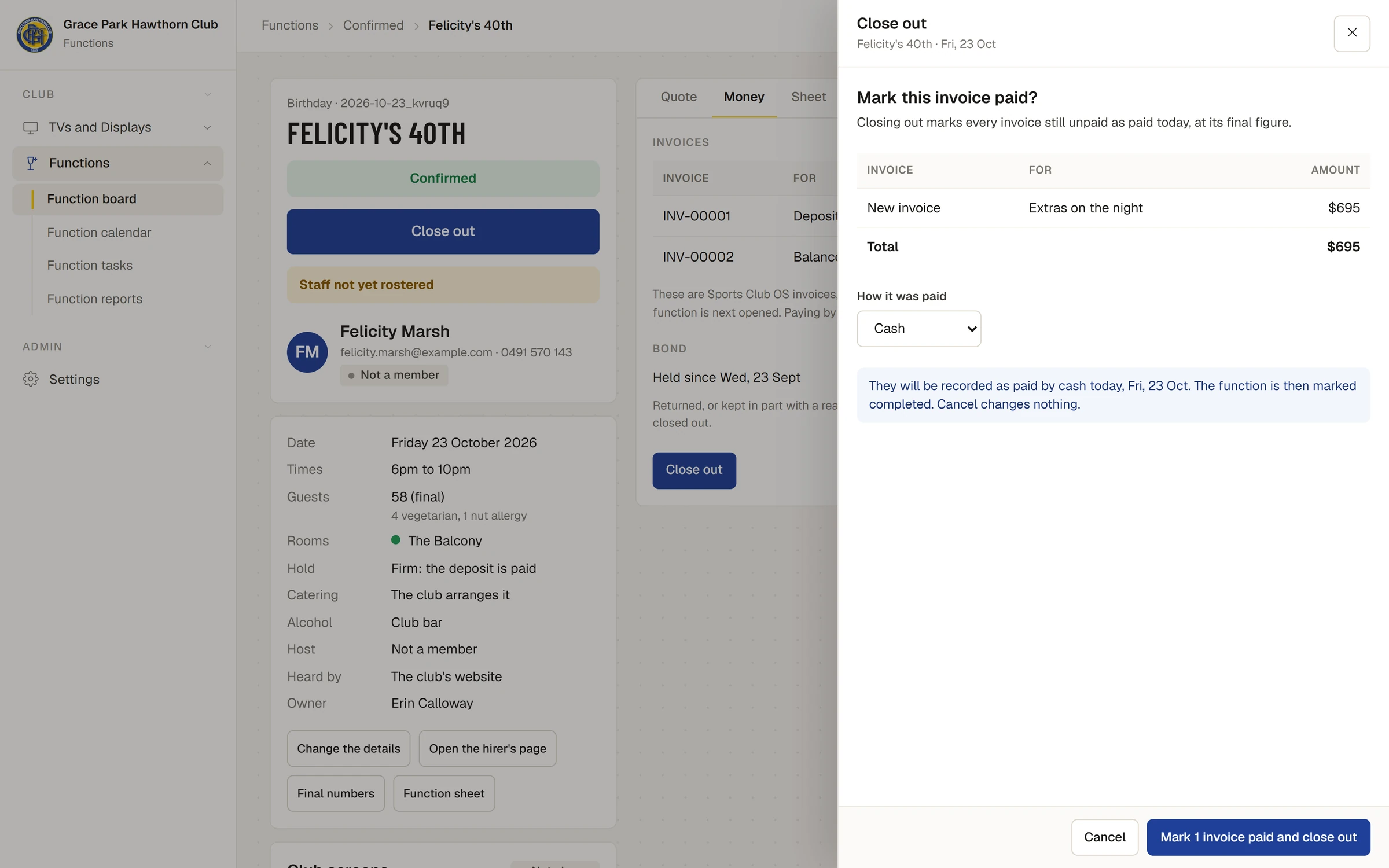
A message says Closed out. With nothing unpaid, step 6 is left out and the function closes out at once.
What happens
- A new version of the quote is made, with the final guest numbers, the bar tab and the extras.
- The invoices follow: an unpaid balance changes to the final figure, anything more after the balance was paid becomes an Extras on the night invoice, and if the final total is less than was paid, a Refund to the hirer is recorded.
- Every invoice still unpaid is marked paid on that day, the way you chose. See the note above.
- The bond shows as Returned with the amount and date, and any amount Kept with its reason.
- The function moves to Completed, and the tasks left are Thank the hirer and any of your own.
The bond
The bond is held apart from the cost of the function:
- It is on the quote and the hirer's page, but never in the total, the GST, an invoice or the income figures.
- It is recorded as held when the deposit is paid, and settled at close-out: returned in full, or in part with a reason.
- Function reports show bonds held on their own, as "Not income; shown apart".
Sports Club OS records the bond; the money itself is returned to the hirer by the club, outside Sports Club OS.
If something goes wrong
- "This function has not happened yet" Close out on or after its day.
- "Say why part of the bond is being kept" Type a reason with the amount kept.
- "The bond is $300" The amount kept cannot be more than the bond.
- "Only a confirmed function is closed out" It is not confirmed, or it is already completed.
Last checked in release 2026.10.23, on 23 October 2026.