
Overview
What Competitions does
Ladders, box leagues, round robins, knockouts and events in six sports, with results, club ratings, scoring on a phone and wallboards.
Who this is for: Anyone with “Run competitions” or “Play in competitions” (by default: Administrator, Sports Convener, Member).
Competitions runs the club's own ladders, box leagues, round robins and knockout tournaments in squash, tennis, padel, pickleball, badminton and snooker. A convener sets each one up, takes the entries and makes the draw. Members enter, play, and enter their results, which count straight away. Every result moves a club rating for that sport, and the boards on the club's TVs follow the play, point by point where a match is scored on a phone.
Squash, tennis, padel, pickleball and badminton matches can be scored point by point on a phone at the court, by each sport's current rulebook unless the club offers other rules. Snooker is scored a frame at a time.
Who uses it
- Members see every competition, enter or ask to enter, answer ladder challenges, enter and correct their own results, score matches on a phone, and see My matches and Club rankings.
- Anyone given a match's scoring code, signed in or not, can score that match on their phone, or watch it if another phone is already scoring it.
- The convener runs competitions: creates them, approves entries, makes the draw, sets each match's time and court in the order of play, corrects or removes any result, prints scoring codes, chooses the club's scoring rules on , Scoring, and chooses what the club's TVs show. The Sports Convener role can do this by default, and so can the Administrator. A convener is a volunteer member, not staff, so the role sees other members by name, member number and club rating only.
Your club can give running competitions to other roles on Roles & permissions.
Where things are
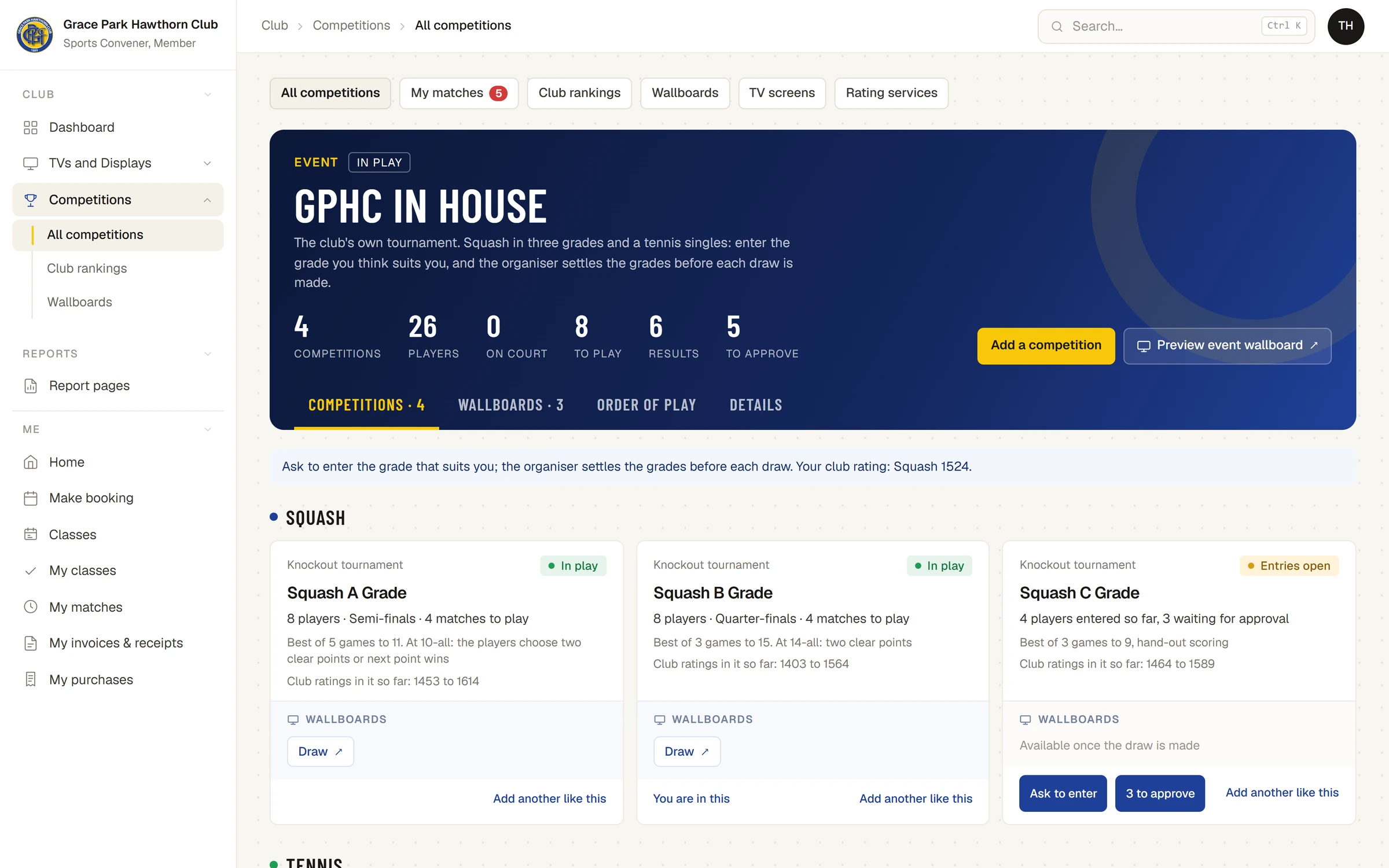
- : every competition and event, as cards. Each card says what it is, where it is up to and, once it is under way, its wallboards.
- : the club rating for each sport, highest first.
- : every board a TV can show, with a live preview.
- : everything you are playing in. For someone who runs competitions and is not a member themselves (an administrator, say), the same tab is Needs attention: entry requests and matches past their date.
- TV screens and Rating services are tabs at the top of the Competitions page, shown to the convener. TV screens lists the club's TVs, the same list as .
- On a phone at the court, a match's own scorer page, opened from the match with Score this match, or with the match's code at sportsclubos.net/score.
- , Scoring (the convener): the rules each sport is scored by, the older and local rules the club offers, and which sports are offered for a new competition.
The words it uses
| Word | What it means |
|---|---|
| Competition | One ladder, box league, round robin or knockout tournament, in one sport, singles or doubles |
| Scoring code | A short code, such as GPHC-7K3M, with a QR code, that opens one match on any phone to score or watch it |
| Event | One tournament made of several competitions: a grade each, or a sport each |
| Grade | A competition inside an event, for players of a similar standard |
| Entries open | The competition is taking players. Nothing is drawn yet |
| In play | The draw, boxes, fixtures or ladder are made and matches are being played |
| Club rating | A number for each player in each sport, moved by every result. Everyone starts at 1500 |
| Order of play | The convener's board of courts by time for one day |
| Walkover | A match given to one player without being played. It counts for the competition but not for ratings |
| Plate | A second draw in a knockout for players who lose their first match |
What it connects to
- Members: only members whose membership is active can be entered. The convener picks them from a list of names, member numbers and ratings.
- TVs and Displays: the club's TVs are one list, set on and on the TV screens tab here. A TV can show a competition board or anything else from TVs and Displays. A screen showing a competition board is changed from Competitions. See Wallboards and putting a board on a TV and Set up a TV and choose what it shows.
- The Dashboard: the convener's Dashboard has a Competitions widget.
Rules worth knowing
- A result counts as soon as it is entered. There is no confirmation step. Either player or the convener can correct it afterwards, and the convener can remove it.
- Anyone under 18 on the day is shown by first name and initial, everywhere in competitions and on the TVs.
- A player's mobile and email are shown only to the people they are drawn against in a match still to play, and only if that player chose to share them. The convener sees no more than a player does.
- Members do not set a match's time or court. The convener does, in the order of play.
- One phone scores a match: the first to start. Any other phone that opens it watches.
- A competition keeps the scoring rules it was made with. A later change on the Scoring tab affects only competitions made afterwards.
What it does not do
For the full list, see What is not built yet.
There are no entry fees and no handicaps.
Anyone can also score a match of their own, with no club and no account, at sportsclubos.net/score: see Score a quick match on your phone. A quick match is not part of any club's competitions.
Articles
- How it works: Ladders, boxes, round robins and knockouts, Events with several grades and sports, Club ratings
- For members: Your matches and rankings, Enter a match result, Score a match point by point on a phone
- Scoring each sport: Score a tennis or padel match on a phone, Score a pickleball match on a phone, Score a badminton match on a phone
- Scoring codes: Score or watch a match with its code, Prepare and print scoring codes
- For the convener: Create a competition and take entries, Choose the club's scoring rules, Set match times in the order of play, Wallboards and putting a board on a TV
- For anyone: Score a quick match on your phone
Last checked in release 2026.10.28, on 28 October 2026.