
How to
Have a message drafted for you
Describe a message and have a first draft written, or reword a paragraph. Only what you type, its kind and the club's name go to the drafting service.
Who this is for: Anyone with “Send communications” (by default: Administrator).
At the Message step you can describe what a message is for and have a first draft written for you, in the club's own email layout. Once there is text in the message, you can also have one piece of it reworded: shorter, friendlier, more formal or plainer. The drafting is done by a language model. What it is sent, and what it is not, is set out below.
Before you start
- You need to be able to send communications. The Administrator can by default.
- Drafting must be switched on for your club. If it is not, the message has no Describe it, and have a draft written box and no Reword this choices; everything else works the same.
- Choose the message's kind at step 1 first. The draft is written to suit it: an essential notice is written as facts only.
Have a draft written
- Go to step 3, Message. An empty message opens on How would you like to start?
- Under Describe it, and have a draft written, type what the message is for, with every detail you know: what, when, where, cost, what people should do. For example: "Invite members to the trivia night on Friday 13 November, 7pm in the clubrooms, $15 a head, teams of up to eight".
- Press Write a draft. It says Writing, up to half a minute… while it works.
- The draft appears as the message, with a subject and preview line, and a message says Draft written. Read it through and fill in anything in [square brackets].
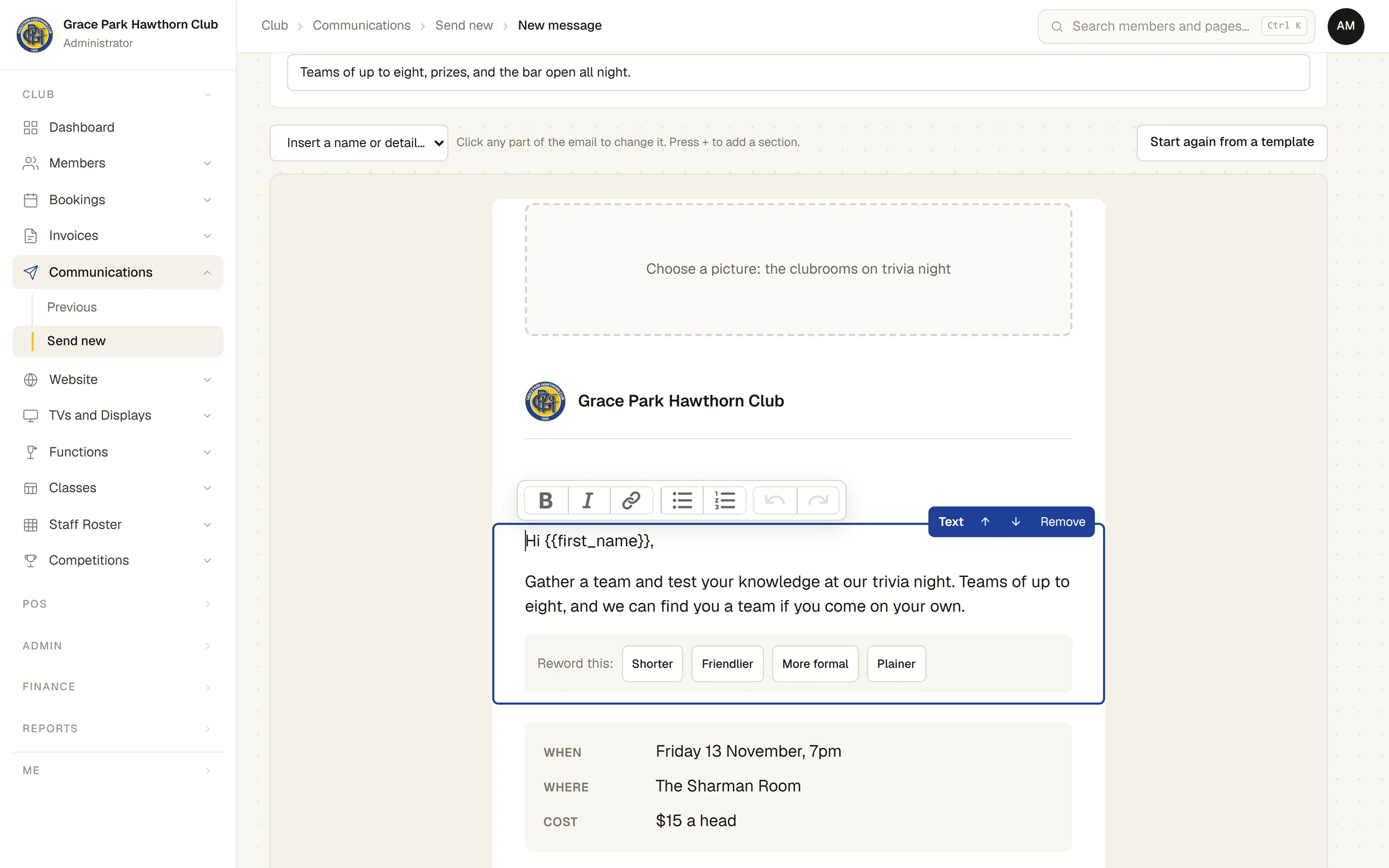
The draft is an ordinary message. Change any part of it, as you would one you wrote yourself.
What the draft holds
- Details you did not give (a time, a place, a price, a reply-by date) are left in [square brackets], such as [reply-by date], never made up. The Check step warns about any left.
- It may start "Hi
{{first_name}},". The merge field is filled in with each person's own name when the message is sent. - A place for a picture may be suggested; it says what kind of picture would suit. Add your own, or leave it: an empty picture place is left out of the email.
- A button is given a web address only if you gave one in your description, or if it is for booking a court. Otherwise add the address yourself: the message cannot be sent with a button that has none.
- It ends with [Your name] where a sign-off suits, rather than an invented name.
Read every word before you send. The draft can be wrong, or say something in a way your club would not.
Reword one piece
- Click a piece of text in the message. Under it, Reword this: offers Shorter, Friendlier, More formal and Plainer.
- Press one. It says Rewording…, then the text is replaced.
- If you prefer what you had, press Put it back.
Rewording keeps every fact, date, name, link and merge field in the text.
What is sent to the drafting service
- To write a draft: the words you typed in the box, the kind of message you chose, and the club's name.
- To reword: the words of that one piece of text, and the club's name.
- Nothing else. No member's details are added: no names, addresses or anything from the member list. Merge fields stay as
{{first_name}}and are filled in only when Sports Club OS sends the email.
Because only what you type is sent, do not type private details about people into the box.
The club's record of activity notes that a draft was asked for, and by whom, but not what was typed. The answer comes back as the same sections any message is made of, and is checked as anything typed would be, so a draft cannot carry anything a message you wrote yourself could not: it cannot add a picture or an unsafe link.
For how the drafting service is hosted and what happens to what it is sent, see the Trust Centre. For what Sports Club OS keeps about people, and what is never sent to any outside service, see What Sports Club OS keeps about people.
If something goes wrong
- Write a draft cannot be pressed: the description is too short. Say a little more about what the message is for.
- The drafting service could not be reached. Try again in a moment, or write it yourself.
- No draft came back. Try describing it another way.
Last checked in release 2026.10.23, on 23 October 2026.