
How to
Sell court time and take guest fees at the till
Sell a walk-in court or snooker table from the till as a real booking, and take the guest fees owing on today's bookings.
Who this is for: Anyone with “Use the till” (by default: Administrator, Head Coach, Casual Staff, Bar Manager, Bar Staff).
Court and table time sold at the till is a real booking, made in the same moment as the sale, so the court is never sold twice. The guest fees owing on today's bookings are listed on the till to be paid there. Both need the connection.
Before you start
- You need to be able to use the till. The Bar Staff, Bar Manager, Casual Staff and Head Coach roles can by default.
- The club's products must include court or table time for each sport and length it sells, and a Guest fees product. See Products, prices, happy hours and stock.
Sell court or table time
- For a member, find them in the sale first, so they pay the members' price and the booking is in their name.
- Press the Courts and tables button at the top of the till, or press a court product in the Courts group.
- Courts and tables today shows each court or table by the quarter hour, from now: Free, Taken, On this sale or Too short a gap. Choose the product along the top, such as Squash 45m, Tennis 1h or Snooker 1h.
- Press a free square where the booking should start. The till shows it, for example Court 1, 11:30am–12:15pm, with the price.
- Press Add to the sale. A message says It is booked when the sale is saved.
- Take payment, or put the sale on a tab. The booking is made then.
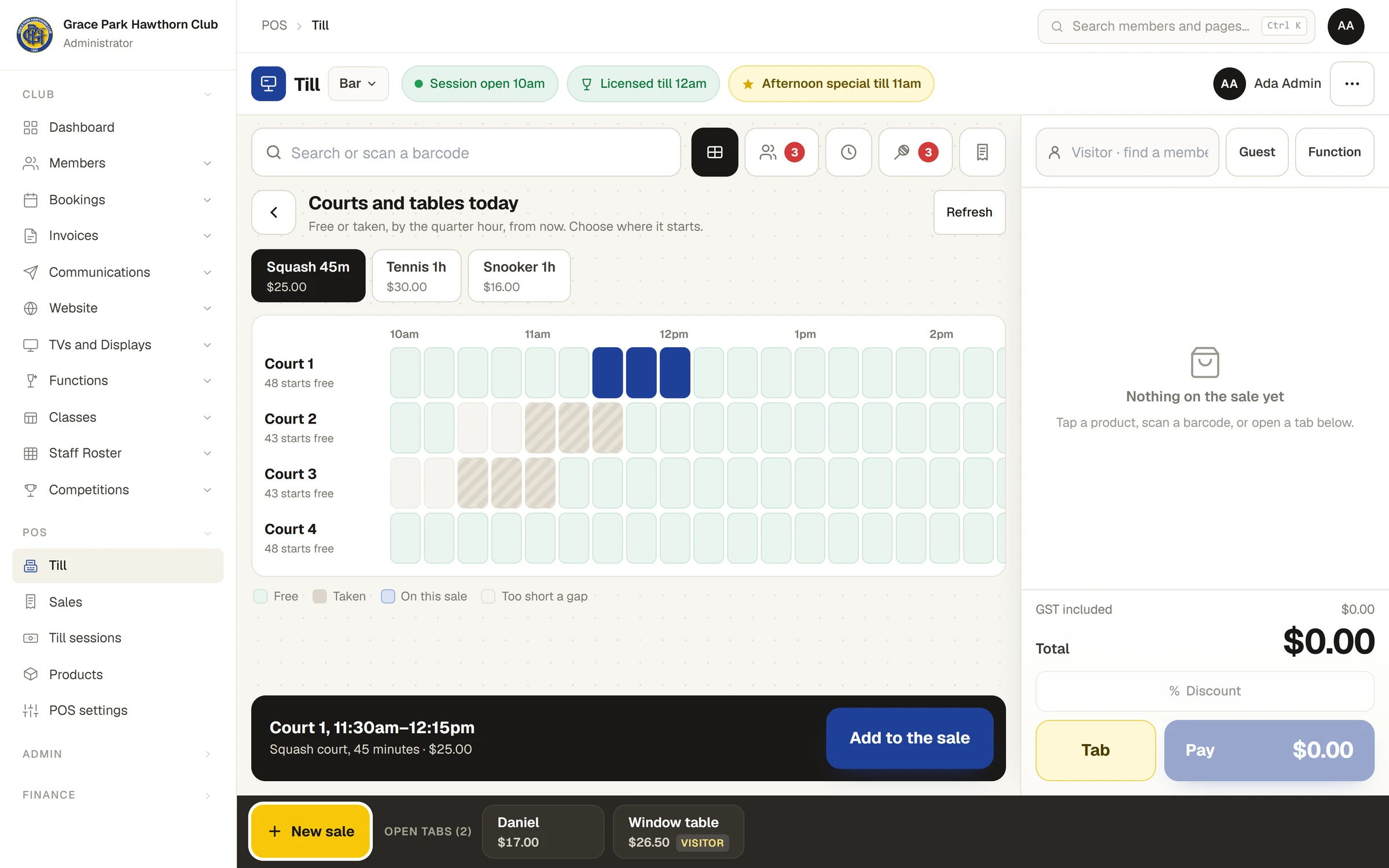
If someone else books that court in the meantime, the sale is refused and nothing is saved: choose another time. Each court shows how many starts are free; Refresh shows the latest.
The booking appears on the Bookings calendar. A member's is a member booking in their name; anyone else's carries the tab's name, or "Walk-in".
The till sells from now to the end of today only: The till books from now on. Earlier times and other days are on the Bookings page.
Take the guest fees owing today
When a member books with guests, the guest fee is recorded on the booking and paid at the club, here at the till. Nothing is charged when the member books, and nothing is added to their account by itself. How guests are named and the fee worked out is in Guests and guest fees.
- Press the Owing today button (with the number owing) at the top of the till. Guest fees owing today lists today's bookings with fees not yet paid: the time, court, member, guests and amount.
- Press Add beside one. The line says, for example, Guest fees: Grace Nguyen, Court 1 6pm. If the sale has no customer yet, the member who booked becomes the customer, so the fee can go on their account.
- Take payment. The fee is marked paid on the booking and leaves the list.
The Guest fees button in the Courts group opens the same list.
To put the fee on the member's account, press Member account when paying. The usual rules apply: the membership must be Active, and the household's limit counts. See Charge to a member's account.
Make booking tells a member the fees are paid at the club, and that the club can take them there or add them to their account. Once the fee is taken here, the member's booking says it is paid, and the court board marks it PAID GUEST.
The fee counts in the income as court hire and guest fees.
Refunds and voids
Refunding or voiding a court line cancels its booking and frees the court. Voiding a guest fee line puts the fee back to owing. See Voids, refunds and manager approval.
If something goes wrong
- "Court 2 is taken at 6pm." or "Court 2 is not free for 45 minutes from 6pm." Choose another start.
- "That guest fee is already on sale 00012." It is on another sale or tab. Find that one, or void the line there.
- "The till has no guest fee product. A manager adds one." The bar manager adds a product of the kind Guest fees on Products.
Last checked in release 2026.10.23, on 23 October 2026.