
How it works
Licensed hours, age and ID checks
The till sells alcohol only in licensed hours and never to a member known to be under 18, reminds staff to check ID, and limits takeaway.
Who this is for: Anyone with “Use the till” or “Run the till” (by default: Administrator, Head Coach, Casual Staff, Bar Manager, Bar Staff).
The till checks the liquor rules it can know, every time alcohol goes on a sale: the time, the customer's age where the club holds it, and whether takeaway is allowed. When it refuses, it says why. It cannot see who is standing at the bar, so checking ID is still the job of whoever is serving.
Licensed hours
- Alcohol is sold only within the club's licensed hours for the day. Outside them, alcohol buttons are greyed with No alcohol now, or No alcohol until 4pm before the day's hours begin.
- The bar at the top of the till shows the hours: Licensed till 11pm, Bar opens 4pm, or No alcohol today.
- Hours that run past midnight belong to the day they started.
- A date can have other hours, such as an extended licence for an event or a day the bar closes early. On that date they replace the weekday's hours.
- No manager can override licensed hours.
Under 18
- A member whose date of birth shows them under 18 cannot be sold alcohol. Their card on the till says Under 18, and alcohol is greyed for them.
- Alcohol cannot be charged to their account or paid with prepaid credit.
- A member with no date of birth on record is taken to be an adult.
Checking ID
The first time alcohol goes on a sale, the till asks Who is this sale for?. Under the choices it says, for a guest or a visitor: check ID if they look under 25. The reminder can be switched off on POS settings.
Takeaway
- A takeaway product, such as a six-pack to take home, is sold only to a current member on a member's sale. For anyone else its button says Members only.
- Under a restricted club licence, takeaway alcohol cannot be sold at all.
The kind of sale
Each sale with alcohol is marked Member, Guest, Visitor or Function. The club's records then show what was sold to members and what to others, which the ATO's mutuality rules for a club's income tax ask about. See Member and visitor income.
For anyone who can: “Run the till”
Set the licence and hours
On , Licence and hours:
- Choose Full club licence or Restricted club licence.
- Tick or untick Remind staff to check ID when selling alcohol to a visitor or guest who looks under 25. It is ticked to begin with.
- Under Licensed hours, tick each day alcohol is sold and choose from and to. An unticked day says No alcohol this day.
- Under Dates with other hours, press Add a date for a date with other hours, with a licence reference if there is one.
- Press Save settings.
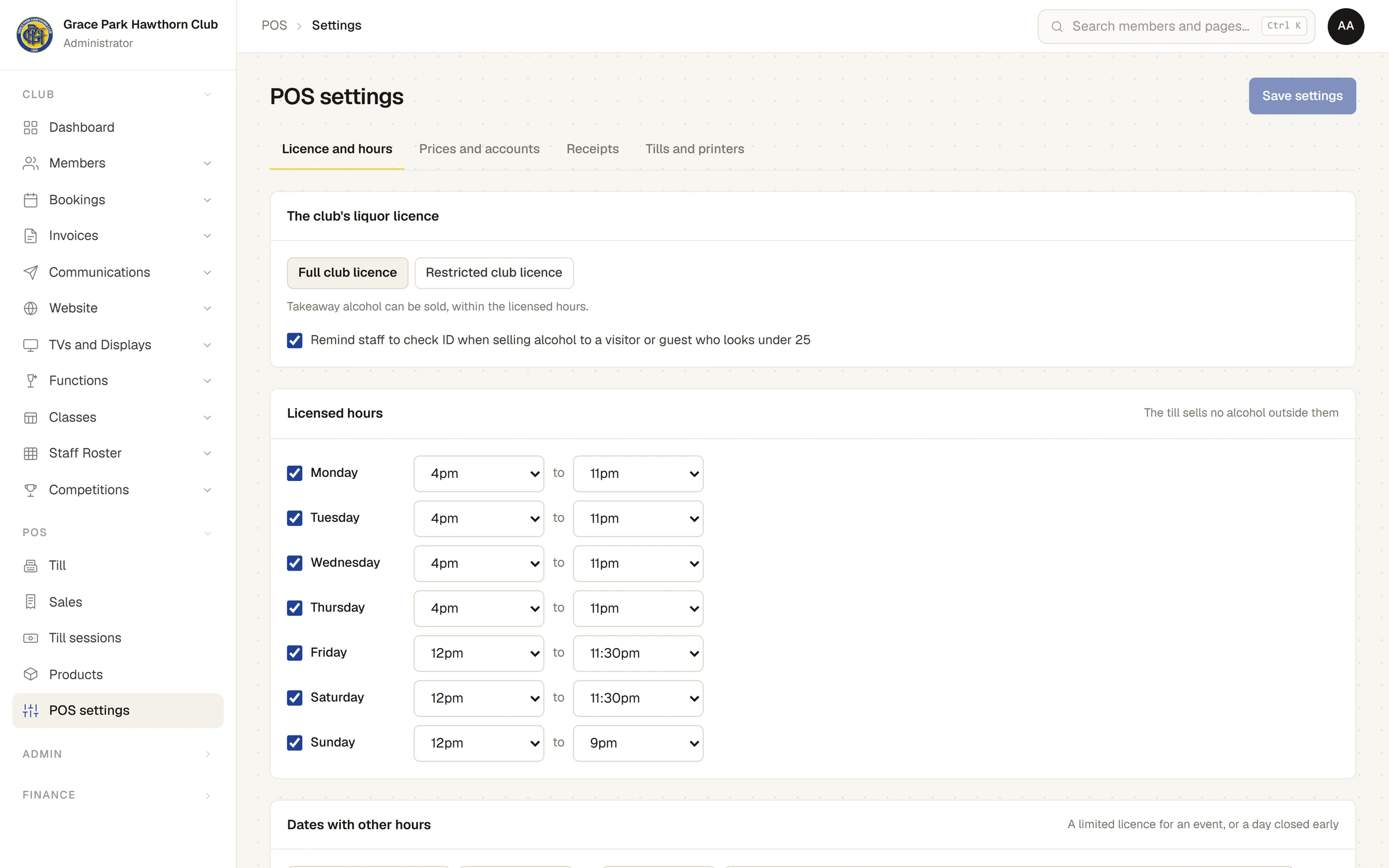
The hours to begin with are 4pm to 11pm Monday to Thursday, noon to 11.30pm Friday and Saturday, and noon to 9pm Sunday. Set your club's own before the bar opens.
Last checked in release 2026.10.23, on 23 October 2026.