
How to
Read and answer members' emails and texts in the Inbox
Open a conversation in the Inbox, read it, reply by email or text, and mark it done so nobody answers it twice.
Who this is for: Anyone with “Use the member inbox” or “Send text messages” (by default: Administrator, Casual Staff, Treasurer).
The Inbox shows what members and other people have emailed to the club's mailbox, and what members have replied to the club's texts, in one place. Everyone on an inbox sees the same conversations. When one is dealt with, you mark it done, so nobody answers it twice.
Before you start
- You can open the Inbox only if you are named on at least one inbox. An Administrator names the people on each inbox. See Who can read an inbox.
- The Administrator, Casual Staff and the Treasurer can use the Inbox by default, but being named on an inbox's list is what decides. Your club can change which roles can use it on Roles & permissions.
- To reply by text you also need to be able to send text messages. Without that you can read replies to texts but not answer them.
- To reply by email, the inbox's domain must be verified first. See Set up an inbox and who can read it.
Open the Inbox
Open . The number beside Inbox in the menu is how many conversations are waiting for an answer.
The page has three columns: the folders on the left, the list of conversations in the middle, and the conversation you are reading on the right. On a narrow screen you see one at a time, with a back button.
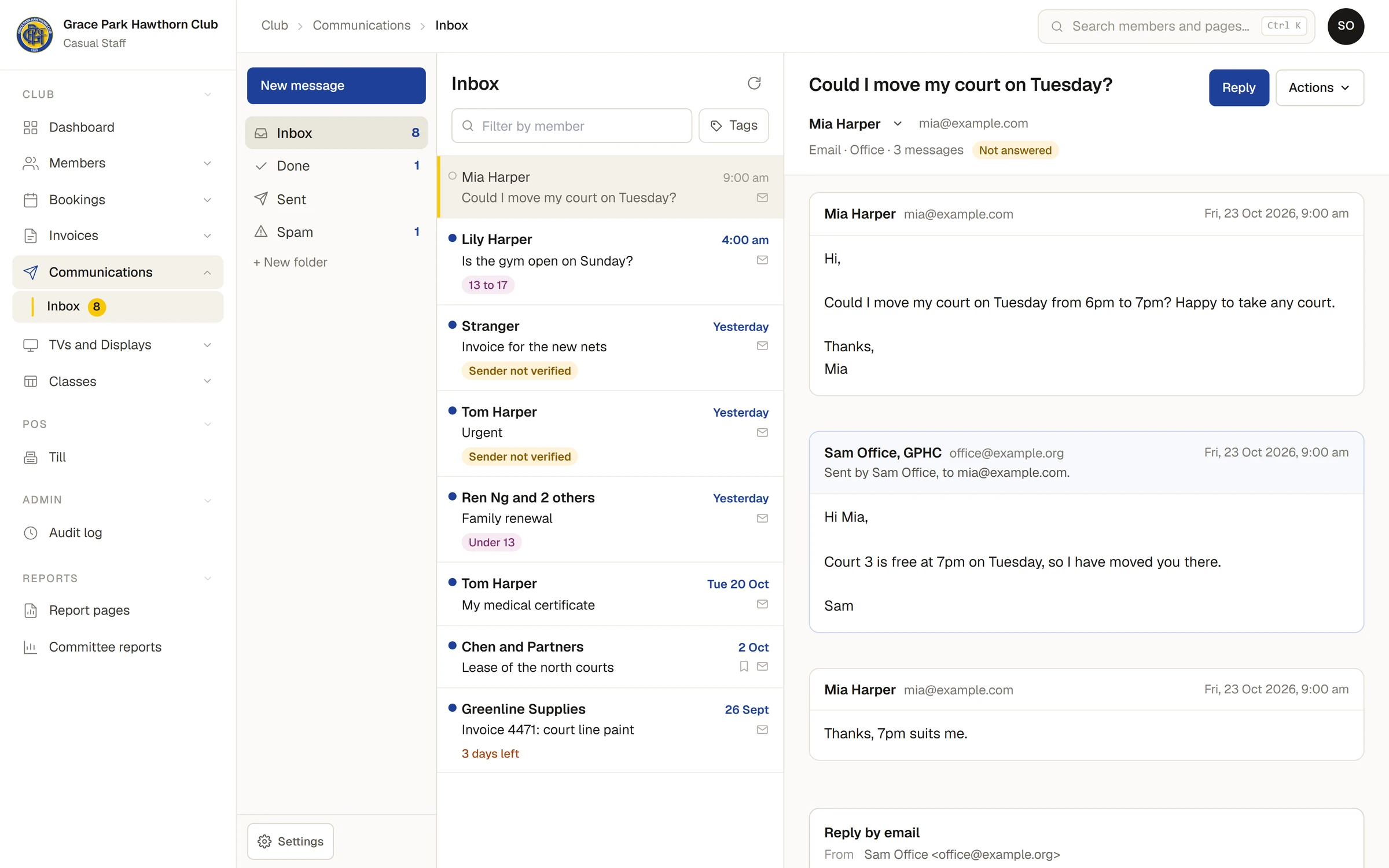
Each row in the list shows who it is from, when, the subject and a small mark for an email or a text. A blue dot means you have not read it yet. A ring means you have read it and nobody has answered it. Rows can also carry a Sender not verified mark, a tag, an age band for a child and a count such as 3 days left.
If you are on more than one inbox, the folders are grouped by inbox, and All shows every inbox you are on together. Replies to the club's texts are in their own inbox, Text/SMS.
Read a conversation
- Press a row. The whole conversation opens on the right, oldest message first, including what the club has already sent.
- Read it. The first line under the subject says who it is about and how many messages it holds, and the mark Not answered shows while nobody has replied.
Reading it marks it read for you only. Someone else on the inbox still sees it as unread until they open it. Who has read what is not shown to anyone.
To put the blue dot back, choose Mark unread under Actions.
An email is shown as it was sent, but nothing in it can run, and pictures hosted on other sites are not loaded. When there are some, a line says how many were held back and offers Show images. Loading them tells the sender the email was opened. Show plain words shows the email as plain text, and Taller gives it more room. See Why does it say Sender not verified? for the warning some emails carry.
An attachment shows its name and size. Press Get a download link, then Download. The link works for five minutes. Files that can harm a computer say so beside the name.
Reply to an email
- Press Reply. The cursor goes to the box at the bottom, headed Reply by email.
- Check From and To. The reply goes from the club's address for this inbox, with your name on it. It goes to the address on the member's record, whatever address the message itself came from, and says (the address on their record).
- Write your reply and press Send reply.
- Your reply joins the conversation, and the member's answer will join it too.
Your email signature, if you have one, goes below your words. See Set your email signature.
If the member has no email address on their record, the box says There is no email address on their record. Add one on the member's page, or ring them.
Reply to a text
A conversation that began as a text has the box Reply by text, from the club's number.
- Write your reply. The club's name is added at the start for you, and counts in the length.
- Check the count under the box. It says how many SMS the text is, how many characters are left and what the reply costs.
- Press Send text.
There is a most a text may be. If yours is longer, the box says how long it is and Shorten it before it can be sent.
Replies to a text get no automatic answer from Sports Club OS. A person has to write back. A member who replies STOP is taken off texts at once, and only the member can start them again; that is handled for you and is not a conversation to answer.
Mark it done
When a conversation has been dealt with, choose Actions, then Mark done. It moves to the Done folder and the reading pane empties, because nobody goes on reading something they have just filed. A message appears at the bottom with Undo, which puts it back. See Sort the Inbox with folders, tags and right-click.
If the member writes again, the conversation comes back to the Inbox folder, so a later message is never missed. An automatic message, such as an out-of-office reply, does not reopen it. It is added to the conversation and says so.
If something goes wrong
- This inbox can read mail but not reply yet. The club's domain has not been verified for this inbox. Until it is, answer from the club's own mailbox and then mark the conversation done. An Administrator can do the setup; see Set up an inbox and who can read it.
- You can read this, but not reply by text. Replying by text needs permission to send text messages. An Administrator can give it to you on Roles & permissions.
- This is in Spam. Choose Not spam under Actions first.
- It was sent, but could not be recorded here, so it may not show. Do not send it again. The reply left, but the page could not write it down. Check Sent before trying again.
- You cannot open this conversation. You are not named on the inbox it belongs to. Being an Administrator does not change that.
Last checked in release 2026.10.31, on 31 October 2026.