
How it works
Who a conversation is about
How a conversation is linked to members, what a shared address does, and how to link, unlink or keep it under one person.
Who this is for: Anyone with “Use the member inbox” or “Send text messages” (by default: Administrator, Casual Staff, Treasurer).
Sports Club OS links each conversation to the members it is about, by the email address or mobile number it came from. That is what lets the Inbox filter by member, shows the conversation on the member's page, and decides how long it is kept.
What you see
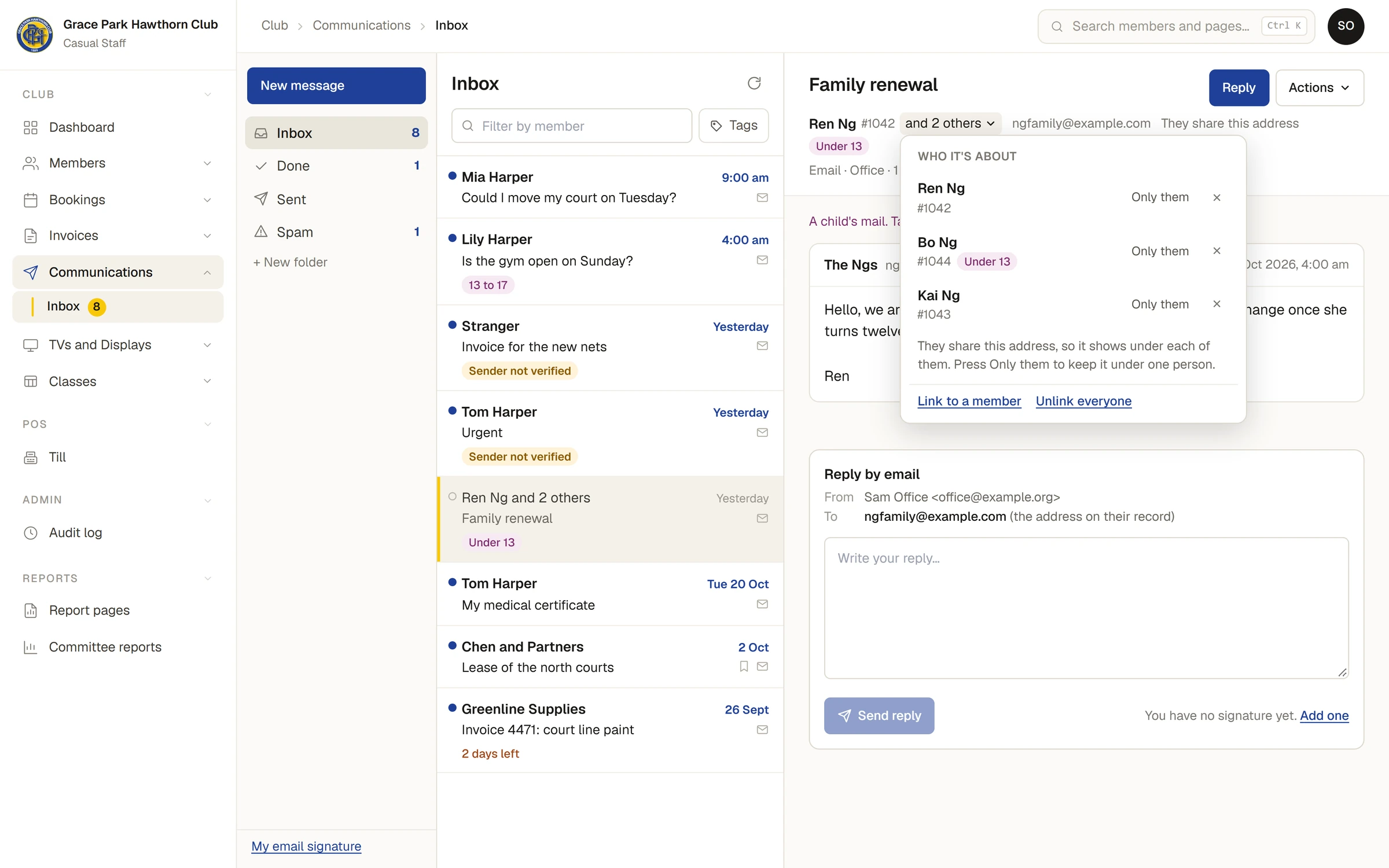
Under the subject, one line says who the conversation is about: their name, their member number, and Not a member where that applies. If it is about more than one person, it says and 2 others.
Press that line, or the arrow beside it, or choose Who it's about… under Actions, to open the list.
How people are linked
- A conversation is linked to everyone whose email address (or mobile number) it came from, and to people in the same household who have no email address of their own. A household is people who share an address.
- When it is linked through a shared address, the line says They share this address (or They share this number), and the list says so: They share this address, so it shows under each of them. Press Only them to keep it under one person.
- A child's mail is marked with an age band such as Under 13 or 13 to 17, and the conversation says A child's mail. Take care with what you reply and who else you share it with.
- A conversation from someone the club has no record of is Not linked to a member.
Change who it is about
- Only them keeps the conversation under that person and takes it off the others in the household.
- The cross beside a name unlinks that person. Sports Club OS remembers that you unlinked them, so a later message from the same address is not linked to them again.
- Unlink everyone takes the conversation off every member.
- Link to a member asks Who is this about?. Type a name or member number, then press the person. This is how you link a conversation from an address the club does not hold.
A reply to an email always goes to the address on the member's record, never to an address written in the email.
Why it matters
A conversation linked to a current member is kept. One linked to nobody is deleted after 30 days unless someone chooses Keep. See How long mail is kept.
Someone who can read a member's messages sees every conversation linked to that member on the member's page, whichever inbox it is in. See A member's messages.
Last checked in release 2026.10.31, on 31 October 2026.